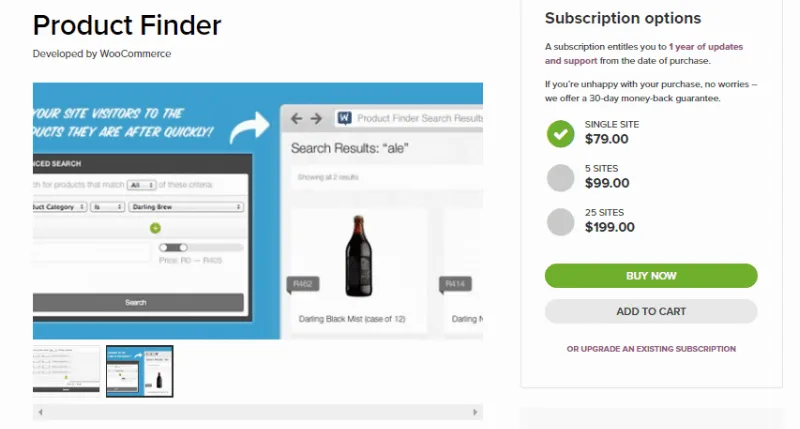
WooCommerce Product Finder
Antivirus scan
Powered by ClamAV
✅ Verified clean
This product file has passed our security filters.
Want to run a fresh ClamAV scan right now? Takes a few seconds and shows scanner version, signature DB and live result.
This can take 5 to 30 seconds.
Clean file Threat detected
No threats detected in this file.
- File
- Size
- Scanned
- ClamAV
- Signature database
⚡ Powered by ClamAV
Scan could not be completed
Report product
If you detected an issue (broken file, malware, inappropriate content, etc.) let us know and we'll review it ASAP.
Sign in to reportNewer version out, or a problem?
About WooCommerce Product Finder
Your customer knows what they want to spend, not what you call the product
With hundreds of products, text search fails silently: the visitor types one word, your catalog uses another, and they leave convinced you don't have what they need. Product Finder adds an advanced search form to your WooCommerce store so buyers get there through what they do know: a category, a characteristic or a budget.
Shoppers rarely master your internal naming. They know they need something of a certain size, material or price. A form that lets them combine those criteria saves them from guessing words, and saves you from losing the sale over a synonym.
Three kinds of stores that get the most out of Product Finder
Large catalog with many products
If you have hundreds of similar items, browsing through menus becomes a maze. Here the form acts as a receptionist: the customer ticks what interests them and sees only that. It is the case the plugin was designed for: complex catalogs or catalogs with many SKUs.
Store with well-built attributes
If your products already have clear attributes (size, color, brand, material), the form turns them into search criteria. You decide which ones are offered and which are not, so you don't overwhelm visitors with options that are of no use to them.
Store where budget comes first
When the buyer's first question is how much it costs, the price slider lets them narrow the range without opening product after product.
Shortcode, template tag or widget: where to place the form
The plugin brings together three pieces:
- Attribute or category selection: the user chooses what to filter the results by.
- Standard text search: for those who do know which word to type.
- Price slider: to narrow down by range.
You can place it with a shortcode on a page, with a template tag if you prefer to build it into the theme, as a widget in a widget area, or with hooks if you customize by hand. Every method accepts the same parameters, so you can show different filters in different parts of the site: for example, other attributes on a category page than on the home page.
Frequently asked questions about Product Finder
Can I limit the search to certain attributes? Yes. You set default attributes in the WooCommerce settings and change them on a specific form using parameters.
Does it replace my current search? It isn't meant to, although it can. It works best as a complement for guided search.
Can I have different forms on different pages? Yes, by passing different parameters to the shortcode, template tag or hook depending on the context.
Will it improve my conversions? The idea is that people find what they want sooner and leave less out of frustration. The result depends on how well organized your catalog is.
Without well-built attributes, the form falls short
Product Finder filters by the attributes and categories that already exist in your store. If your products don't have them or they are messy, the form will have nothing useful to offer, and that groundwork is up to you. It is also not worth it for stores with few products, where good categories are already enough.
Topics
Version history
-
v
1.5.2 Current 10 Oct 2026
-
v
1.5.1 18 May 2026
-
v
1.5.0 6 Nov 2025
Customer reviews
Sign in to leave a review. Only people who have the product can review it.
No reviews for this product yet.
Frequently asked questions
-
GPL (General Public License) is the license under which WordPress and most premium plugins/themes are distributed. It grants you the right to use, modify and redistribute the software in as many projects as you want, with no domain restrictions.
-
Yes. With membership you get automatic updates via our GPLClub Updater plugin (installed on your WP, detects new versions and applies them). With individual purchase, you get one year of manual updates from your account.
-
Depends on the plan. Monthly: 3 domains. Semi-annual: 7. Annual and Lifetime: 15. Individual purchase: 1 domain.
-
GPLClub offers its own support for installation, configuration and compatibility. For direct support from the original author (feature requests, product-specific bugs), a license purchased from the author is required.