WooCommerce Products Badge Management
Antivirus scan
Powered by ClamAV
✅ Verified clean
This product file has passed our security filters.
Want to run a fresh ClamAV scan right now? Takes a few seconds and shows scanner version, signature DB and live result.
This can take 5 to 30 seconds.
Clean file Threat detected
No threats detected in this file.
- File
- Size
- Scanned
- ClamAV
- Signature database
⚡ Powered by ClamAV
Scan could not be completed
Report product
If you detected an issue (broken file, malware, inappropriate content, etc.) let us know and we'll review it ASAP.
Sign in to reportNewer version out, or a problem?
About WooCommerce Products Badge Management
WooCommerce stores that want to highlight new arrivals and category offers
In a store with many products, customers can't tell what has just arrived from what has been in the catalog for months, and badges added by hand fall behind as soon as the catalog or the season changes. This plugin assigns badges based on rules set in your store: whether a product is new, whether it belongs to a category, or whether you mark it yourself.
It suits you if you want to give one specific product its own badge or if a category needs its own promotion. It is not the best fit if you need several badges to appear at once on the same image, because the plugin shows only one at a time. As it is an extension for WooCommerce, you need that store installed and active.
Which badge wins when several rules match
The priority order decides everything when a product meets several conditions at once. The variation badge has the highest priority and overrides all others. Next comes the new arrival badge, as long as the product is within the number of days you have set, followed by the badge assigned manually to the product, the category badge and, last, the global badge, which appears only if nothing else matches.
This means a category badge does not cover a new arrival badge, and a specific product badge takes precedence over the store-wide one.
Four badge types for four different needs
Each type answers a different decision in the store:
- New arrival: appears while the product is within the number of days you set.
- Category: one badge shared by all products in a category.
- Individual product: a manual badge for one specific product.
- Variation: a badge for one specific variant, with the highest priority.
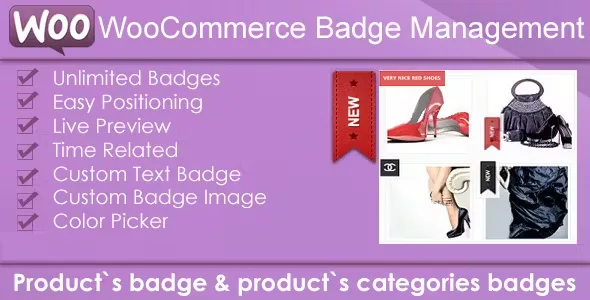
If you don't want to design every badge from scratch, there is a library of more than 33 professionally designed SVG badges, organized by type, with an instant preview before you choose one.
Badge design in WooCommerce Products Badge Management, with live preview
You can choose your own text and colors, adjust padding and margins, round the corners and control opacity. If you prefer an image, you can upload your own as the badge. Position is set by dragging the badge, and every change shows up at once in the preview.
There is a view of the public side of the store and another for the administrator.
Performance designed for block themes
The plugin includes a built-in caching system and keeps database queries to a minimum. It is also optimized for block themes.
Frequently asked questions about WooCommerce Products Badge Management
Can I show several badges at once on the same product?
No. Only one badge is shown each time, the one with the highest priority that meets the conditions.
What happens if a product is new and also sits in a category with a badge?
The new arrival badge is shown, because it has priority over the category badge while it is within the configured number of days.
Can I use my own image as a badge?
Yes. You can upload a custom image, or use text with your own colors or one of the more than 33 SVG badges included.
How do I choose where the badge appears?
The position is set by dragging the badge in the live preview, so you see the result before settling on it.
Topics
Version history
-
v
6.0.0 Current 17 Mar 2026
Customer reviews
Sign in to leave a review. Only people who have the product can review it.
No reviews for this product yet.
Frequently asked questions
-
GPL (General Public License) is the license under which WordPress and most premium plugins/themes are distributed. It grants you the right to use, modify and redistribute the software in as many projects as you want, with no domain restrictions.
-
Yes. With membership you get automatic updates via our GPLClub Updater plugin (installed on your WP, detects new versions and applies them). With individual purchase, you get one year of manual updates from your account.
-
Depends on the plan. Monthly: 3 domains. Semi-annual: 7. Annual and Lifetime: 15. Individual purchase: 1 domain.
-
GPLClub offers its own support for installation, configuration and compatibility. For direct support from the original author (feature requests, product-specific bugs), a license purchased from the author is required.