WooCommerce Products Compare
Antivirus scan
Powered by ClamAV
✅ Verified clean
This product file has passed our security filters.
Want to run a fresh ClamAV scan right now? Takes a few seconds and shows scanner version, signature DB and live result.
This can take 5 to 30 seconds.
Clean file Threat detected
No threats detected in this file.
- File
- Size
- Scanned
- ClamAV
- Signature database
⚡ Powered by ClamAV
Scan could not be completed
Report product
If you detected an issue (broken file, malware, inappropriate content, etc.) let us know and we'll review it ASAP.
Sign in to report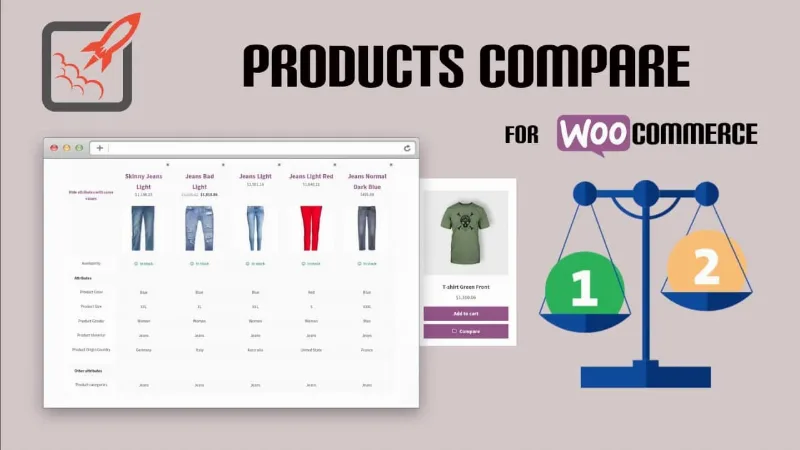
About WooCommerce Products Compare
When the customer has ten tabs open to choose between three nearly identical products
In a store with many similar items, an undecided shopper does what you don't want: opens several product pages, compares them from memory or across tabs and, once tired, goes to look at another store. The more alike your products are, the more it costs you when that comparison happens outside your site. WooCommerce Products Compare puts that comparison inside your store.
Picking products in the category and seeing them side by side
The customer sees the compare option on category pages, ticks the products they are considering and opens a table with the details of each one next to the others. The table includes:
- Prices and ratings for each product.
- Stock level, useful when they hesitate between something available and something running out.
- Descriptions and the attributes you have defined on your products.
More than two products can be compared at once, so it doesn't force you into pairs.
The comparison doesn't stay in the category
The compare option can appear on any page of the store, not just in listings. The products the customer has already chosen remain visible while they browse, so they can add more options without going back or starting over. This suits you well if your catalog is browsed in several ways: categories, searches or individual product pages.
The look of the tables can be adapted to your store's branding with CSS or with your theme's options.
Deciding whether your catalog needs a comparison tool (and the doubts that usually come up)
It pays off if you sell many similar products where the difference lies in price, features or availability: electronics, tools, sports gear or any range with close models. If your catalog is made of one-off pieces or products that look nothing alike, the table adds nothing. And since the table shows the data in your product pages, it will only be useful if your attributes and descriptions are filled in properly and are comparable: with poor product pages, the comparison will come out poor.
Can more than two products be compared?
Yes, the customer can select several and see the full breakdown in a single table.
What data does the table show?
Price, ratings, stock, descriptions and the key attributes you have configured on your products.
Does it only work on category pages?
No. Category pages are where the customer sees the option, but the compare option can be offered on any page of the store.
Can I change the table design?
Yes, with CSS or with your theme's options so it matches your brand.
Does it work with the cart and checkout blocks and with HPOS?
Yes, it is compatible with both.
Topics
Version history
-
v
1.4.4 Current 18 May 2026
-
v
1.4.3 6 Nov 2025
Customer reviews
Sign in to leave a review. Only people who have the product can review it.
No reviews for this product yet.
Frequently asked questions
-
GPL (General Public License) is the license under which WordPress and most premium plugins/themes are distributed. It grants you the right to use, modify and redistribute the software in as many projects as you want, with no domain restrictions.
-
Yes. With membership you get automatic updates via our GPLClub Updater plugin (installed on your WP, detects new versions and applies them). With individual purchase, you get one year of manual updates from your account.
-
Depends on the plan. Monthly: 3 domains. Semi-annual: 7. Annual and Lifetime: 15. Individual purchase: 1 domain.
-
GPLClub offers its own support for installation, configuration and compatibility. For direct support from the original author (feature requests, product-specific bugs), a license purchased from the author is required.