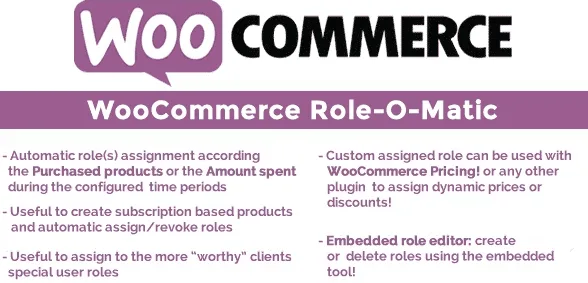
WooCommerce Role-O-Matic
Antivirus scan
Powered by ClamAV
✅ Verified clean
This product file has passed our security filters.
Want to run a fresh ClamAV scan right now? Takes a few seconds and shows scanner version, signature DB and live result.
This can take 5 to 30 seconds.
Clean file Threat detected
No threats detected in this file.
- File
- Size
- Scanned
- ClamAV
- Signature database
⚡ Powered by ClamAV
Scan could not be completed
Report product
If you detected an issue (broken file, malware, inappropriate content, etc.) let us know and we'll review it ASAP.
Sign in to reportNewer version out, or a problem?
About WooCommerce Role-O-Matic
Rewarding repeat customers without checking orders one by one
In an online store, the customer who buys every few months usually gets the same treatment as someone who has just arrived, because giving perks by hand means checking orders one by one. WooCommerce Role-O-Matic works out who meets a spending or purchase condition and assigns them a role, so the role is set without you keeping track by hand.
Three store profiles and the rule that suits each one
Store with repeat customers
If you want whoever spends the most in a period to get better conditions, use the amount rules in the Amounts configurator. You set the minimum and, if you want, a maximum, always excluding taxes, the period (fixed dates or a dynamic span such as the last months or the last 24 hours) and the role to assign. If the customer stops meeting the condition in that period, the role is removed.
Store selling subscriptions or plans by role
You link products to one or more roles in the Products configurator, and the customer receives that role when they buy. You can set an expiry that is relative, for example one month after purchase, or a fixed date. When the date arrives, the role is removed. You can also stop anyone from buying the product again until it has expired, or restrict purchases if the customer already has certain roles.
Store with prices or discounts by role
Roles connect with other tools. The plugin works alongside WooCommerce Pricing or any third-party plugin to apply dynamic prices or discounts according to the assigned role. Role-O-Matic decides who has each role, and the pricing plugin decides what they pay.
Spending without taxes or products bought: two different rules
Amount rules look at how much the customer has spent, excluding taxes. Product rules look at what the customer has bought, and they are useful for tying a role to a specific product. Each time a customer places an order, or an order is saved or changes its status, the plugin checks the amount rules to see whether any of them applies.
Roles must exist before you create the rule
Every role you want to assign must be created before you build the rule. You can create it with the built-in role editor or with any other third-party plugin. The plugin also needs WooCommerce active, because it works with its orders and products.
Frequently asked questions about WooCommerce Role-O-Matic
What do I need to use it?
You need WooCommerce active and the roles created in advance, either with the built-in editor or with another roles plugin.
Can I base the role on what the customer spent in recent months?
Yes. You choose a dynamic span, such as the last months or the last hours, and set the minimum spend and, if you want, the maximum, always excluding taxes.
What happens if a customer stops meeting the condition?
If they already had the role but have not spent the required amount during the configured period, the role is removed.
Can I assign a role on a future date?
Yes. An amount rule can have a deferred application date, for example to use February spending and assign the role in June.
Can it be used to sell subscriptions?
It can link roles to products with a relative or fixed expiry. When the expiry is reached, the role is removed, and you can stop the product from being bought again until that date.
Roles are assigned and removed on their own according to dates
The purchase date is the date of the most recent order with one of the allowed statuses, and the expiry is counted from there. For example, if you mark processing and completed as valid statuses, only those orders count to assign the role. When the expiry arrives, the role is removed without you having to do it.
Topics
Version history
-
v
8.9 Current 8 Jan 2025
Customer reviews
Sign in to leave a review. Only people who have the product can review it.
No reviews for this product yet.
Frequently asked questions
-
GPL (General Public License) is the license under which WordPress and most premium plugins/themes are distributed. It grants you the right to use, modify and redistribute the software in as many projects as you want, with no domain restrictions.
-
Yes. With membership you get automatic updates via our GPLClub Updater plugin (installed on your WP, detects new versions and applies them). With individual purchase, you get one year of manual updates from your account.
-
Depends on the plan. Monthly: 3 domains. Semi-annual: 7. Annual and Lifetime: 15. Individual purchase: 1 domain.
-
GPLClub offers its own support for installation, configuration and compatibility. For direct support from the original author (feature requests, product-specific bugs), a license purchased from the author is required.