WooCommerce Sync for QuickBooks Desktop - by MyWorks Software
Antivirus scan
Powered by ClamAV
✅ Verified clean
This product file has passed our security filters.
Want to run a fresh ClamAV scan right now? Takes a few seconds and shows scanner version, signature DB and live result.
This can take 5 to 30 seconds.
Clean file Threat detected
No threats detected in this file.
- File
- Size
- Scanned
- ClamAV
- Signature database
⚡ Powered by ClamAV
Scan could not be completed
Report product
If you detected an issue (broken file, malware, inappropriate content, etc.) let us know and we'll review it ASAP.
Sign in to reportNewer version out, or a problem?
About WooCommerce Sync for QuickBooks Desktop - by MyWorks Software
WooCommerce orders that reach QuickBooks Desktop without retyping them
This plugin syncs WooCommerce with QuickBooks Desktop. It requires QuickBooks Desktop Pro, Premier or Enterprise, the desktop application it syncs with.
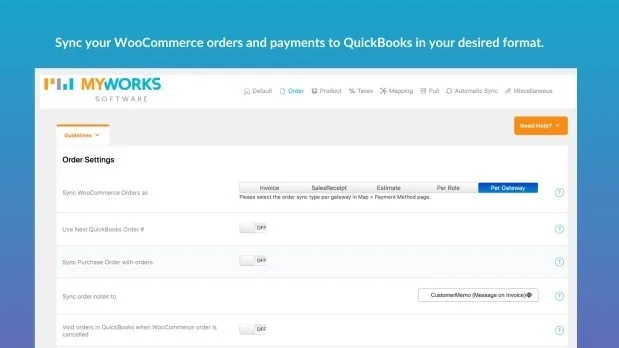
Follow one order from start to finish. A customer buys in the store and pays by card. The order goes to QuickBooks as a sales receipt, invoice, estimate or sales order, according to the rule you have set. You can decide the document type by customer type or by the payment gateway used at checkout, and even sync a sales order and an invoice at the same time. Past orders can also be sent to QuickBooks, not only new ones.
Common questions before connecting your store to QuickBooks Desktop
Can I send some orders as receipts and others as invoices?
Yes. Advanced rules are based on customer type or on the payment gateway used at checkout.
Which QuickBooks Desktop editions are supported?
Pro, Premier and Enterprise.
What happens when there is a refund?
Full or partial refunds made in WooCommerce are synced automatically to QuickBooks.
Does it work with stores that charge in several currencies?
Yes. The plugin supports all currencies, including stores with multiple currencies, and global tax rates. It also supports QuickBooks Desktop in countries outside the United States.
Can inventory flow from QuickBooks back to the store?
Yes. If you update inventory or pricing in QuickBooks, the two-way sync passes them on to WooCommerce.
Payments, fees and refunds by payment gateway
You can assign a QuickBooks account where payments are recorded, with its own setting for each payment gateway on your site. If the gateway fee is recorded on the WooCommerce order, the plugin syncs it too. When you make a full or partial refund in WooCommerce, the movement reaches QuickBooks automatically.
Customers, sales reps and payment terms
You can send all WooCommerce customers to a single QuickBooks customer or to a project, or create rules that direct them to a different customer based on their role in the store. When syncing customers and orders, the plugin can also automatically set the customer type, sales rep, payment terms and class.
Shipping methods and custom fields
Each WooCommerce shipping method can be mapped to a different Item and ShipVia in QuickBooks. Custom fields can also be mapped: tracking numbers, delivery dates, purchase order numbers or metadata on each order line.
Inventory by sites or bins, only with QuickBooks Enterprise
Advanced inventory lets you sync only the sites or bins you choose and send each order to a specific site or bin in QuickBooks. This feature is for QuickBooks Enterprise.
Topics
Version history
-
v
1.7.1 Current 15 May 2024
Customer reviews
Sign in to leave a review. Only people who have the product can review it.
No reviews for this product yet.
Frequently asked questions
-
GPL (General Public License) is the license under which WordPress and most premium plugins/themes are distributed. It grants you the right to use, modify and redistribute the software in as many projects as you want, with no domain restrictions.
-
Yes. With membership you get automatic updates via our GPLClub Updater plugin (installed on your WP, detects new versions and applies them). With individual purchase, you get one year of manual updates from your account.
-
Depends on the plan. Monthly: 3 domains. Semi-annual: 7. Annual and Lifetime: 15. Individual purchase: 1 domain.
-
GPLClub offers its own support for installation, configuration and compatibility. For direct support from the original author (feature requests, product-specific bugs), a license purchased from the author is required.