WooSearch – Popup Product Search & Filters for WooCommerce
Antivirus scan
Powered by ClamAV
✅ Verified clean
This product file has passed our security filters.
Want to run a fresh ClamAV scan right now? Takes a few seconds and shows scanner version, signature DB and live result.
This can take 5 to 30 seconds.
Clean file Threat detected
No threats detected in this file.
- File
- Size
- Scanned
- ClamAV
- Signature database
⚡ Powered by ClamAV
Scan could not be completed
Report product
If you detected an issue (broken file, malware, inappropriate content, etc.) let us know and we'll review it ASAP.
Sign in to reportNewer version out, or a problem?
About WooSearch – Popup Product Search & Filters for WooCommerce
Search that finds the product by what the customer remembers
In a store with many products, the customer who types an approximate name and sees nothing, or who has to leave the page to narrow down results, usually stops searching. Part of the problem is what they can search for and how the results are shown to them.
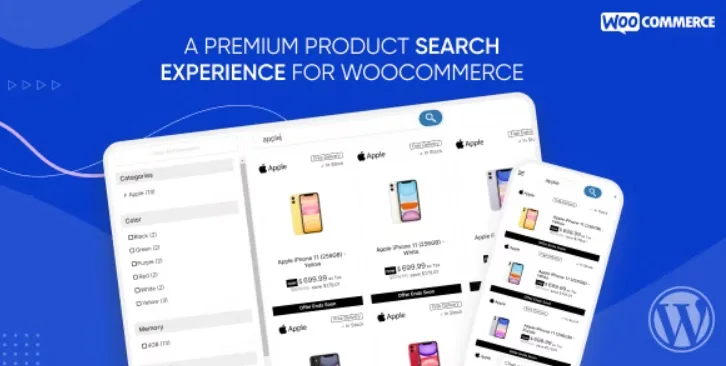
WooSearch opens the search in a modern popup and searches by title, SKU, description and custom fields of WooCommerce products. This way, someone who remembers a reference or a technical detail stored in a custom field still reaches the product. On sale prices, the saving is calculated and shown automatically, so the discount is visible without doing the math.
Filters that update without leaving the results
The filters are built in and shown within the results themselves. If you do not need them, you can turn them off. When a selection changes, the list updates in real time, without the customer having to navigate elsewhere.
Each attribute shows how many products match that option, so the customer sees the number of results while adjusting the filters. You choose which attributes are included, some or all.
Banners, brand logos and excluded products
Promotional banners appear when products meet certain criteria, for example free shipping above a certain amount or an offer that ends soon.
WooSearch is compatible with WooCommerce Brands and can show each brand's logo in the results. You can also exclude products or whole categories from the search, or remove out of stock items, although you can also show them with their stock status.
Layout and data shown in each result
You can choose whether the search shows results with or without filters, change the colors, edit the help texts of the search field and turn promotional messages on or off.
- Stock status of each product.
- Text after the price, such as the tax status.
- Automatically calculated saving on sale prices.
- Number of characters after which results are displayed.
- Advanced caching system.
Needs WooCommerce active to search your catalog
WooSearch works on WooCommerce products, so the store must have that plugin installed and active. Without it there is no catalog to show in the popup.
Frequently asked questions about WooSearch search
Can I search by SKU or custom fields?
Yes. Besides the title, the search looks at the SKU, the description and the custom fields of each product.
Can the filters be removed?
Yes. They appear within the results, but you can turn them off if you do not need them and choose which attributes they include.
What happens with out of stock products?
You can exclude them from the results or show them with the stock status of each one.
Can I show brand logos?
Yes, as long as your catalog uses WooCommerce Brands, which WooSearch is compatible with.
WooCommerce stores with a large catalog and customers who search by reference
WooSearch makes the most sense in stores where customers search by code or by a feature stored in a custom field, because the product searches by SKU and custom fields. If your customers almost always browse by category, a search like this will add less.
To decide, look mainly at what your customers search for. If you want brand logos, first check that your catalog uses WooCommerce Brands.
Topics
Version history
-
v
1.4.26 Current 8 Jan 2025
Customer reviews
Sign in to leave a review. Only people who have the product can review it.
No reviews for this product yet.
Frequently asked questions
-
GPL (General Public License) is the license under which WordPress and most premium plugins/themes are distributed. It grants you the right to use, modify and redistribute the software in as many projects as you want, with no domain restrictions.
-
Yes. With membership you get automatic updates via our GPLClub Updater plugin (installed on your WP, detects new versions and applies them). With individual purchase, you get one year of manual updates from your account.
-
Depends on the plan. Monthly: 3 domains. Semi-annual: 7. Annual and Lifetime: 15. Individual purchase: 1 domain.
-
GPLClub offers its own support for installation, configuration and compatibility. For direct support from the original author (feature requests, product-specific bugs), a license purchased from the author is required.