WordPress API Posts and Pages Sync with Multiple WordPress Sites
Antivirus scan
Powered by ClamAV
✅ Verified clean
This product file has passed our security filters.
Want to run a fresh ClamAV scan right now? Takes a few seconds and shows scanner version, signature DB and live result.
This can take 5 to 30 seconds.
Clean file Threat detected
No threats detected in this file.
- File
- Size
- Scanned
- ClamAV
- Signature database
⚡ Powered by ClamAV
Scan could not be completed
Report product
If you detected an issue (broken file, malware, inappropriate content, etc.) let us know and we'll review it ASAP.
Sign in to reportNewer version out, or a problem?
About WordPress API Posts and Pages Sync with Multiple WordPress Sites
Keeping several separate WordPress sites without publishing twice
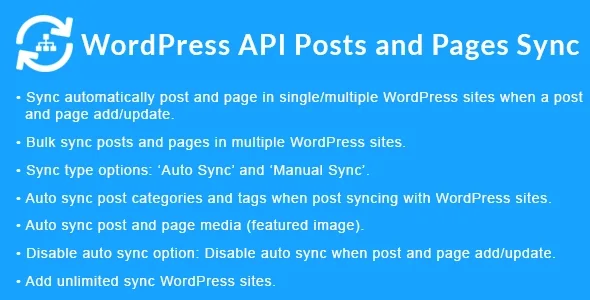
When you run several independent WordPress sites, the problem is rarely the first publication. It is fixing a typo on one site and forgetting the other, or finding out weeks later that an old page is still live on one of them. This plugin copies posts and pages from a source site to other WordPress sites, automatically or manually, so the content does not depend on someone remembering to repeat it.
It fits separate WordPress sites, because posts and pages sync across several sites.
Notices, content already published and manual control: three use cases
Anyone running a network with the same notices
If the same note, condition or announcement must appear on several sites, you can write it once and let it replicate with automatic sync. You can add destination sites without limit.
Anyone who needs to send several posts and pages at once
With bulk sync you can send posts and pages to several sites at once.
Anyone who prefers to decide what goes out and when
There is a manual sync option, in addition to automatic sync. If you prefer that control across the whole network, you can disable automatic sync.
Categories, tags and media travel with each post
A post rarely travels alone. When it syncs, the plugin also carries its categories and tags, and the associated media files, including the featured image.
If the post or term metadata is specific to your source site, there are options to exclude it from sync so it is not copied to the other sites.
Deletions and manual sending: who decides when content moves
The sync-on-delete option trashes or deletes posts and pages on the destination sites when they are trashed or deleted on the source site. It is worth understanding before you enable it, because a deletion on the source is replicated to the others.
You can choose between automatic and manual sending.
Frequently asked questions about WordPress API Posts and Pages Sync
Can I sync to more than one site?
Yes. You can add destination WordPress sites without limit and sync posts and pages to several of them at once.
Are featured images copied too?
Yes. The media files attached to the post or page sync along with it, including the featured image.
What happens if I delete a post on the source site?
If the sync-on-delete option is enabled, it is sent to the trash or deleted on the destination sites as well.
Are categories and tags synced?
Yes, each time a post is synced with other sites, its categories and tags go with it.
Does it work with ACF custom fields?
Yes, but only for a specific list of field types, including text, select, checkboxes, date and Google Map.
WordPress API Posts and Pages Sync only moves ACF with certain field types
Syncing Advanced Custom Fields data, in both ACF and ACF PRO, covers Text, Text Area, Number, Email, Password, Wysiwyg Editor, Select, Checkbox, Radio Button, True / False, Google Map, Date Picker, Color Picker and Message. Any other field type is left out of sync, so check your field groups before relying on them.
Version history
-
v
1.8.0 Current 17 May 2024
Customer reviews
Sign in to leave a review. Only people who have the product can review it.
No reviews for this product yet.
Frequently asked questions
-
GPL (General Public License) is the license under which WordPress and most premium plugins/themes are distributed. It grants you the right to use, modify and redistribute the software in as many projects as you want, with no domain restrictions.
-
Yes. With membership you get automatic updates via our GPLClub Updater plugin (installed on your WP, detects new versions and applies them). With individual purchase, you get one year of manual updates from your account.
-
Depends on the plan. Monthly: 3 domains. Semi-annual: 7. Annual and Lifetime: 15. Individual purchase: 1 domain.
-
GPLClub offers its own support for installation, configuration and compatibility. For direct support from the original author (feature requests, product-specific bugs), a license purchased from the author is required.