Workreap - Freelance Marketplace WordPress Theme
Antivirus scan
Powered by ClamAV
✅ Verified clean
This product file has passed our security filters.
Want to run a fresh ClamAV scan right now? Takes a few seconds and shows scanner version, signature DB and live result.
This can take 5 to 30 seconds.
Clean file Threat detected
No threats detected in this file.
- File
- Size
- Scanned
- ClamAV
- Signature database
⚡ Powered by ClamAV
Scan could not be completed
Report product
If you detected an issue (broken file, malware, inappropriate content, etc.) let us know and we'll review it ASAP.
Sign in to report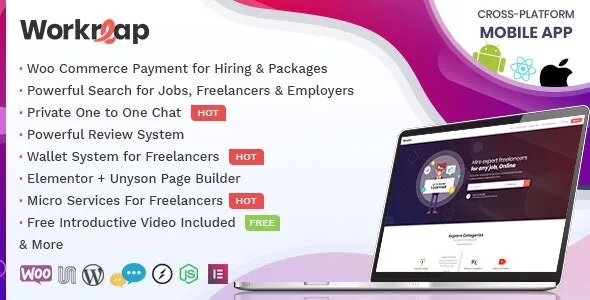
About Workreap - Freelance Marketplace WordPress Theme
Opening a marketplace means starting to hold other people's money
Anyone planning a work portal for freelancers tends to think about acquisition: how the first profiles will arrive, how the first clients will arrive. The part that shows up later, and fills the week, is the treasury.
In Workreap, when an employer hires, the payment goes into the admin's account. When the work is completed, the amount moves to the freelancer's available balance, the freelancer requests a withdrawal, and the admin transfers the money by hand and records the operation. In other words: between collecting and paying out, your account holds money that belongs to other people, and each withdrawal is a task someone on your team carries out.
Work out how many withdrawals you expect each month before choosing the theme, and decide who will handle those requests and the disputes.
Projects, tasks and payments inside Workreap
- Projects by milestones or by the hour, with flexible invoicing on the latter and several freelancers hired on a single project.
- Tasks published by freelancers, with pricing extended through Advanced Custom Fields.
- Switchable modules: projects and tasks are turned on or off separately.
- Employer wallet, withdrawals and invoices, with payments through WooCommerce.
- Tiered commissions and custom commissions per user, plus paid packages.
- Disputes with chat between users and the admin.
- Identity verification, which can be required of both parties or just one.
- Private chat, user dashboards, city search and over 15 home pages.
How the money travels in each type of work
The two work models get paid differently, and it is worth deciding which one you open first.
Tasks. The employer pays upfront and you set the commission percentage.
Hourly projects. The freelancer sends payment requests to the employer and the commission applies to them.
For withdrawals, the theme covers PayPal, Payoneer and bank transfer, and you can set the minimum balance for withdrawing.
What Workreap leaves out
Payments outside the site. The platform is designed to collect within the site, with no custom handling of external payments.
Turning off parts of the system. The wallet, disputes and invoices cannot be disabled. If your model does not need them, they stay there.
Job vacancies. Its features include no hiring vacancies, since its ground is work by project or by task.
Bulk member migration. Its features include no CSV import or export of members and categories.
Paid extras sold apart. Social Login, Badges and Meetings are extensions independent of the theme, and the Workfleet mobile app is another product.
Setting up the theme, the wallet and orders
Workreap relies on its Workreap Core plugin for the central functions, on WooCommerce for payments and on Elementor for building pages. Follow this order:
- Activate the theme and install the required plugins from Appearance, Install Plugins.
- In WooCommerce, leave order data storage in WordPress post storage mode.
- If you do not import the demo, create the Wallet product: without it, the cart can appear empty.
- Configure the commission and the minimum withdrawal balance in the payment settings.
- Run a complete operation with two test accounts, from hiring through to withdrawal.
When your marketplace sells something else
If your idea is fixed-price services rather than milestone projects, PremiumPress Micro Jobs organizes profiles, service pages and orders that move through statuses, and deducts your commission at checkout. HivePress Marketplace adds selling on top of HivePress listings, with fixed-price services or digital downloads and payout requests from vendors.
If you are actually going to sell products from several shops, your ground is Dokan Pro.
Payouts, commissions and languages in Workreap
Do freelancers get paid automatically?
No. The freelancer requests the withdrawal and the admin makes the transfer and marks it complete.
Can I charge commission on both sides?
Yes, the admin can charge commission to both types of user, and Workreap supports tiers and custom commissions per user.
Does it work for sites in other languages?
The theme supports translation and right-to-left writing, and its PDF invoices can be translated too.
Topics
Version history
-
v
3.5.0 Current 7 Sep 2026
-
v
3.4.6 4 Jun 2026
-
v
3.4.5 16 Apr 2026
Customer reviews
Sign in to leave a review. Only people who have the product can review it.
No reviews for this product yet.
Frequently asked questions
-
GPL (General Public License) is the license under which WordPress and most premium plugins/themes are distributed. It grants you the right to use, modify and redistribute the software in as many projects as you want, with no domain restrictions.
-
Yes. With membership you get automatic updates via our GPLClub Updater plugin (installed on your WP, detects new versions and applies them). With individual purchase, you get one year of manual updates from your account.
-
Depends on the plan. Monthly: 3 domains. Semi-annual: 7. Annual and Lifetime: 15. Individual purchase: 1 domain.
-
GPLClub offers its own support for installation, configuration and compatibility. For direct support from the original author (feature requests, product-specific bugs), a license purchased from the author is required.