WP Featured News | Custom Posts Listing Plugin
Antivirus scan
Powered by ClamAV
✅ Verified clean
This product file has passed our security filters.
Want to run a fresh ClamAV scan right now? Takes a few seconds and shows scanner version, signature DB and live result.
This can take 5 to 30 seconds.
Clean file Threat detected
No threats detected in this file.
- File
- Size
- Scanned
- ClamAV
- Signature database
⚡ Powered by ClamAV
Scan could not be completed
Report product
If you detected an issue (broken file, malware, inappropriate content, etc.) let us know and we'll review it ASAP.
Sign in to reportNewer version out, or a problem?
About WP Featured News | Custom Posts Listing Plugin
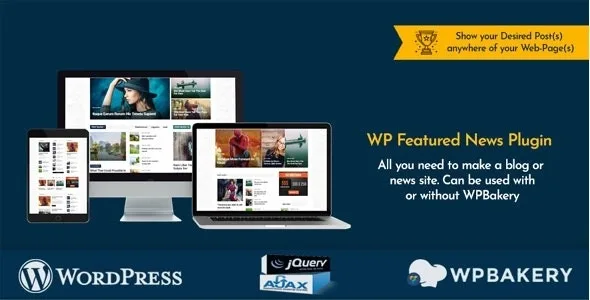
Featured posts anywhere on the page, not only in the sidebar
Many news sites and listings end up with recent posts locked in the sidebar, while the homepage has no clear order and each section is designed by hand. WP Featured News lets you show your posts or custom post types anywhere on your pages, not only in widget areas, so each block sits where it makes sense in your design.
More than 31 blocks and fine control over what is shown
The plugin includes more than 31 post blocks with different designs. In each one you set the block title, how many posts appear, whether they come from posts or custom post types, which category is shown and whether its name appears on the post. You also choose whether the date, the author and other data are visible, ascending or descending order, and how many blocks you want on the same page.
You can feature a specific large post by entering its ID, and the rest appear as small posts. For both, you control how many characters of the title and how many words of the excerpt are shown, along with the title and meta colors.
Tabs, Next and Previous buttons, and loading without reloading the page
Blocks can switch categories through tabs, so each tab shows a different category inside the same block. You can also browse with Next and Previous buttons or with a Load More button. In all three cases the results arrive via Ajax, so visitors see more posts without the page reloading.
Two ways to place the lists of WP Featured News: with WPBakery or without it
The plugin is based on the WPBakery page builder, and from there you can create lists of posts and place them anywhere on the page by dragging the element. It is not required, though, because the plugin can also be used without WPBakery. Depending on how you work, it fits one of these two ways:
- If you already build your pages with WPBakery, the list is added as one more element, using drag and drop.
- If you don't use WPBakery, you can still use the plugin without it.
Heading styles, colors and typography for each block
Each block offers 13 heading styles, and you choose which HTML tag the title uses, from H1 to H6, which matters for SEO. You can change the colors of the title, the headline, the link hover, the category background, the border and the active tab, as well as the margins and padding.
For typography, hundreds of Google Fonts are available, and you adjust font family, size, weight and line height for the title, headline, meta, excerpt and button. The blocks are fully responsive on mobile.
Frequently asked questions about WP Featured News
Can I show custom post types?
Yes. When you create a block you choose whether the content comes from posts or from custom post types, and you can pick any category.
Can I show different categories in the same block?
Yes, with the tabs option: each tab can show a different category within the same block.
Does it include an ads widget?
The plugin includes a Google AdSense widget, along with a popular posts widget.
What happens when I create a new category?
It appears automatically in the category dropdown of the blocks, so you don't have to add it by hand.
Topics
Version history
-
v
1.6.0 Current 16 May 2024
Customer reviews
Sign in to leave a review. Only people who have the product can review it.
No reviews for this product yet.
Frequently asked questions
-
GPL (General Public License) is the license under which WordPress and most premium plugins/themes are distributed. It grants you the right to use, modify and redistribute the software in as many projects as you want, with no domain restrictions.
-
Yes. With membership you get automatic updates via our GPLClub Updater plugin (installed on your WP, detects new versions and applies them). With individual purchase, you get one year of manual updates from your account.
-
Depends on the plan. Monthly: 3 domains. Semi-annual: 7. Annual and Lifetime: 15. Individual purchase: 1 domain.
-
GPLClub offers its own support for installation, configuration and compatibility. For direct support from the original author (feature requests, product-specific bugs), a license purchased from the author is required.