WP Leads Builder For Any CRM Pro
Antivirus scan
Powered by ClamAV
✅ Verified clean
This product file has passed our security filters.
Want to run a fresh ClamAV scan right now? Takes a few seconds and shows scanner version, signature DB and live result.
This can take 5 to 30 seconds.
Clean file Threat detected
No threats detected in this file.
- File
- Size
- Scanned
- ClamAV
- Signature database
⚡ Powered by ClamAV
Scan could not be completed
Report product
If you detected an issue (broken file, malware, inappropriate content, etc.) let us know and we'll review it ASAP.
Sign in to reportNewer version out, or a problem?
About WP Leads Builder For Any CRM Pro
A quote form that reaches your CRM directly
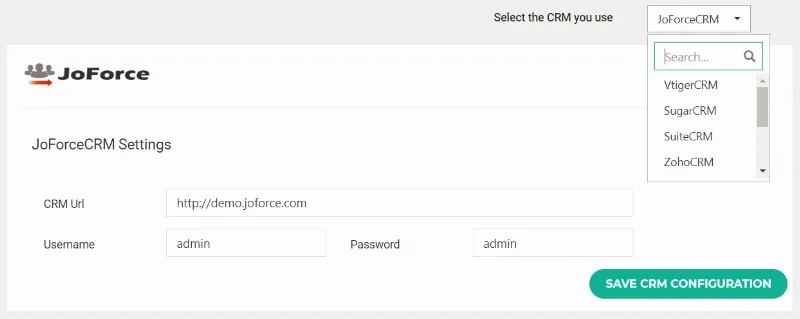
Picture a WooCommerce store with a quote request form built with Contact Form 7. When someone submits it, WP Leads Builder For Any CRM Pro picks up the fields and saves them in the CRM your team uses. It works with Salesforce, HubSpot, Zoho CRM, Zoho CRM Plus, Zoho Bigin, Vtiger, Freshsales, SugarCRM, SuiteCRM and JoForce.
During setup you choose, from a dropdown, which form field matches each CRM field. If your form already exists, the plugin can use it, and it also creates its own Lead or Contact forms that you place on the page with a shortcode.
When you have several sales reps, a round-robin queue shares new leads evenly. If the same person comes back, you decide whether the duplicate is skipped, updated or created again.
Doubts about WP Leads Builder For Any CRM Pro before connecting it to your CRM
Which forms can I use it with?
Contact Form 7, Gravity Forms, WPForms, Ninja Forms, Caldera Forms and Elementor Pro. Elementor forms need Elementor Pro installed and active, and with Caldera Forms the mapping is done by hand, without AI help.
What happens if the AI service doesn't respond?
The lead is still saved with a default score of 50, and the log shows a clear warning that the AI check did not finish.
Can company data overwrite what the customer wrote?
No. For business emails the AI suggests company name, industry and size, but it never overwrites your answers, and free email providers such as Gmail are skipped.
What WP Leads Builder For Any CRM Pro does with each lead before saving it
AI review is what separates this plugin from one that simply forwards data. Each lead gets a score from 0 to 100 and a Hot, Warm or Cold priority, along with a short intent summary and the reasoning. For these features to work, the WordPress AI client has to be set up.
Random keyboard mashing, fake test entries and disposable emails are held back and do not reach your CRM. You set the spam cutoff.
The routing policy decides what happens next: sync everything directly, stage only leads that score below a threshold you set, or stage every lead for review. From one screen you approve, reject or process them in bulk.
A draft reply for your sales rep and an alert when a hot lead arrives
When a lead scores 80 or more, or is marked Hot, you get an email. Staged leads can notify you instantly or in a daily digest.
The sales assistant writes a summary and an editable email reply in one of four tones. The draft lands where your team already works: it is appended to the lead's description, saved as a CRM note or comment, created as an email draft where the CRM supports it, or kept in WordPress for review first. Nothing is sent to the customer automatically.
Customers who abandoned their cart, turned into contacts with a buying profile
Checkout details from WooCommerce go to your CRM, and customers who abandoned their cart arrive as leads. Once the customer buys, they are converted to a contact in the CRM.
The plugin also studies each customer's order history and writes five insights to their contact record: a buyer persona (VIP, Bargain Hunter, Regular Loyal Buyer, At-Risk and others), a current churn score and a projected one over a window you choose between 15 and 180 days, the risk level, and a suggested retention action. It runs when an order completes and again every day, on your own server, without using AI tokens.
Topics
Version history
-
v
2.0.5 Current 15 May 2024
Customer reviews
Sign in to leave a review. Only people who have the product can review it.
No reviews for this product yet.
Frequently asked questions
-
GPL (General Public License) is the license under which WordPress and most premium plugins/themes are distributed. It grants you the right to use, modify and redistribute the software in as many projects as you want, with no domain restrictions.
-
Yes. With membership you get automatic updates via our GPLClub Updater plugin (installed on your WP, detects new versions and applies them). With individual purchase, you get one year of manual updates from your account.
-
Depends on the plan. Monthly: 3 domains. Semi-annual: 7. Annual and Lifetime: 15. Individual purchase: 1 domain.
-
GPLClub offers its own support for installation, configuration and compatibility. For direct support from the original author (feature requests, product-specific bugs), a license purchased from the author is required.