WP Leaflet Maps Pro
Antivirus scan
Powered by ClamAV
✅ Verified clean
This product file has passed our security filters.
Want to run a fresh ClamAV scan right now? Takes a few seconds and shows scanner version, signature DB and live result.
This can take 5 to 30 seconds.
Clean file Threat detected
No threats detected in this file.
- File
- Size
- Scanned
- ClamAV
- Signature database
⚡ Powered by ClamAV
Scan could not be completed
Report product
If you detected an issue (broken file, malware, inappropriate content, etc.) let us know and we'll review it ASAP.
Sign in to reportNewer version out, or a problem?
About WP Leaflet Maps Pro
Maps for directories that already live in WordPress
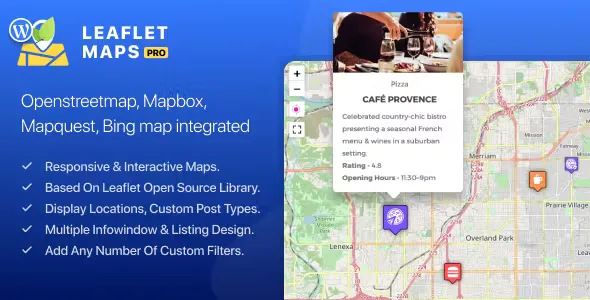
A chain with several shops, a real estate agency with hundreds of flats or an association with pickup points all have the same problem: visitors want to find what is near them, and a plain text list of addresses does not help them decide. WP Leaflet Maps Pro draws those locations on a map, built on leaflet.js, the most popular open-source library for interactive maps.
Locations, custom post types and custom fields
You can create locations and show them on the map, or use the custom post types you already have and display them with all their custom field information. With markers you create categories with different icons, so a visitor can tell a branch from a pickup point at a glance. The map can have its own center or calculate it by default from the assigned locations, and it can center on the visitor's current location.
Info window and listing below the map
Clicking a marker opens a window with the title, content, excerpt, featured image, categories, tags, custom fields or custom taxonomies, since placeholders are all you need to display that data. Below the map you can show a listing in grid or list format, and the visitor can switch between them on the front end. If you need your own design, you can customize the HTML, and the info window and listing designs are all responsive.
- Contact card with phone, email, website or any other data you add to the location.
- Automatic pagination for the listing, with the number of items per page set from the backend.
- On marker click, redirect to a URL or show a message in the info window.
Filters so visitors find what is nearby
The full listing module lets you filter, sort by title, address or category (ascending or descending) and print the entries. An advanced search filters posts or locations by zip code, address, city, country, post or location title and categories. You can also search for posts or locations nearby within a radius you set in the backend, and filter by several categories at once. URL filters let you filter map entries by passing parameters in the page address.
Two ways to fill the map: existing posts or a CSV
Not every directory starts from the same place. If your data already lives in WordPress, its posts and fields feed the map. If it lives in a spreadsheet, CSV import loads as many locations as you need with all their fields and lets you assign categories from the same file. For developers, the wpomp_marker_source filter takes markers from an external database or another source.
- WordPress posts: custom post types with their fields, and Advanced Custom Fields if you want to assign locations with it.
- CSV file: locations with any number of fields and several categories per location.
What you can change in WP Leaflet Maps Pro without programming
From the backend you enable or disable the search form, the category filter and the sorting options, and choose the map controls (zoom, full screen and map type) and their position over the map. Listing texts are changed with placeholders, without touching code. If your site works in several languages, it supports .po files, and on a multisite network it can be activated network wide.
Frequently asked questions about WP Leaflet Maps Pro
Can I use my custom post types?
Yes. The plugin shows custom post types on the map with the information from their custom fields, and you can use Advanced Custom Fields to assign the locations.
Can it import a large list of locations?
Yes. CSV import supports any number of locations and fields, and lets you assign several categories to each one.
Can I change the design of the info window?
Yes. There are several info window and listing designs, all responsive, and you can customize the HTML to integrate your own design.
Version history
-
v
1.0.9 Current 8 May 2024
Customer reviews
Sign in to leave a review. Only people who have the product can review it.
No reviews for this product yet.
Frequently asked questions
-
GPL (General Public License) is the license under which WordPress and most premium plugins/themes are distributed. It grants you the right to use, modify and redistribute the software in as many projects as you want, with no domain restrictions.
-
Yes. With membership you get automatic updates via our GPLClub Updater plugin (installed on your WP, detects new versions and applies them). With individual purchase, you get one year of manual updates from your account.
-
Depends on the plan. Monthly: 3 domains. Semi-annual: 7. Annual and Lifetime: 15. Individual purchase: 1 domain.
-
GPLClub offers its own support for installation, configuration and compatibility. For direct support from the original author (feature requests, product-specific bugs), a license purchased from the author is required.