WP MAPS PRO Plugin for Google Maps
Antivirus scan
Powered by ClamAV
✅ Verified clean
This product file has passed our security filters.
Want to run a fresh ClamAV scan right now? Takes a few seconds and shows scanner version, signature DB and live result.
This can take 5 to 30 seconds.
Clean file Threat detected
No threats detected in this file.
- File
- Size
- Scanned
- ClamAV
- Signature database
⚡ Powered by ClamAV
Scan could not be completed
Report product
If you detected an issue (broken file, malware, inappropriate content, etc.) let us know and we'll review it ASAP.
Sign in to report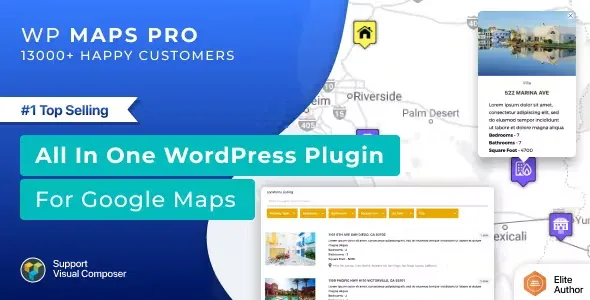
About WP MAPS PRO Plugin for Google Maps
A store locator fails because of the data, not the map
Dropping a pin on Google Maps is easy. The hard part comes with twenty locations, phone numbers that change and a customer typing a postcode on their phone expecting to see the nearest one. Someone searching "near me" has already decided to go: if the map sends them to an old address, you don't get a second chance.
WP Maps Pro is a mapping and store locator plugin for WordPress, based on Google Maps and OpenStreetMap. It suits businesses with several locations (shops, clinics, dealerships, offices) and sites that want to plot their own posts on a map. Its advantage is that each place's details are kept in one spot and the map updates with them.
Locations can be WordPress posts, not just pins
You can show posts, pages or your own content types on the map, and even mix several types on a single one. The location is assigned from a meta box or from your own custom fields, and also with Advanced Custom Fields if you already work with it.
- Tailor-made info window: with placeholders you show title, content, excerpt, featured image, categories, tags or custom fields, plus phone, fax, email or website.
- Listing below the map: as a grid or a list, and the visitor can switch format. The HTML can be adapted to your design.
- Search and filters: by postcode, address, city, country, title and categories, with sorting and printing of the filtered list. The listing runs on ajax.
- Proximity: finds locations within a radius you set in the dashboard.
- Multiple categories: a location can have several, and the visitor filters by them right on the map.
- On click: you choose between redirecting to the location or opening a message in the info window.
It also offers directions to get there and a Zapier integration that sends marker clicks to other applications (you need your own Zapier account).
What it is not: it doesn't handle bookings, stock or orders, it only displays and filters places. And since it relies on Google Maps, expect to create a Google API key before the map loads.
Common questions before building the map
Can I load many locations at once?
Yes. You import locations from CSV with no limit, with whatever fields you want and the categories assigned in the file itself. All delimiters are supported.
Is it only for stores?
No. It works for any business with physical points and also for showing your own geolocated posts or content.
Can I use it without Google?
The plugin is described as based on Google Maps and OpenStreetMap. Check in the demo which OpenStreetMap options it offers before you decide.
Do I need to code?
Not for the usual: filters, listings and info windows are set up from the dashboard. You will only touch HTML if you want a very custom listing design.
CSV is the short route to loading many locations
Before configuring anything, organize your data in a spreadsheet: name, full address, phone, website and category for each place. A misspelled postcode is the most common cause of a pin in the wrong place, and no plugin option fixes that for you.
With the sheet ready, import the CSV, check a few locations on the map and then adjust the filters, the search radius and the listing format. If your places are already WordPress posts, assign the location from the meta box and keep the CSV for whatever isn't on your site yet.
Version history
-
v
6.0.4 Current 16 Jul 2025
Customer reviews
Sign in to leave a review. Only people who have the product can review it.
No reviews for this product yet.
Frequently asked questions
-
GPL (General Public License) is the license under which WordPress and most premium plugins/themes are distributed. It grants you the right to use, modify and redistribute the software in as many projects as you want, with no domain restrictions.
-
Yes. With membership you get automatic updates via our GPLClub Updater plugin (installed on your WP, detects new versions and applies them). With individual purchase, you get one year of manual updates from your account.
-
Depends on the plan. Monthly: 3 domains. Semi-annual: 7. Annual and Lifetime: 15. Individual purchase: 1 domain.
-
GPLClub offers its own support for installation, configuration and compatibility. For direct support from the original author (feature requests, product-specific bugs), a license purchased from the author is required.