WP Sheet Editor Taxonomy Terms Pro
Antivirus scan
Powered by ClamAV
✅ Verified clean
This product file has passed our security filters.
Want to run a fresh ClamAV scan right now? Takes a few seconds and shows scanner version, signature DB and live result.
This can take 5 to 30 seconds.
Clean file Threat detected
No threats detected in this file.
- File
- Size
- Scanned
- ClamAV
- Signature database
⚡ Powered by ClamAV
Scan could not be completed
Report product
If you detected an issue (broken file, malware, inappropriate content, etc.) let us know and we'll review it ASAP.
Sign in to report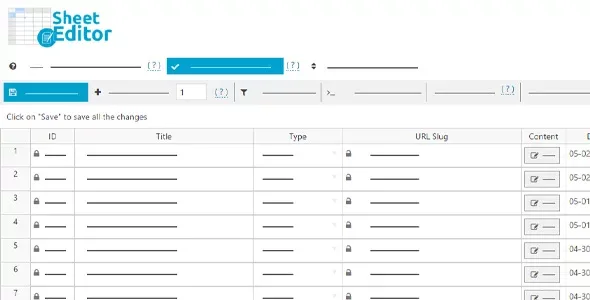
About WP Sheet Editor Taxonomy Terms Pro
When your store has 800 categories and the WordPress screen only lets you edit them one at a time
Fixing the description of a hundred categories, moving a whole block under another parent category or finding the ones with no image turns into hundreds of clicks and open tabs in the native WordPress editor. Searches only filter by name, so you can't even tell how many categories are badly filled in.
WP Sheet Editor Taxonomy Terms Pro replaces that screen with a spreadsheet inside the WordPress dashboard. Changes are applied directly on the website, with no need to export and import files.
A taxonomist who doesn't know it: what changes depending on who you are
If you run a WooCommerce store with lots of attributes
Every taxonomy has its own sheet: one for product categories, another for tags and one for each global attribute (colors, sizes, etc.). You can create terms by typing in the sheet, pasting from Excel, pasting category lists from another website or importing a file from your wholesaler or dropshipping supplier.
If you handle the SEO of a blog or a large catalog
You can edit each term's name, slug, parent category, description, image and SEO title and description in a single view. The advanced search combines conditions: for example, categories with an empty description, categories without an image, or terms containing a keyword in any field.
If you inherited a website with messy taxonomies
You can convert terms from one taxonomy to another (tags to categories, categories to product attributes, one attribute to another), move hundreds of categories under a new parent and duplicate a category to generate copies, with the posts automatically assigned to the new category.
Formulas to change hundreds of terms at once
The formulas engine lets you update many terms with a single operation:
- Replace words or phrases in descriptions, names, parent categories or images.
- Add the same description or upload an image to hundreds of categories at once.
- Fill in the SEO title and description in bulk.
Columns can be hidden, shown, reordered, resized and renamed, and you can add your own columns to edit custom fields. Fields added by other plugins, including Advanced Custom Fields metaboxes, appear in the sheet automatically.
How it behaves with huge catalogs
WP Sheet Editor Taxonomy Terms Pro only loads in the admin area, so it doesn't affect the speed of the public side. It supports thousands of rows in the sheet and saves only the modified cells: if you load 500 rows and change 3 fields, only 3 fields are saved. You can also control how many rows are saved per batch and how long to wait between batches, which helps if your hosting is tight on resources.
It needs your own decisions to repair the data
It is a bulk editing tool: it doesn't create content for you or fix a poorly planned structure. If your category hierarchy is a mess, the sheet helps you reorganize it quickly, but deciding how it should end up is still up to you. And since changes are applied live, it's wise to make a backup before running formulas on hundreds of terms.
Frequently asked questions
Do I have to export and import files to edit?
No. The sheet works on the real data of the website and changes are applied live. You can still paste data from Excel or import a supplier's file to create terms.
Does it work with custom taxonomies?
Yes. It generates one sheet for each taxonomy, including event or portfolio categories.
Can I convert tags into categories?
Yes, you can convert terms from one taxonomy to another, for example tags to categories or one product attribute to another.
Does it slow down my website?
It only loads in the WordPress dashboard, so it doesn't affect the speed of the pages your visitors see.
Version history
-
v
1.7.23 Current 21 Jan 2026
Customer reviews
Sign in to leave a review. Only people who have the product can review it.
No reviews for this product yet.
Frequently asked questions
-
GPL (General Public License) is the license under which WordPress and most premium plugins/themes are distributed. It grants you the right to use, modify and redistribute the software in as many projects as you want, with no domain restrictions.
-
Yes. With membership you get automatic updates via our GPLClub Updater plugin (installed on your WP, detects new versions and applies them). With individual purchase, you get one year of manual updates from your account.
-
Depends on the plan. Monthly: 3 domains. Semi-annual: 7. Annual and Lifetime: 15. Individual purchase: 1 domain.
-
GPLClub offers its own support for installation, configuration and compatibility. For direct support from the original author (feature requests, product-specific bugs), a license purchased from the author is required.