WP Table Builder Pro
Antivirus scan
Powered by ClamAV
✅ Verified clean
This product file has passed our security filters.
Want to run a fresh ClamAV scan right now? Takes a few seconds and shows scanner version, signature DB and live result.
This can take 5 to 30 seconds.
Clean file Threat detected
No threats detected in this file.
- File
- Size
- Scanned
- ClamAV
- Signature database
⚡ Powered by ClamAV
Scan could not be completed
Report product
If you detected an issue (broken file, malware, inappropriate content, etc.) let us know and we'll review it ASAP.
Sign in to report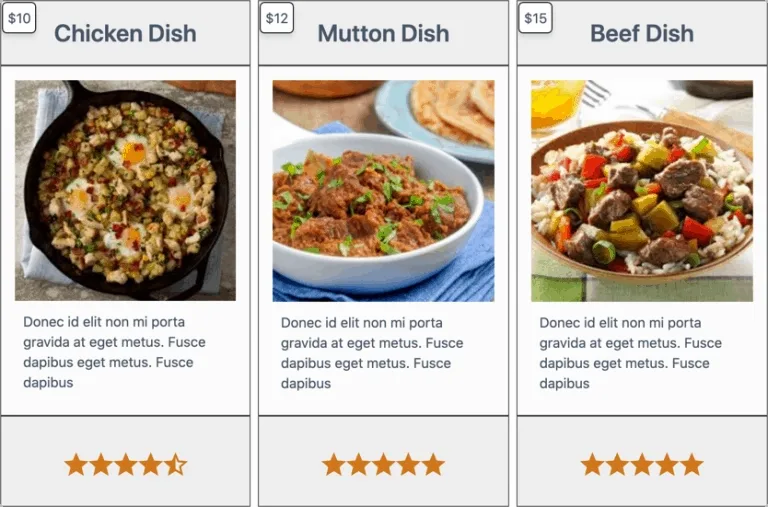
About WP Table Builder Pro
The table you need and nobody wants to lay out by hand
A comparison of three models with their prices, their ratings and their buy button. A rate card. A timetable. A specifications table. All of that convinces the reader far more than a paragraph, and all of it, written by hand in HTML, is where people give up.
WP Table Builder builds those tables by dragging, without writing code or wrestling with shortcodes.
What can go inside a cell
Not only text. There are fourteen element types: image, button, list, star rating, circle rating, progress bar, badge, ribbon, icon, styled list, and also HTML and shortcodes if you need to bring something in from another plugin.
That mix is what separates a data table from a table that sells: the product photo, the stars and the button on the same row.
What the paid version adds
- Search and pagination, essential past thirty rows.
- Column sorting, so the reader orders by price or by score.
- Sticky headers, top row and first column, which is what stops you getting lost in a wide table.
- Twenty-eight templates: pricing, product comparisons, schedules, scoreboards.
The decision to make: mobile
This is where almost every table on the internet fails, and where thinking before laying out pays.
A six-column table does not fit on a phone, so there are two ways out: scrolling horizontally, or each row stacking vertically into a card. The plugin allows control over the breakpoint, the stacking direction and what happens to the header.
The decision is not aesthetic. If your table is a comparison of three products, stacking works: each product becomes a complete card. If it is a data table where the point is comparing the same column across rows, stacking destroys it, and there what you want is horizontal scrolling with the first column fixed. Choosing wrong leaves the table unreadable on exactly the device most people arrive from.
Alternatives in the catalogue
The other reference for tables in WordPress is TablePress, and the difference between the two is clear once you see it.
TablePress is built for data tables: loaded from a spreadsheet or a file, updated by importing again, and holding hundreds of rows with sorting and search. If what you have is tabular information that changes (prices, timetables, results, inventory), that is the route.
WP Table Builder is built for tables that sell: few rows, assembled by hand, with images, buttons and ratings inside the cells. A comparison of three products with their buy buttons does not get made by importing a file.
Put another way: if your table's content lives in a spreadsheet, TablePress. If you are writing it to convince somebody, this one.
Frequently asked questions
Do I need to know HTML?
No. Tables are built by dragging elements into the cells.
Can I put buttons and images in the cells?
Yes, along with ratings, progress bars, badges and icons, among others.
Can the reader sort the table?
Yes, in the paid version, along with search and pagination.
How do they look on mobile?
They adapt, and you control the breakpoint and whether rows stack or the table scrolls.
Version history
-
v
1.4.9 Current 17 May 2024
Customer reviews
Sign in to leave a review. Only people who have the product can review it.
No reviews for this product yet.
Frequently asked questions
-
GPL (General Public License) is the license under which WordPress and most premium plugins/themes are distributed. It grants you the right to use, modify and redistribute the software in as many projects as you want, with no domain restrictions.
-
Yes. With membership you get automatic updates via our GPLClub Updater plugin (installed on your WP, detects new versions and applies them). With individual purchase, you get one year of manual updates from your account.
-
Depends on the plan. Monthly: 3 domains. Semi-annual: 7. Annual and Lifetime: 15. Individual purchase: 1 domain.
-
GPLClub offers its own support for installation, configuration and compatibility. For direct support from the original author (feature requests, product-specific bugs), a license purchased from the author is required.