WP Travel Engine - Itinerary Downloader
Antivirus scan
Powered by ClamAV
✅ Verified clean
This product file has passed our security filters.
Want to run a fresh ClamAV scan right now? Takes a few seconds and shows scanner version, signature DB and live result.
This can take 5 to 30 seconds.
Clean file Threat detected
No threats detected in this file.
- File
- Size
- Scanned
- ClamAV
- Signature database
⚡ Powered by ClamAV
Scan could not be completed
Report product
If you detected an issue (broken file, malware, inappropriate content, etc.) let us know and we'll review it ASAP.
Sign in to reportNewer version out, or a problem?
About WP Travel Engine - Itinerary Downloader
Travel sites running WP Travel Engine that want to give travelers the trip program on their phone
Those who sell trips get the same questions again and again: schedules, what the price includes, what each day looks like. The answer is already written on the trip page, but on the website it needs a connection and in email it gets lost between messages. Itinerary Downloader is made for sites that already use WP Travel Engine and want travelers to take that program away as a document.
It needs WP Travel Engine installed and active, since it is an extension of that plugin. If your site does not use it, this add-on will not help you. The Mailchimp integration is optional and only requires a Mailchimp API key if you want to use it.
The full program in a PDF that opens offline
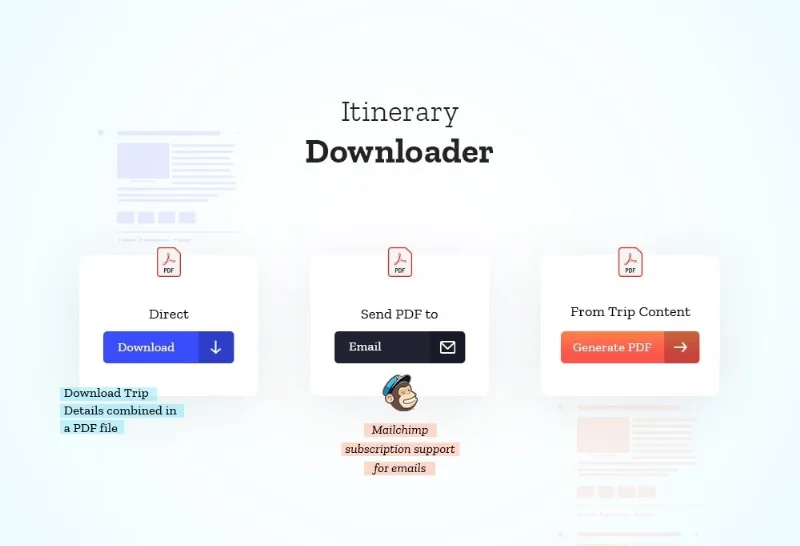
With a shortcode you add a button to any trip page, and clicking it generates the PDF in a single click. The document can include these sections:
- Trip overview
- Availability
- Trip cost
- Itinerary
- Trip facts
- Frequently asked questions about the trip
- Quick contact details
Once downloaded, the PDF opens on the phone even without internet, so the traveler can check the plan on the go.
Email delivery with a pop-up form and consent options
If you enable the pop-up form, the user enters their email and the PDF arrives in their inbox as an attachment. You can set consent to be mandatory before the PDF is sent, or give the user the option of joining a subscription list or not.
With the Mailchimp integration, besides the sending, the user can subscribe to your list. For that you need to enable the form, add the Mailchimp API key and finish configuring the related settings.
What text and sections you control and where the button appears
You can change the text shown, hide the PDF sections you do not need and adjust several generation options. You also decide whether the button goes above the inquiry form or below the pricing widget, and whether the downloaded file carries the trip name.
Frequently asked questions about Itinerary Downloader
Do I need WP Travel Engine to use it?
Yes. Itinerary Downloader extends WP Travel Engine, so that plugin must be installed and active.
Can the PDF be read offline?
Yes. Once downloaded, it opens on the phone even without internet.
Can I choose what information the PDF includes?
Yes. You can hide specific sections and change the texts that appear in the document.
Is Mailchimp required?
No. It is only needed if you want to add users to a subscription list when you send them the itinerary.
Can the button appear on archive pages?
Yes. From the Trip Archive settings you can enable the button on those pages.
Topics
Version history
-
v
2.1.0 Current 13 May 2024
Customer reviews
Sign in to leave a review. Only people who have the product can review it.
No reviews for this product yet.
Frequently asked questions
-
GPL (General Public License) is the license under which WordPress and most premium plugins/themes are distributed. It grants you the right to use, modify and redistribute the software in as many projects as you want, with no domain restrictions.
-
Yes. With membership you get automatic updates via our GPLClub Updater plugin (installed on your WP, detects new versions and applies them). With individual purchase, you get one year of manual updates from your account.
-
Depends on the plan. Monthly: 3 domains. Semi-annual: 7. Annual and Lifetime: 15. Individual purchase: 1 domain.
-
GPLClub offers its own support for installation, configuration and compatibility. For direct support from the original author (feature requests, product-specific bugs), a license purchased from the author is required.