WP Travel Engine - Partial Payment
Antivirus scan
Powered by ClamAV
✅ Verified clean
This product file has passed our security filters.
Want to run a fresh ClamAV scan right now? Takes a few seconds and shows scanner version, signature DB and live result.
This can take 5 to 30 seconds.
Clean file Threat detected
No threats detected in this file.
- File
- Size
- Scanned
- ClamAV
- Signature database
⚡ Powered by ClamAV
Scan could not be completed
Report product
If you detected an issue (broken file, malware, inappropriate content, etc.) let us know and we'll review it ASAP.
Sign in to report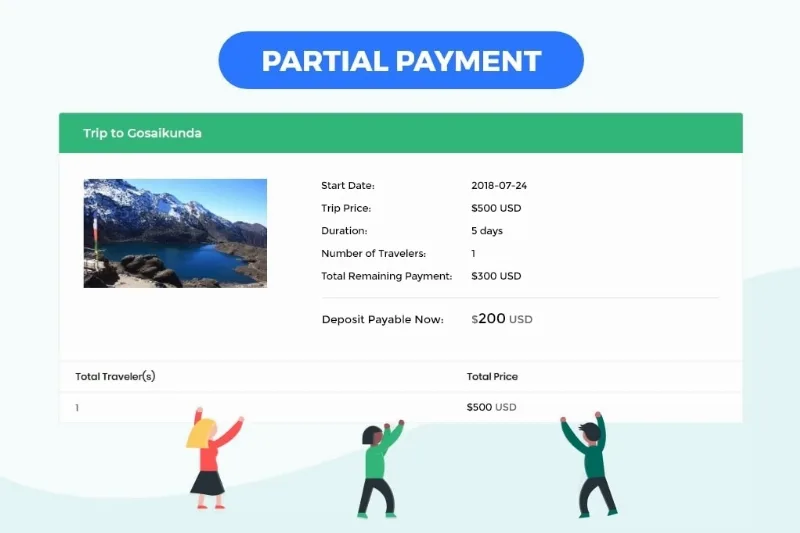
About WP Travel Engine - Partial Payment
Charging everything upfront scares off bookings; charging little leaves you exposed
A organized trip costs enough that travelers hesitate before paying it in full, and meanwhile you have to commit to accommodation, guides or transport before the departure date. Asking for a reasonable deposit helps both sides, but handling it by hand (bank transfers, emails, spreadsheets) ends in forgotten balances. WP Travel Engine - Partial Payment adds that deposit to the WP Travel Engine booking process and organizes what comes afterwards.
A trek booked months ahead, step by step with WP Travel Engine - Partial Payment
Imagine an agency with an affordable mountain route and a luxury safari. This is how the process goes:
1. You decide how much is requested upfront for each trip
The deposit is set trip by trip, as a percentage or as a fixed amount. There is also a fixed-per-booking type: a single deposit, whether one traveler goes or six. The cheap route can ask for little and the safari can ask for more, because they don't attract the same buyer.
2. The traveler chooses how to pay
At checkout they see the deposit option and, if you allow it, the full payment option; you can show or hide the latter. They get a clear summary of what they owe, so there is no doubt about the amount due. If the deposit turns out to be higher than the total booking price, the partial option hides itself.
3. You set until when deposits are accepted
With cut-off days you stop accepting deposits a set number of days before departure. Once that date passes, checkout requires full payment even if you have that option disabled. This prevents someone from booking with a deposit three days before leaving and leaving you with an uncollected balance.
4. The balance doesn't get forgotten
You can set how long the remainder has to be paid in (Final Payment Due In), but note: that setting only determines the displayed date and schedules the email reminders; it doesn't block anything by itself. Reminders are not sent when nothing remains to be paid, and in checkout messages you can show the balance with the {amount_due} tag.
If you use WP Travel Engine's Advanced Email Automator add-on, you have two triggers: remaining payment completed and payment pending. That automator is a separate add-on. And remember that this plugin doesn't work on its own: it needs WP Travel Engine installed. Check in the demo how the balance collection works with your payment gateway before building your flow.
Questions before enabling the deposit on your trips
Can I set a different deposit for each trip?
Yes. It is defined on each trip, with a percentage or a fixed amount, and you can add the fixed-per-booking type.
Can I force full payment on last-minute bookings?
Yes, with cut-off days. Once the date is exceeded, checkout asks for full payment automatically.
Does full payment stop being offered?
Not necessarily: there is an option to show or hide it, so you decide.
Does it work without WP Travel Engine?
No. It is an add-on for that plugin and depends on it.
If all your trips are paid in full, this add-on is surplus
It makes sense for agencies and operators selling experiences with a distant date and a high average ticket, where the deposit lowers the barrier to entry. If you sell day trips or cheap activities paid in full at booking, you won't make use of it. Nor is it a tailor-made installment system: the logic revolves around the deposit, the remaining balance and its reminders.
Version history
-
v
2.1.3 Current 8 Jan 2025
Customer reviews
Sign in to leave a review. Only people who have the product can review it.
No reviews for this product yet.
Frequently asked questions
-
GPL (General Public License) is the license under which WordPress and most premium plugins/themes are distributed. It grants you the right to use, modify and redistribute the software in as many projects as you want, with no domain restrictions.
-
Yes. With membership you get automatic updates via our GPLClub Updater plugin (installed on your WP, detects new versions and applies them). With individual purchase, you get one year of manual updates from your account.
-
Depends on the plan. Monthly: 3 domains. Semi-annual: 7. Annual and Lifetime: 15. Individual purchase: 1 domain.
-
GPLClub offers its own support for installation, configuration and compatibility. For direct support from the original author (feature requests, product-specific bugs), a license purchased from the author is required.