WPC AJAX Search for WooCommerce
Antivirus scan
Powered by ClamAV
✅ Verified clean
This product file has passed our security filters.
Want to run a fresh ClamAV scan right now? Takes a few seconds and shows scanner version, signature DB and live result.
This can take 5 to 30 seconds.
Clean file Threat detected
No threats detected in this file.
- File
- Size
- Scanned
- ClamAV
- Signature database
⚡ Powered by ClamAV
Scan could not be completed
Report product
If you detected an issue (broken file, malware, inappropriate content, etc.) let us know and we'll review it ASAP.
Sign in to reportNewer version out, or a problem?
About WPC AJAX Search for WooCommerce
Whoever uses your store search has almost decided to buy
A search that is slow to answer, forces a page reload or returns an unordered list makes customers give up just when they were closest to buying. It is a problem that never shows up in your analytics as a complaint, only as a sale that did not happen. In large catalogs, like a wholesaler's, that person usually knows what they want (a name, a reference, a category) and only needs to get there fast.
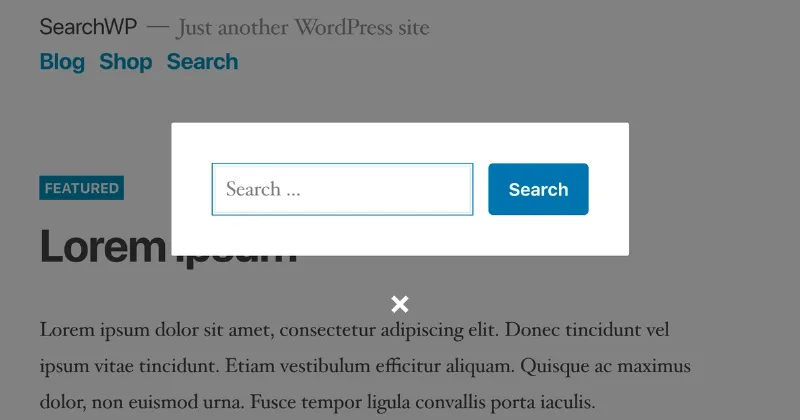
WPC AJAX Search for WooCommerce offers a popup that shows live results and a preview of each product.
A search popup that opens from any button
Visitors open the popup from anywhere you place the search button, including different menus, and see results as they type. You decide how it behaves:
- Popup heading and position within the site.
- Overlay effect and sliding effect, which you can turn on or off.
- Close button in the corner, and closing by clicking outside.
- Automatic opening or closing when typing in the search is possible.
- Link to each product in the same tab or a new one.
From the popup itself you can add a product to the wishlist or the compare list, and open it in the WPC Smart Quick View popup.
Keywords that work as shelves
The plugin comes with predefined keywords for on-sale, featured, recent and popular products. When the customer types one of them, the popup shows that group of products. You can change the keyword for each type to another one your audience uses, and add more popular terms as suggestions.
It is a way to guide someone who does not know what to look for: they type "deals" or "new" and already have a shop window. Still, you have to choose and maintain those words yourself; if you use a term your customers never type, nothing will happen.
Smart Search: rules to decide what each search returns
It is exclusive to the Premium version. Instead of the normal search, you create rules: one or several words, with exclusions, and the number of characters or words that triggers each rule. Each rule can return:
- Products.
- A custom message (it supports shortcodes from other WPClever plugins).
- A list of categories to browse.
- Blog posts.
Products can be pulled from the whole catalog, tags, categories, product types, brands, collections, visibility, shipping classes or attributes. The "Combined" source mixes several criteria at once: for example, bundles of a specific type, above a certain price, from one category, with a given attribute and shipping class. You can also limit how many results appear and in what order.
Smart Search and buying from the quick view require the Premium version
It helps to separate what the plugin already includes from what you will have to cover with something else:
- Already solved: live search, configurable popup, special keywords, product links and wishlist and compare buttons.
- With the Premium version of this plugin: Smart Search rules, the search setting by categories or SKU and the results limit.
- With the Premium version of WPC Smart Quick View: adding to the cart straight from the popup.
- With another WPClever plugin: added-to-cart notifications (WPC Added to Cart Notifications), brands (WPC Brands for WooCommerce) and collections (WPC Smart Product Collections for WooCommerce) as Smart Search sources.
- On you: writing the rules and messages, and checking that the results make sense for your catalog.
Frequently asked questions about WPC AJAX Search for WooCommerce
Does it work with any theme?
It is designed to work with almost any theme and with the most common plugins. The sensible thing is to test your theme's search button in the demo before building it out.
Can customers buy without leaving the popup?
They can see the product in the quick view. Adding it to the cart from there requires the Premium version of WPC Smart Quick View.
Can it search by SKU or category?
Yes, with the Premium version, which adds that setting and a results limit.
Can I show something other than products?
Yes, with Smart Search: custom messages, category lists or blog posts depending on the word searched.
Topics
Version history
-
v
2.6.1 Current 11 Nov 2026
-
v
2.6.0 30 Sep 2026
-
v
2.5.6 15 Sep 2026
-
v
2.5.5 29 Jul 2026
-
v
2.5.1 16 Mar 2026
Customer reviews
Sign in to leave a review. Only people who have the product can review it.
No reviews for this product yet.
Frequently asked questions
-
GPL (General Public License) is the license under which WordPress and most premium plugins/themes are distributed. It grants you the right to use, modify and redistribute the software in as many projects as you want, with no domain restrictions.
-
Yes. With membership you get automatic updates via our GPLClub Updater plugin (installed on your WP, detects new versions and applies them). With individual purchase, you get one year of manual updates from your account.
-
Depends on the plan. Monthly: 3 domains. Semi-annual: 7. Annual and Lifetime: 15. Individual purchase: 1 domain.
-
GPLClub offers its own support for installation, configuration and compatibility. For direct support from the original author (feature requests, product-specific bugs), a license purchased from the author is required.