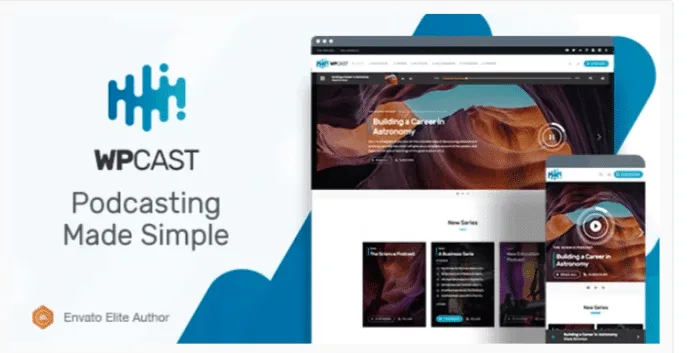
Wpcast – Audio Podcast WordPress Theme
Antivirus scan
Powered by ClamAV
✅ Verified clean
This product file has passed our security filters.
Want to run a fresh ClamAV scan right now? Takes a few seconds and shows scanner version, signature DB and live result.
This can take 5 to 30 seconds.
Clean file Threat detected
No threats detected in this file.
- File
- Size
- Scanned
- ClamAV
- Signature database
⚡ Powered by ClamAV
Scan could not be completed
Report product
If you detected an issue (broken file, malware, inappropriate content, etc.) let us know and we'll review it ASAP.
Sign in to reportNewer version out, or a problem?
About Wpcast – Audio Podcast WordPress Theme
Publishing a podcast by hand usually ends in loose episodes, a player that stops when you change pages, and listeners who don't know where to subscribe. If your show grows with several series or several hosts, that mess multiplies. Wpcast is built for an audio site that looks organized from the first episode.
Uploading an episode: title, mp3 and publish
You write the title, place the mp3 file on the page and publish. The file can live in your WordPress media library or on an external platform. If you already have episodes published on another site, the theme also recognizes Gutenberg audio blocks, classic audio shortcodes and other embedding systems, so the earlier content keeps working.
Series, authors and topics that feed the RSS
You organize episodes by series, by author or by topic. Each archive generates a valid RSS feed for Apple Podcast, Google Podcast and any podcast reader, and each podcast includes a subscription link ready to use. Series can be displayed as cards with the latest playable episodes, a link to each episode and a subscription button.
If you already use Seriously Simple Podcast or PowerPress, the theme is compatible with both, and you can import episodes from earlier Libsyn or Blubrry archives.
The Wpcast player that keeps playing while the listener browses
Music doesn't stop when changing pages thanks to the Ajax navigation plugin included with the theme. The player has a playlist, time seek, volume control and an app-like experience on mobile. From the archive itself, the listener can play an episode, add it to their playlist or share it.
Authors, likes and ratings on every episode
Each author can have social icons, a biography and a personal picture, with direct image upload. With the bundled ReAktions plugin, episodes get share buttons, likes, view counts and ratings.
Building the site without coding: page builder, blocks and four archive styles
If you don't like Gutenberg, the theme includes Page Builder by WPBakery to create pages, even with a front-end editor. It adds 17 shortcodes for the builder (podcast grids, playable slider, lists, sharing links, social icons and buttons), also available as Gutenberg blocks. You can choose among four blog archive designs: cards, horizontal cards, wide cards and classic lists with large images.
Call to action, off-canvas menu and automatic subscriptions
In the header you can place a call to action button with text, icon and link. An off-canvas space adds an extra menu and a widget area. Subscription buttons are added automatically so every listener can follow your updates. If you want a subscription form, the theme is compatible with the official Mailchimp plugin.
Frequently asked questions about Wpcast
Do I need to know how to code?
No. The theme is designed to publish a podcast without writing code.
Can I move my episodes from Libsyn or Blubrry?
Yes. The theme lets you import episodes from earlier Libsyn or Blubrry archives.
Where do I store the mp3 files?
You can host them in your WordPress media library or on external platforms.
Is it good for one host as well as several?
Yes. It works for one person, for several authors, several topics or several podcasts within the same site.
Can I add a contact form?
Yes. Wpcast is compatible with Contact Form 7, the most popular contact form plugin for WordPress.
Topics
Version history
-
v
2.1.0 Current 8 Jan 2025
Customer reviews
Sign in to leave a review. Only people who have the product can review it.
No reviews for this product yet.
Frequently asked questions
-
GPL (General Public License) is the license under which WordPress and most premium plugins/themes are distributed. It grants you the right to use, modify and redistribute the software in as many projects as you want, with no domain restrictions.
-
Yes. With membership you get automatic updates via our GPLClub Updater plugin (installed on your WP, detects new versions and applies them). With individual purchase, you get one year of manual updates from your account.
-
Depends on the plan. Monthly: 3 domains. Semi-annual: 7. Annual and Lifetime: 15. Individual purchase: 1 domain.
-
GPLClub offers its own support for installation, configuration and compatibility. For direct support from the original author (feature requests, product-specific bugs), a license purchased from the author is required.