WPForms Form Locker Addon
Antivirus scan
Powered by ClamAV
✅ Verified clean
This product file has passed our security filters.
Want to run a fresh ClamAV scan right now? Takes a few seconds and shows scanner version, signature DB and live result.
This can take 5 to 30 seconds.
Clean file Threat detected
No threats detected in this file.
- File
- Size
- Scanned
- ClamAV
- Signature database
⚡ Powered by ClamAV
Scan could not be completed
Report product
If you detected an issue (broken file, malware, inappropriate content, etc.) let us know and we'll review it ASAP.
Sign in to report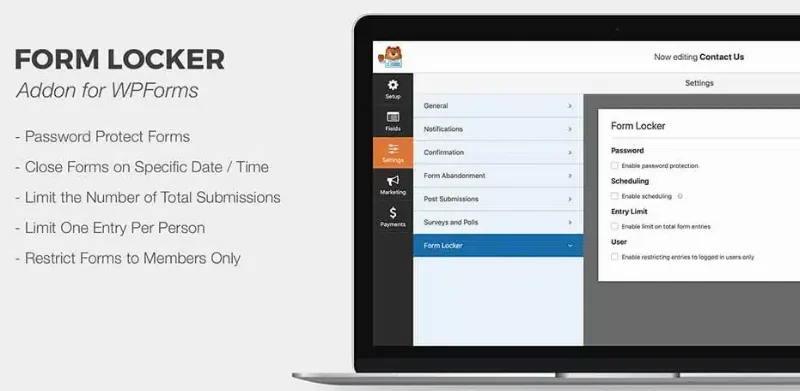
About WPForms Form Locker Addon
A form that stays open forever receives what you don't want
You publish a form for a giveaway, a limited spot or a members area, and the problem shows up soon: duplicate entries, bots, submissions after the deadline or visitors who shouldn't be there. When something is at stake (a spot, a prize, a discount), every entry that shouldn't count ends up in an argument.
WPForms Form Locker Addon is a WPForms addon that adds access rules to your form: who can submit it, when and how many times. It needs WPForms installed; on its own it does nothing.
Form Locker's access rules, one by one
- Password: only people who know it can submit the form.
- Age verification: requires a valid birth date before submitting.
- Email confirmation: verifies the address before submission, so the person filling in the form is real and has a working email.
- Timed submissions: sets opening and closing dates and times.
- Members-only: limits the form to logged-in users.
- Submission limit: caps the number of entries per form, useful for limited spots.
- IP restriction: limits entries from specific addresses.
- Email limit: controls how many times the same address can be used.
Its limits are worth knowing. A password is a shared barrier: if it leaks, anyone gets in. Age verification relies on the date the person types, so it doesn't prove their real age or make you comply with any child protection law by itself. The email limit stops repeats of the same address, but not someone using several. And it isn't a booking calendar or a payment system: it only decides who can submit.
Does it work for giveaways, events and members areas?
Do I need to code?
No. It works like any other WPForms option, with no code.
Can I limit a form to registered users?
Yes. With members-only access, only people who have logged in can see and submit the form. It also encourages sign-ups.
Can I close a form on a specific date?
Yes. Opening and closing dates and times automate the deadlines of contests or registrations, so you don't have to remember to switch it off.
Does it prevent spam?
It helps: restricting IPs, requiring email confirmation and limiting duplicates cut down junk submissions. Don't treat it as a total defense against every bot.
A clean giveaway needs several rules at once
The rules complement each other. For a single-entry giveaway, combine scheduled opening and closing with the email limit. For an event with limited capacity, use the submission cap together with a closing date. For content reserved for customers, keep the form members-only.
Test it like an anonymous visitor would
Before publishing, open the form in an incognito window, without being logged in. Check what someone sees when the form is closed, protected or has reached its cap, and make sure it seems clear to you. If you use the email limit, send two tests with the same address to see how it responds.
Topics
Version history
-
v
2.11.0 Current 24 Jun 2026
-
v
2.9.0 23 Jan 2025
Customer reviews
Sign in to leave a review. Only people who have the product can review it.
No reviews for this product yet.
Frequently asked questions
-
GPL (General Public License) is the license under which WordPress and most premium plugins/themes are distributed. It grants you the right to use, modify and redistribute the software in as many projects as you want, with no domain restrictions.
-
Yes. With membership you get automatic updates via our GPLClub Updater plugin (installed on your WP, detects new versions and applies them). With individual purchase, you get one year of manual updates from your account.
-
Depends on the plan. Monthly: 3 domains. Semi-annual: 7. Annual and Lifetime: 15. Individual purchase: 1 domain.
-
GPLClub offers its own support for installation, configuration and compatibility. For direct support from the original author (feature requests, product-specific bugs), a license purchased from the author is required.