WPFunnels Integrations Addon
Antivirus scan
Powered by ClamAV
✅ Verified clean
This product file has passed our security filters.
Want to run a fresh ClamAV scan right now? Takes a few seconds and shows scanner version, signature DB and live result.
This can take 5 to 30 seconds.
Clean file Threat detected
No threats detected in this file.
- File
- Size
- Scanned
- ClamAV
- Signature database
⚡ Powered by ClamAV
Scan could not be completed
Report product
If you detected an issue (broken file, malware, inappropriate content, etc.) let us know and we'll review it ASAP.
Sign in to report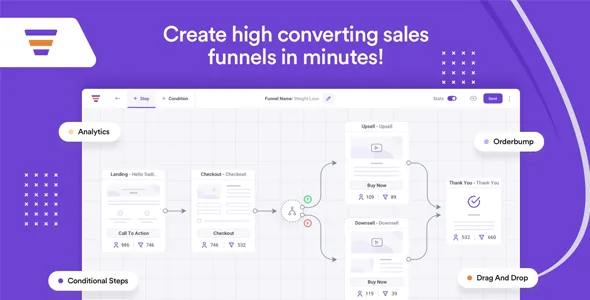
About WPFunnels Integrations Addon
If you already sell with funnels and your email list treats everyone the same
A sales funnel produces much finer signals than a simple purchase: who left their email and did not buy, who accepted the extra offer and who turned it down. If all of that stays inside WordPress and your email tool only receives the word customer, you end up sending the same follow-up to someone who accepted everything and to someone who rejected everything.
WPFunnels Integrations Addon is for people who already work with WPFunnels Pro and want to take those decisions to their CRM or automation tool. It is no use if you have not built any funnels yet, and it does not work on its own: it is an add-on for WPFunnels Pro. It does not write or send emails either: it only passes data, lists and tags. You write and launch the emails in your marketing tool.
Every buyer decision becomes an event
You define events based on the steps in your funnel and assign each one the lists and tags where you want that person to land. The available events are these:
- Click on a CTA and opt-in form submission.
- Order bump accepted or not accepted.
- Main offer accepted.
- Upsell accepted or rejected.
- Downsell accepted or rejected.
If a funnel has several order bumps, upsells or downsells, each one has its own accepted and rejected events. That lets you tell apart, for example, someone who said yes to the first upsell but not the second, and write them a different follow-up.
Your usual lists and tags, with different rules in each funnel
You do not have to recreate anything in your email tool: you choose from the lists and tags that already exist. Triggers are also set per funnel, so a lead generation funnel and a product sales funnel can feed completely different campaigns.
Keep in mind that segmentation depends on the steps in your funnel: the events are the ones listed above, not any action a visitor takes on the site.
Mail Mint with no connection needed, and the rest from the Integrations menu
With Mail Mint there is no connection to set up, because the integration is direct. It is the option designed for building automations, managing contacts and running campaigns without leaving WordPress. For the other tools, you connect them from the Integrations menu in WPFunnels:
- Email and CRM: FluentCRM, Mailchimp, MailPoet, AWeber, ActiveCampaign, Constant Contact, Brevo (Sendinblue), MailerLite, GetResponse, ConvertKit, Omnisend, HubSpot and Zoho CRM.
- Automation: Encharge, Zapier, WPFusion, Pabbly Connect and Pabbly Email Marketing.
If your tool is not listed, WPFunnels has a Webhooks feature to send the data to other destinations.
Questions before you connect your CRM
Can I use it without WPFunnels Pro?
No. To connect any tool other than Mail Mint you need WPFunnels Pro and this addon active at the same time.
Is there a limit on the data I can send?
WPFunnels does not set one. Do check the contact limits of the tool you plan to use, though.
Do I have to connect Mail Mint?
No, the Mail Mint integration is direct.
Does it send the follow-up emails?
No. It sends data and tags; email campaigns and automations are created in your email tool.
Topics
Version history
-
v
1.5.0 Current 12 May 2026
-
v
1.4.4 25 Apr 2025
Customer reviews
Sign in to leave a review. Only people who have the product can review it.
No reviews for this product yet.
Frequently asked questions
-
GPL (General Public License) is the license under which WordPress and most premium plugins/themes are distributed. It grants you the right to use, modify and redistribute the software in as many projects as you want, with no domain restrictions.
-
Yes. With membership you get automatic updates via our GPLClub Updater plugin (installed on your WP, detects new versions and applies them). With individual purchase, you get one year of manual updates from your account.
-
Depends on the plan. Monthly: 3 domains. Semi-annual: 7. Annual and Lifetime: 15. Individual purchase: 1 domain.
-
GPLClub offers its own support for installation, configuration and compatibility. For direct support from the original author (feature requests, product-specific bugs), a license purchased from the author is required.