WPML – XLIFF Addon
Antivirus scan
Powered by ClamAV
✅ Verified clean
This product file has passed our security filters.
Want to run a fresh ClamAV scan right now? Takes a few seconds and shows scanner version, signature DB and live result.
This can take 5 to 30 seconds.
Clean file Threat detected
No threats detected in this file.
- File
- Size
- Scanned
- ClamAV
- Signature database
⚡ Powered by ClamAV
Scan could not be completed
Report product
If you detected an issue (broken file, malware, inappropriate content, etc.) let us know and we'll review it ASAP.
Sign in to report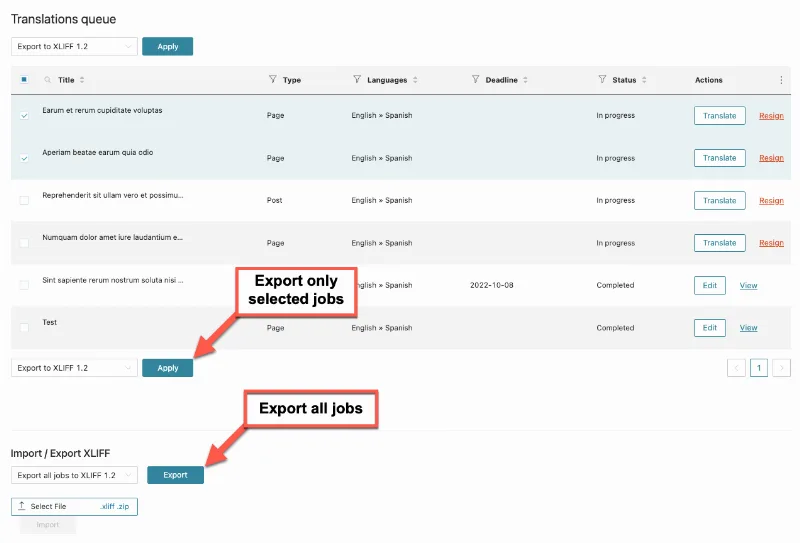
About WPML – XLIFF Addon
Sending text to an outside translator often ends in copy and paste from the dashboard, spreadsheets with broken formatting and emails with attachments nobody can tell the version of. If your translator works in their own tool, the bottleneck is not translating: it is getting content out of WordPress and back in without losing anything on the way.
Professional translators don't work inside your WordPress
People who translate for an agency or on their own usually have their own computer-assisted translation program (so-called CAT tools), with their own memory and glossary. They rarely want a user in your dashboard. What the whole industry does understand is the XLIFF format, an exchange standard. WPML – XLIFF Addon turns your translation jobs into XLIFF files that the translator opens in their tool, and lets you upload them back when they are ready.
How the WPML – XLIFF Addon workflow works
The process has three steps:
- From WPML → Translations → Translation Tasks, you select the jobs and choose in the dropdown the XLIFF version to export to.
- The translator works on the file outside WordPress.
- On that same screen, in the XLIFF import and export area, you select the translated file and upload it.
Options that matter when the translator is picky
You can choose the XLIFF version and which elements to include in the file, from WPML → Settings → Translators. If your translator sends back a file their program can't read, that is the first place to look.
Notes for the translator
When selecting content in the translations dashboard you can add notes that travel inside the file.
Attached files in notifications
There is an option in the Translators tab, under Notifications, to include the XLIFF files in the emails translators receive when they have a new job.
It needs WPML and the Classic Editor to fix imported text
This add-on does not work alone: it extends WPML and depends on you having it installed. There is also a detail that surprises people: to edit a translation you uploaded via XLIFF later, you have to use WPML's Classic Translation Editor.
- What it already solves: exporting jobs to XLIFF, choosing the version and elements, adding notes, importing the translated file and sending it attached in notifications.
- What you cover: WPML itself with its language settings.
- What you cover: finding the translator and their CAT tool, because the add-on does not translate anything by itself.
- What you cover: enabling the Classic Translation Editor in WPML → Settings → Translation Editor if you are going to touch up imported text.
Frequently asked questions
Is it useful if I translate myself inside the dashboard?
It doesn't add much. Its value is in exchanging files with an external tool.
Can I choose the XLIFF format version?
Yes. You choose it in the translator settings and also when exporting jobs from the actions dropdown.
Can I export several jobs at once?
Yes, you select the jobs you want in Translation Tasks and apply the export action.
Can I correct a translation after uploading it?
Yes, but by opening it in the Classic Translation Editor, which you must set as the editor for new translations.
Does it work without WPML?
No, it is a WPML add-on and needs to be installed alongside it.
Topics
Version history
-
v
0.9.7 Current 3 Aug 2024
Customer reviews
Sign in to leave a review. Only people who have the product can review it.
No reviews for this product yet.
Frequently asked questions
-
GPL (General Public License) is the license under which WordPress and most premium plugins/themes are distributed. It grants you the right to use, modify and redistribute the software in as many projects as you want, with no domain restrictions.
-
Yes. With membership you get automatic updates via our GPLClub Updater plugin (installed on your WP, detects new versions and applies them). With individual purchase, you get one year of manual updates from your account.
-
Depends on the plan. Monthly: 3 domains. Semi-annual: 7. Annual and Lifetime: 15. Individual purchase: 1 domain.
-
GPLClub offers its own support for installation, configuration and compatibility. For direct support from the original author (feature requests, product-specific bugs), a license purchased from the author is required.