XStore – Multipurpose WooCommerce Theme
Antivirus scan
Powered by ClamAV
✅ Verified clean
This product file has passed our security filters.
Want to run a fresh ClamAV scan right now? Takes a few seconds and shows scanner version, signature DB and live result.
This can take 5 to 30 seconds.
Clean file Threat detected
No threats detected in this file.
- File
- Size
- Scanned
- ClamAV
- Signature database
⚡ Powered by ClamAV
Scan could not be completed
Report product
If you detected an issue (broken file, malware, inappropriate content, etc.) let us know and we'll review it ASAP.
Sign in to report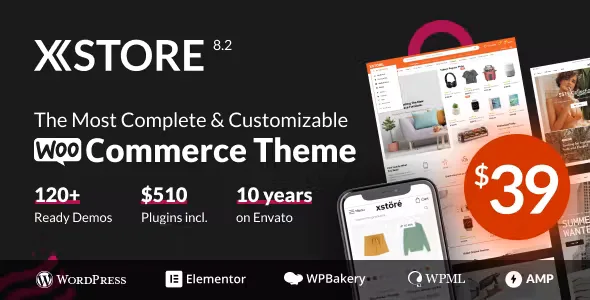
About XStore – Multipurpose WooCommerce Theme
Setting up a WooCommerce store often ends in a pile of separate plugins for the wishlist, the comparison tool, color swatches and filters, each with its own style and weight, and a homepage that looks nothing like what you had in mind. XStore tries to avoid that by bringing all of it into the theme itself.
From empty catalog to a store that looks like a brand: the XStore walkthrough
First-time visitors don't compare your product, they compare your store with the one next door. If the product page, the menu and the loading speed feel different from what they already know, they leave before looking at the price. That's why it helps to go through the process step by step.
Step 1: pick a demo that resembles your business
XStore includes more than 140 ready-to-import demos, designed for very different sectors: fashion, electronics, furniture, cosmetics, jewelry, food, car parts, watches, sports or multivendor marketplaces, among others. A one-click demo installer loads the structure and sample content, so you don't start from a blank page. Still, the demo is only a starting point, and you'll have to replace texts, photos and products with your own.
Step 2: adjust identity and navigation
The theme options let you change layout, typography (font, size, color and spacing) and color palette without touching code. The drag and drop header builder lets you assemble the header with the elements you need, and the mega menu helps organize a large catalog with custom drop-downs and featured products. If you sell hundreds of items, this part matters more than it seems, because it decides whether customers find what they are looking for.
Step 3: stop installing plugins for the basics
Wishlist, product comparison, color and size swatches, AJAX filters, sliders and mega menus come built in. Fewer third-party plugins means fewer different styles to reconcile and fewer pieces to maintain. Even so, XStore doesn't replace everything: payment gateways, shipping, taxes and order management itself still depend on WooCommerce and the extensions you choose.
Step 4: build pages with your editor
The theme is compatible with Elementor and Elementor Pro. If you already work with that page builder, this step comes naturally. Check in the demo you choose which parts depend on Elementor Pro, because not everything you see in a demo is necessarily available with the free version of the editor.
What to expect from speed, SEO and mobile in XStore
The design is responsive, so shopping works on desktop, tablet and mobile. The theme is optimized for Google Page Speed and its code is structured with SEO in mind; it also integrates with plugins such as Yoast SEO. Keep in mind that no theme guarantees rankings or speed on its own: heavy images, slow hosting or too many plugins can ruin the result.
Languages and right-to-left writing
XStore is translation-ready and RTL-ready, and it is compatible with WPML, Polylang and Loco Translate. It includes more than 30 languages, Spanish among them, and the translations are community-driven. If you sell in several countries, it's a clear advantage, although you'll have to translate your product and page texts yourself.
Frequently asked questions about XStore
Does it work if I don't sell a typical physical product?
Yes, the demos also cover sectors such as restaurants, hotels, portfolios, agencies or blogs, although its core is WooCommerce.
Do I need to know how to code?
Not for the usual work: the theme options, the header builder and the demo installer are designed to be used without code.
Can I build a marketplace with several vendors?
There are demos designed for a multivendor marketplace. For vendors to manage their own products you'll need the corresponding marketplace plugin, which the theme doesn't replace.
Is it suitable for a small store?
Yes, but with few products you may not use half of its options. Look closely at the simplest demo before deciding.
Topics
Version history
-
v
9.7.11 Current 24 Oct 2026
-
v
9.7.10 15 Oct 2026
-
v
9.7.9 7 Oct 2026
-
v
9.7.7 13 Aug 2026
-
v
9.7.3 23 Apr 2026
Customer reviews
Sign in to leave a review. Only people who have the product can review it.
No reviews for this product yet.
Frequently asked questions
-
GPL (General Public License) is the license under which WordPress and most premium plugins/themes are distributed. It grants you the right to use, modify and redistribute the software in as many projects as you want, with no domain restrictions.
-
Yes. With membership you get automatic updates via our GPLClub Updater plugin (installed on your WP, detects new versions and applies them). With individual purchase, you get one year of manual updates from your account.
-
Depends on the plan. Monthly: 3 domains. Semi-annual: 7. Annual and Lifetime: 15. Individual purchase: 1 domain.
-
GPLClub offers its own support for installation, configuration and compatibility. For direct support from the original author (feature requests, product-specific bugs), a license purchased from the author is required.