YITH Multiple Shipping Addresses For WooCommerce
Antivirus scan
Powered by ClamAV
✅ Verified clean
This product file has passed our security filters.
Want to run a fresh ClamAV scan right now? Takes a few seconds and shows scanner version, signature DB and live result.
This can take 5 to 30 seconds.
Clean file Threat detected
No threats detected in this file.
- File
- Size
- Scanned
- ClamAV
- Signature database
⚡ Powered by ClamAV
Scan could not be completed
Report product
If you detected an issue (broken file, malware, inappropriate content, etc.) let us know and we'll review it ASAP.
Sign in to report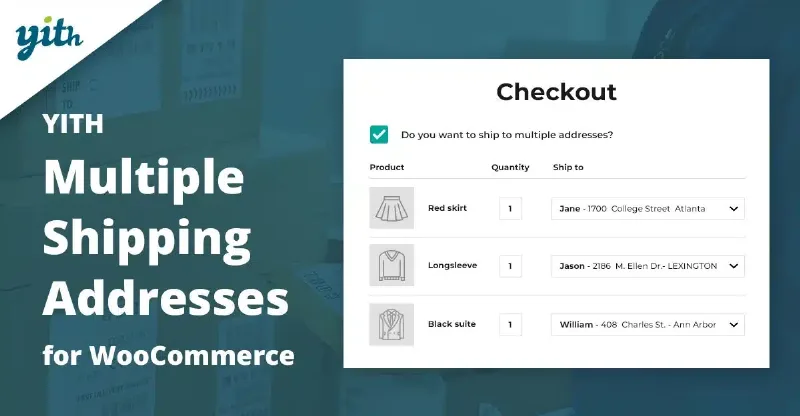
About YITH Multiple Shipping Addresses For WooCommerce
For the gift shop, not for stores where everything ships to one address
A customer fills the cart, finds the perfect last-minute gift for his father, who lives in another country, and at checkout discovers that WooCommerce only lets him ship everything to one address. He removes the gift and the purchase waits for another day, which rarely comes. YITH Multiple Shipping Addresses exists for that moment. If you sell gifts, T-shirts for events, hampers or anything people buy for others, it fits. If your customers always buy for themselves, it adds nothing.
Nor is it a logistics plugin. It lets customers choose different addresses within a single order and lets you track the status of each shipment, but it does not calculate routes or manage carriers. Shipping costs and methods depend on what you have already configured in your store.
The gift that gets lost at the last step
Many people gather several gifts in one visit, and each goes to a different home, sometimes in another country. If you force them to repeat the process with several orders, some of those sales disappear, especially during the holidays. Allowing several destinations in one order can raise the average order value, because customers dare to add more items.
How customers split their products at checkout
- Modal window at checkout: one click opens a window where they add addresses with no limit on their side (you can set a maximum per user).
- Default address: they can mark one and apply it to all products, or choose a different one for each product.
- Quantities per address: if they buy ten T-shirts, they can send one to their home, three to some friends and six to the party venue.
- Saved addresses: they load the ones they already have or add new ones without leaving the payment step.
Which products are included and where the section appears
You can enable multiple shipping for the whole store or exclude specific products, categories or tags.
You also decide whether guests without an account can use it (there is an option to allow it) and where it shows: above or below the checkout, or inside it, under the billing details. You can change the text of the «Ship to a different address?» checkbox, the main color of the section, and whether the weight of each shipment is displayed.
Tracking each shipment after the purchase
On the order page you can update the status of each shipment separately. Each change can notify the customer by email. In addition, in My Account customers add, edit and delete their addresses.
Frequently asked questions
Can customers without an account use it?
Yes, if you enable the option to allow guests. Otherwise, only registered customers will see it.
Can addresses be managed from My Account?
Yes: they can add, edit and delete addresses from that section.
Can I prevent a product from shipping to several addresses?
Yes, with the exclusion list by product, category or tag.
Does it notify the customer when a shipment status changes?
Yes, an automatic email can be sent on every status change.
Topics
Version history
-
v
1.33.0 Current 28 Sep 2025
Customer reviews
Sign in to leave a review. Only people who have the product can review it.
No reviews for this product yet.
Frequently asked questions
-
GPL (General Public License) is the license under which WordPress and most premium plugins/themes are distributed. It grants you the right to use, modify and redistribute the software in as many projects as you want, with no domain restrictions.
-
Yes. With membership you get automatic updates via our GPLClub Updater plugin (installed on your WP, detects new versions and applies them). With individual purchase, you get one year of manual updates from your account.
-
Depends on the plan. Monthly: 3 domains. Semi-annual: 7. Annual and Lifetime: 15. Individual purchase: 1 domain.
-
GPLClub offers its own support for installation, configuration and compatibility. For direct support from the original author (feature requests, product-specific bugs), a license purchased from the author is required.