YITH WooCommerce Catalog Mode Premium
Antivirus scan
Powered by ClamAV
✅ Verified clean
This product file has passed our security filters.
Want to run a fresh ClamAV scan right now? Takes a few seconds and shows scanner version, signature DB and live result.
This can take 5 to 30 seconds.
Clean file Threat detected
No threats detected in this file.
- File
- Size
- Scanned
- ClamAV
- Signature database
⚡ Powered by ClamAV
Scan could not be completed
Report product
If you detected an issue (broken file, malware, inappropriate content, etc.) let us know and we'll review it ASAP.
Sign in to report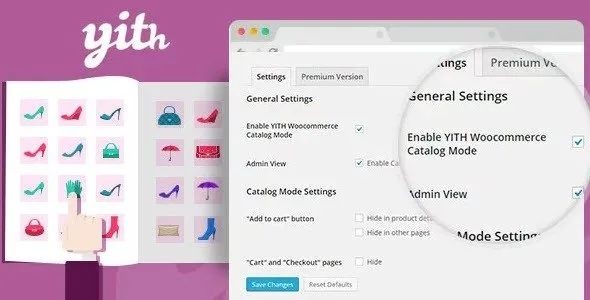
About YITH WooCommerce Catalog Mode Premium
Some stores cannot or do not want to charge online yet: the price depends on each customer, stock is being counted, a holiday is coming up or the product simply sells better after a phone call. If you leave the buy button open, you get orders you cannot fulfil; if you take the shop down, you lose the catalog and your search visibility. This plugin lets you keep products visible and change what visitors can do with them.
If you sell by quote, you lose sales when the price just vanishes
Hiding the price and the buy button is the easy part. What decides whether people write to you or leave is what you put in their place. A product with no price and no guidance looks abandoned; with a clear button such as "Request a quote" or "Call us", the visitor knows the next step. That is why the button and label builder is the central piece: it replaces the buy button and the price, both on the product page and in shop listings, and you can assign a default one or a different one for specific products.
Rules by product, category, user, country and schedule
- Massive catalog mode: with one click you disable the cart, checkout and all the shop's buy buttons, and with another click you go back to selling.
- Selection: apply it to the whole shop, only to certain products, tags or categories, or to the whole shop except an exclusion list.
- Users: you can apply it only to visitors without an account, so the price becomes a reason to register, or only to users from specific countries.
- Schedules: schedule closures by days of the week, time ranges or dates, for example a holiday or a fixed stocktaking day. Products stay visible but cannot be purchased.
- Reviews: you can hide the reviews tab from visitors without an account.
You can also hide the button on shop, category and tag pages, and hide the cart and checkout pages along with any reference to them.
Inquiry form in YITH Catalog Mode Premium
You can show a form on the product page, on all products or only on some. It includes its own form with the fields you choose, or you can use one built with Contact Form 7, Gravity Forms, Formidable Forms, Ninja Forms or WP Forms. It can be placed after the price, the short description or the buy button, in a WooCommerce tab or inside a collapsible section. The email you receive shows which product page the inquiry was sent from, and you can include the direct link to the product. It is compatible with WPML, so you can assign a different form for each language.
Orders and quotes are handled outside the plugin
What it solves and what you will have to cover yourself:
- Solves: hiding prices and buy buttons, replacing them with buttons and labels, showing an inquiry form, scheduling closures and limiting by user or country.
- On you: answering inquiries and preparing quotes, because the plugin does not generate quotations or manage their follow-up.
- On you: deciding whether hidden prices remain visible in some other way (for example in a hand-written description), since the plugin only acts on what WooCommerce displays.
- On you: any payment, booking or order after the inquiry, which happens outside the shop.
With YITH Booking and Appointment you can apply catalog mode to booking products too, and with YITH Multi Vendor each vendor can configure catalog mode for their own shop.
Frequently asked questions
Can I keep selling some products and not others?
Yes. You can apply catalog mode only to certain products, tags or categories, or to the whole shop except those on an exclusion list.
Does it also affect the administrator?
You can decide whether the rules also apply to administrators.
Can I use it to close the shop on holiday?
Yes: you schedule days, time ranges or dates when products can be seen but not bought.
Can I show the price only to people with an account?
Yes, you can hide prices from visitors who are not logged in or limit the rule to users from certain countries.
Can I use my current form?
Yes, if it was built with Contact Form 7, Gravity Forms, Formidable Forms, Ninja Forms or WP Forms. Otherwise, use the included form.
Topics
Version history
-
v
2.59.0 Current 2 Nov 2026
-
v
2.57.0 6 Aug 2026
-
v
2.54.0 7 Apr 2026
Customer reviews
Sign in to leave a review. Only people who have the product can review it.
No reviews for this product yet.
Frequently asked questions
-
GPL (General Public License) is the license under which WordPress and most premium plugins/themes are distributed. It grants you the right to use, modify and redistribute the software in as many projects as you want, with no domain restrictions.
-
Yes. With membership you get automatic updates via our GPLClub Updater plugin (installed on your WP, detects new versions and applies them). With individual purchase, you get one year of manual updates from your account.
-
Depends on the plan. Monthly: 3 domains. Semi-annual: 7. Annual and Lifetime: 15. Individual purchase: 1 domain.
-
GPLClub offers its own support for installation, configuration and compatibility. For direct support from the original author (feature requests, product-specific bugs), a license purchased from the author is required.