YITH WooCommerce Category Accordion Premium
Antivirus scan
Powered by ClamAV
✅ Verified clean
This product file has passed our security filters.
Want to run a fresh ClamAV scan right now? Takes a few seconds and shows scanner version, signature DB and live result.
This can take 5 to 30 seconds.
Clean file Threat detected
No threats detected in this file.
- File
- Size
- Scanned
- ClamAV
- Signature database
⚡ Powered by ClamAV
Scan could not be completed
Report product
If you detected an issue (broken file, malware, inappropriate content, etc.) let us know and we'll review it ASAP.
Sign in to report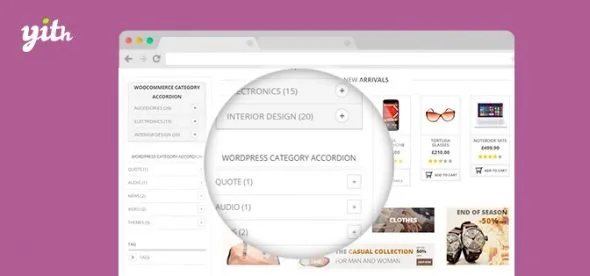
About YITH WooCommerce Category Accordion Premium
A disorganised category menu scares visitors away
People who reach a shop from Google rarely come in through the homepage: they land on a product page and the first thing they do is look to the sides to see whether there is more of the same. If the sidebar is a flat list of dozens of links, or does not exist at all, they leave. You know your catalogue by heart; the visitor does not, and needs to see the hierarchy at a glance without changing page.
YITH WooCommerce Category Accordion solves exactly that: it turns categories, subcategories or tags into collapsible panels that you can place in a sidebar or anywhere else in the shop.
YITH WooCommerce Category Accordion: six styles and plenty of control over what unfolds
The plugin includes six panel templates. In each one you can change colours, borders, radius, spacing and typography, plus the opening and closing icon (style and position). That way the sidebar accordion does not have to look like the one in the footer.
- What to list: WooCommerce (product) categories or tags, or WordPress (post) categories and tags.
- Hierarchy: only parent categories or subcategories too, and how many levels to show.
- Order and cleanup: sort by ID, name or number of items, exclude specific items and automatically hide empty ones.
- Orientation: highlight the current category, show how many products each one has and decide whether the accordion loads open or closed.
- Opening: on click or on mouse hover.
- Images: option to show each category's image, either the original or an icon.
Now the limits. It is a navigation menu, not a filter: it does not filter by price, attributes or size, it only leads to category or tag pages. It does not create or reorganise your categories either: if the structure is a mess, the accordion will show a collapsible mess. And since it blends into your theme's design, check in the demo how it looks with yours before putting it into production.
An accordion that also works as a link menu
Besides categories and tags, a panel can show a custom WordPress menu. It is useful for pushing pages the customer would not find on their own: shipping and returns, customer service, or listings such as best sellers, top rated or on-sale products.
Of course, you create those pages yourself.
Common questions before deciding
Does it only work on category pages?
No. You can use the widget in a sidebar or copy the shortcode into any page, post or section, such as the footer. If you prefer, you can hide it on specific pages, posts or categories.
Can I show tags instead of categories?
Yes, both product tags and WordPress tags, with the same sorting, exclusion and count options.
Does it work as a product filter?
No. It navigates to category or tag pages, but it does not filter the listing by price or attributes.
Can each accordion look different?
Yes. Each panel has its own colour, border, typography and icon options, so you can define one design per location.
The accordion goes in through a widget or a shortcode, and can be hidden where it is not needed
There is a dedicated widget for WooCommerce categories, another for WordPress categories, another for tags and another for menus. Pick the right one, drag it into the widget area and, if you want it outside the sidebar, copy the panel's shortcode wherever you need it.
A sensible order: first set the levels, exclusions and whether it opens on click or hover in the global options, then adjust the style of each panel. Also check where the sidebar ends up on mobile, because that is where most visitors are lost to a poorly handled menu.
Topics
Version history
-
v
2.31.0 Current 27 Jul 2026
-
v
2.28.0 7 Apr 2026
Customer reviews
Sign in to leave a review. Only people who have the product can review it.
No reviews for this product yet.
Frequently asked questions
-
GPL (General Public License) is the license under which WordPress and most premium plugins/themes are distributed. It grants you the right to use, modify and redistribute the software in as many projects as you want, with no domain restrictions.
-
Yes. With membership you get automatic updates via our GPLClub Updater plugin (installed on your WP, detects new versions and applies them). With individual purchase, you get one year of manual updates from your account.
-
Depends on the plan. Monthly: 3 domains. Semi-annual: 7. Annual and Lifetime: 15. Individual purchase: 1 domain.
-
GPLClub offers its own support for installation, configuration and compatibility. For direct support from the original author (feature requests, product-specific bugs), a license purchased from the author is required.