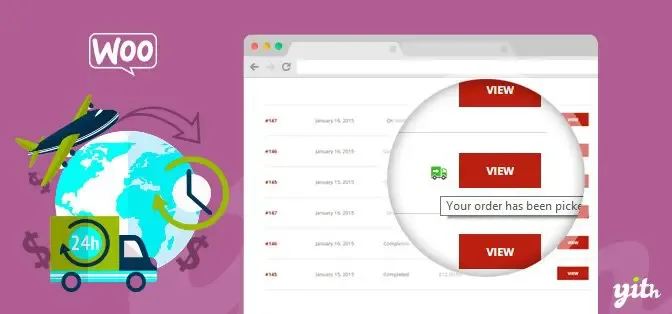
YITH WooCommerce Order Tracking Premium
Antivirus scan
Powered by ClamAV
✅ Verified clean
This product file has passed our security filters.
Want to run a fresh ClamAV scan right now? Takes a few seconds and shows scanner version, signature DB and live result.
This can take 5 to 30 seconds.
Clean file Threat detected
No threats detected in this file.
- File
- Size
- Scanned
- ClamAV
- Signature database
⚡ Powered by ClamAV
Scan could not be completed
Report product
If you detected an issue (broken file, malware, inappropriate content, etc.) let us know and we'll review it ASAP.
Sign in to reportNewer version out, or a problem?
About YITH WooCommerce Order Tracking Premium
Doubt about shipping starts right after payment
Once the customer pays, they stop thinking about the product and start wondering whether the shop will really ship it, with which carrier and when it will arrive. That uncertainty ends up in emails and calls to your support team. YITH WooCommerce Order Tracking Premium puts tracking where the customer looks for it: in their order, in their account and in the order emails.
Where the customer sees the status of their shipment
You enter the data once and the plugin shows it in several places, with the text you customize from the editor:
- On the customer's My Account page, both in the orders list and in the order details.
- In the orders list, as a tooltip when hovering the cursor.
- In the order emails, before or after the product list, as you choose.
This way the customer doesn't need to write to you to find out where their package is.
Add the carrier and the tracking code to each order
Open the order, enter the tracking number, the carrier name and the tracking URL, and the plugin takes care of the rest. If you have many shipments, you can import the data from a CSV file. You choose the carrier from a list of 489 supported services and the tracking link is generated automatically.
A carrier missing from the list is requested from the manufacturer
If your carrier doesn't appear in the list, you need to let the manufacturer know, and they will add it as soon as possible.
Tracking page with shortcode and delivery notes
With the plugin's shortcode you create a tracking page where the customer enters their email address and order ID to see the shipping status.
If you also use YITH WooCommerce PDF Invoices & Packing Slips, tracking data can be included in the packing slips this plugin generates. For that integration you need the premium version of the invoices plugin.
Frequently asked questions about YITH WooCommerce Order Tracking Premium
Can I import many tracking numbers at once?
Yes, you can import them from a CSV file.
Can I change the text the customer sees?
Yes. You customize it from the editor and choose whether the text appears before or after the product list in the emails.
How do my vendors see tracking?
With YITH WooCommerce Multi Vendor, each vendor can add the shipping data for each of their orders, as long as you have that plugin installed.
Do I need anything else for it to work?
Yes, WooCommerce installed and active, because the plugin works on your shop's orders.
Which YITH plugins integrate and what you buy separately
The plugin connects with other YITH plugins, but each one is bought and activated separately:
- YITH Frontend Manager for WooCommerce: you manage tracking from the orders section on the frontend.
- YITH WooCommerce Custom Order Status: you can use placeholders to show tracking in custom status emails.
- YITH WooCommerce Multi Vendor: each vendor adds the shipping data for their orders.
- YITH WooCommerce SMS Notifications: the shipping details appear in the SMS messages you send.
- YITH WooCommerce PDF Invoices & Packing Slips: the tracking data appears in the delivery notes.
If you use Elementor, the plugin's shortcode is also available in its panel. Check which integrations you need before buying, because each one requires its own premium version.
Topics
Version history
-
v
2.45.0 Current 28 Mar 2026
Customer reviews
Sign in to leave a review. Only people who have the product can review it.
No reviews for this product yet.
Frequently asked questions
-
GPL (General Public License) is the license under which WordPress and most premium plugins/themes are distributed. It grants you the right to use, modify and redistribute the software in as many projects as you want, with no domain restrictions.
-
Yes. With membership you get automatic updates via our GPLClub Updater plugin (installed on your WP, detects new versions and applies them). With individual purchase, you get one year of manual updates from your account.
-
Depends on the plan. Monthly: 3 domains. Semi-annual: 7. Annual and Lifetime: 15. Individual purchase: 1 domain.
-
GPLClub offers its own support for installation, configuration and compatibility. For direct support from the original author (feature requests, product-specific bugs), a license purchased from the author is required.