Younger Blogger – Personal Blog WordPress Theme
Antivirus scan
Powered by ClamAV
✅ Verified clean
This product file has passed our security filters.
Want to run a fresh ClamAV scan right now? Takes a few seconds and shows scanner version, signature DB and live result.
This can take 5 to 30 seconds.
Clean file Threat detected
No threats detected in this file.
- File
- Size
- Scanned
- ClamAV
- Signature database
⚡ Powered by ClamAV
Scan could not be completed
Report product
If you detected an issue (broken file, malware, inappropriate content, etc.) let us know and we'll review it ASAP.
Sign in to report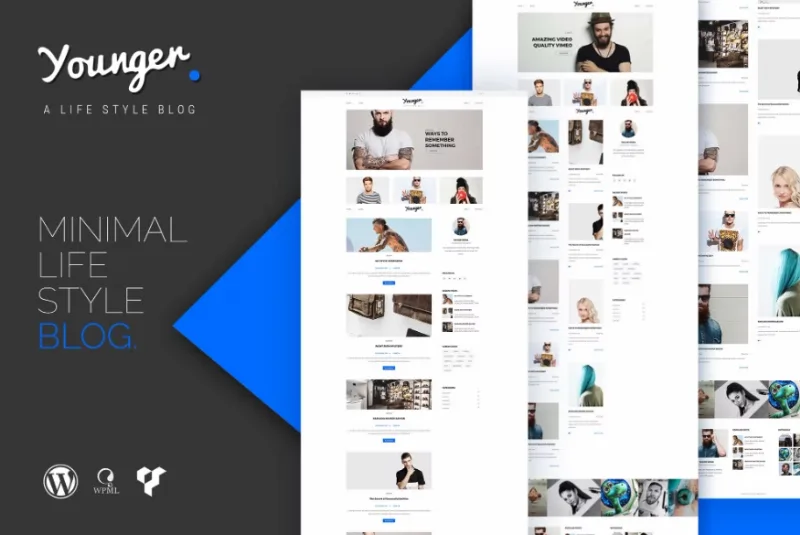
About Younger Blogger – Personal Blog WordPress Theme
You like the demo for photos that are not in the package
You open a personal blog demo and what wins you over is the look of its photographs. Then you install the theme, upload the photos from your phone and the result looks little like it. The design has not changed: the images have.
With Younger Blogger, by themeton, that difference is worth keeping in mind from the start, because the demo images are for presentation only and are not distributed with the theme. What you get is the structure of a clean, simple blog. You bring the visual personality with your photos.
What it brings for publishing in your style
- Seven blog layouts, to decide how your posts are presented.
- Three header layouts.
- WPBakery Page Builder for building pages.
- Revolution Slider for home pages with a carousel.
- Instagram feed within the design.
- One-click data import, to start from the demo structure.
- Live customization, with a responsive, retina-ready design.
- 1170-pixel grid, widget areas and WPML compatibility.
- PSD files included, in case you want to work on the design separately.
Prepare your images before choosing a layout
Since the final look depends on your photos, the order of work matters. These decisions help you get closer to what you saw in the demo:
- Gather several real posts with their featured image, and use those for testing.
- Define a common treatment: similar framing, light and editing bring unity to the listing.
- Try the seven layouts with that material, not with the sample text.
- Check the header with your real logo, because one of the three may fit better than another.
- Look at the result on a phone before settling on your choice.
If your blog has little photography and a lot of text, use that test to judge whether an image-focused layout suits you.
Where a blog theme ends
Younger Blogger takes care of the presentation. Its features do not include a built-in newsletter, image optimization or tools for charging your readers. It does not bring sample photos to publish either.
Layout relies on WPBakery, and the theme is not optimized for Gutenberg. If you prefer to build your pages with blocks, you should choose another approach before you start.
First steps with Younger Blogger
Besides WordPress, you will use the two included plugins: WPBakery Page Builder and Revolution Slider.
- Install and activate the theme.
- Activate WPBakery Page Builder and Revolution Slider.
- Import the demo data in one click.
- Replace the sample images and text.
- Choose the blog layout and header with your real posts.
- Connect your Instagram and check the home page on several screens.
Blogs with a different approach
If you plan to live from advertising, Veen is a light blog with ad spaces planned before, within and after the content. To compare other personal blog designs, the catalog includes Identiz and FlexBlog.
And since your photos will take center stage, WP Smush Pro compresses the image library and whatever you upload later.
Quick answers for your blog
Do the demo photos come with it?
No. The images are for presentation only and are not distributed with the theme.
Which page builder does it use?
It includes WPBakery Page Builder. The theme is not optimized for Gutenberg.
Can I change how the post listing looks?
Yes. You have seven blog layouts and three header layouts.
Can I show my Instagram?
Yes. The theme includes an Instagram feed.
Does it work for a blog in several languages?
It is compatible with WPML.
Can I customize the design outside WordPress?
Yes. It includes PSD files for working on the design in a graphics editor.
Topics
Version history
-
v
1.1 Current 16 Jun 2024
Customer reviews
Sign in to leave a review. Only people who have the product can review it.
No reviews for this product yet.
Frequently asked questions
-
GPL (General Public License) is the license under which WordPress and most premium plugins/themes are distributed. It grants you the right to use, modify and redistribute the software in as many projects as you want, with no domain restrictions.
-
Yes. With membership you get automatic updates via our GPLClub Updater plugin (installed on your WP, detects new versions and applies them). With individual purchase, you get one year of manual updates from your account.
-
Depends on the plan. Monthly: 3 domains. Semi-annual: 7. Annual and Lifetime: 15. Individual purchase: 1 domain.
-
GPLClub offers its own support for installation, configuration and compatibility. For direct support from the original author (feature requests, product-specific bugs), a license purchased from the author is required.