Youtube Video Gallery - Youtube Channel For WPBakery Page Builder With Video Advertising
Antivirus scan
Powered by ClamAV
✅ Verified clean
This product file has passed our security filters.
Want to run a fresh ClamAV scan right now? Takes a few seconds and shows scanner version, signature DB and live result.
This can take 5 to 30 seconds.
Clean file Threat detected
No threats detected in this file.
- File
- Size
- Scanned
- ClamAV
- Signature database
⚡ Powered by ClamAV
Scan could not be completed
Report product
If you detected an issue (broken file, malware, inappropriate content, etc.) let us know and we'll review it ASAP.
Sign in to report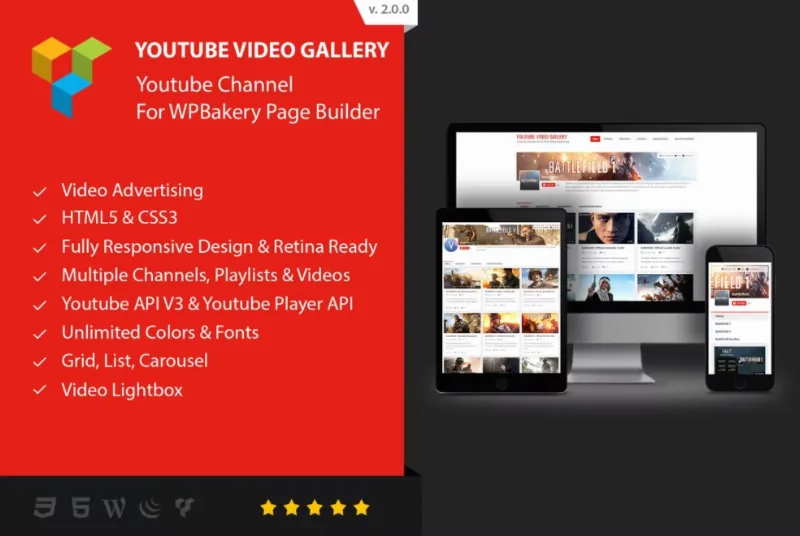
About Youtube Video Gallery - Youtube Channel For WPBakery Page Builder With Video Advertising
The videos from your channel shouldn't send visitors away from your website
Uploading videos to YouTube and linking to them from your site has a cost almost nobody measures: whoever clicks the link ends up on YouTube, surrounded by recommendations from other channels, and often doesn't come back. If you run a restaurant that films its dishes, its kitchen or its events, you want those videos to play on your own page, next to the menu or the booking form.
Youtube Video Gallery is a plugin for WPBakery Page Builder that presents YouTube videos as a gallery inside the page, with several ways to arrange and play them.
A walkthrough with a restaurant: from loose videos to a kitchen page
Imagine you have recorded videos of dishes, of the work in the kitchen and of events. This is how the plugin fits in, step by step:
- Choose the layout. There are demos in grid, list and carousel.
- Decide how it plays. There are three modes: popup window, inline inside the page itself, and YouTube. If you choose YouTube mode, check in the demo whether the video opens inside your page or outside it.
- Control the length of the page. With many videos, you can choose between infinite scroll, a load more button or previous and next buttons. Infinite scroll suits a video page, but if the address or contact form sits below, a load more button stops visitors from never reaching the end.
- Match the look. You can customize fonts and colors so the gallery doesn't look like a foreign block in the rest of the site, and right-to-left (RTL) languages are supported.
The main limit is the starting point: the plugin is built for WPBakery Page Builder. If your site is built with Elementor or the block editor, this gallery is not the right tool.
Questions before building your YouTube gallery
Does it work without WPBakery Page Builder?
Don't count on it. It is designed as an add-on for that page builder, so the sensible choice is to use it on a site that already has it.
Can I show many videos without an endless page?
Yes, thanks to pagination: infinite scroll, a load more button or previous and next buttons. Choose according to how much weight you want the gallery to have on the page.
Is it suitable for a website in Arabic or Hebrew?
It includes right-to-left writing support, so it is one of its options.
Can I change fonts and colors?
Yes, it supports custom fonts and colors. Look at the demos to judge how close it gets to your style before deciding.
Ads in the gallery: three formats and one condition
The plugin allows advertising with HTML5 video ads, Google AdSense or image ads. It makes sense if your site lives off traffic, for example a cooking channel with many visits. For a restaurant looking for bookings, ask yourself whether an ad competes with your own message.
Keep in mind that the plugin provides the space, not the advertisers: for AdSense you need your own account approved by Google, and you have to prepare your own ads. There is also no guarantee of revenue.
Topics
Version history
-
v
2.0.8 Current 16 May 2024
Customer reviews
Sign in to leave a review. Only people who have the product can review it.
No reviews for this product yet.
Frequently asked questions
-
GPL (General Public License) is the license under which WordPress and most premium plugins/themes are distributed. It grants you the right to use, modify and redistribute the software in as many projects as you want, with no domain restrictions.
-
Yes. With membership you get automatic updates via our GPLClub Updater plugin (installed on your WP, detects new versions and applies them). With individual purchase, you get one year of manual updates from your account.
-
Depends on the plan. Monthly: 3 domains. Semi-annual: 7. Annual and Lifetime: 15. Individual purchase: 1 domain.
-
GPLClub offers its own support for installation, configuration and compatibility. For direct support from the original author (feature requests, product-specific bugs), a license purchased from the author is required.