Zenity Mobile App Landing Page Elementor Kit
Antivirus scan
Powered by ClamAV
✅ Verified clean
This product file has passed our security filters.
Want to run a fresh ClamAV scan right now? Takes a few seconds and shows scanner version, signature DB and live result.
This can take 5 to 30 seconds.
Clean file Threat detected
No threats detected in this file.
- File
- Size
- Scanned
- ClamAV
- Signature database
⚡ Powered by ClamAV
Scan could not be completed
Report product
If you detected an issue (broken file, malware, inappropriate content, etc.) let us know and we'll review it ASAP.
Sign in to report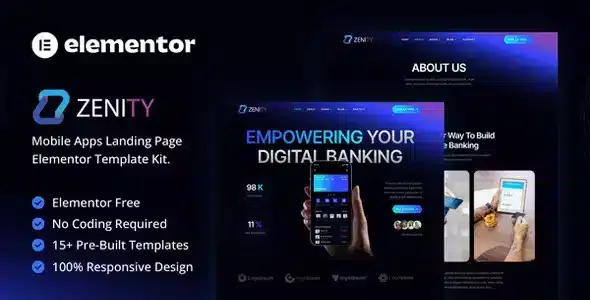
About Zenity Mobile App Landing Page Elementor Kit
Launching an app without a page that explains it
When an app hits the market, the app store listing is often the only presentation a visitor gets, and it leaves no room to explain why the download is worth it. A dedicated landing page fills that gap, but designing one from scratch takes time that a launch rarely has. Zenity is an Elementor template kit built for that page: it presents the app, its features and its download buttons with a clean, modern design.
It is aimed at mobile apps, startups and tech projects, and it also fits product presentations.
From the import plugin to the first page of your app
Zenity is not a WordPress theme but a kit of design data for Elementor. That is why it is not imported from Tools > Import, which only handles posts and pages in WXR format, but with the Template Kit Import plugin by Envato. Once installed, you upload the kit file from Tools > Template Kit and click Install Requirements.
For the kit to work you need Elementor in its free version, Jeg Elementor Kit and MetForm. Import the global styles first and then the pages or parts you want to use.
Questions people ask before importing Zenity
Can I import it with WordPress Tools > Import?
No. That importer only works with posts and pages in WXR format. Zenity needs the Template Kit Import plugin and the Tools > Template Kit option.
Do I need Elementor Pro?
No. The kit is built for free Elementor. If you already have Pro, some parts are handled differently, such as the form and the header.
Why don't my pages look like the demo?
Click Install Requirements, import Global Kit Styles and then the pages or parts you need.
Can I keep the demo images?
They are demo images from Envato Elements. To use them on your website you need to license them from Envato Elements, or you can replace them with your own.
Zenity's templates for telling the app's story from start to finish
The kit includes more than 15 templates and global styles. Among them:
- Home, About, Features and Pricing
- FAQ, Contact and Metform Contact
- Blog and Single Post
- 404, Coming Soon, Tabs, Header and Footer
Adapting colors, texts and images to your app's identity
Everything is edited in Elementor without writing code, and customization is easy. The design is responsive and retina ready, so the page adapts to any device and stays sharp on high-density screens.
The parts that change most on an app landing are the screenshot and the download links. The kit's images are demo images, so replace them with your own.
Contact form and header: what changes if you have Elementor Pro
With Elementor Pro, you can skip installing MetForm and its form blocks, and the header and footer can be customized from the Theme Builder. Without Pro, the form is edited with the MetForm widget on the contact page template, and the header is imported and assigned from the Jeg Elementor Kit menu.
Topics
Version history
-
v
1.0 Current 8 Jan 2025
Customer reviews
Sign in to leave a review. Only people who have the product can review it.
No reviews for this product yet.
Frequently asked questions
-
GPL (General Public License) is the license under which WordPress and most premium plugins/themes are distributed. It grants you the right to use, modify and redistribute the software in as many projects as you want, with no domain restrictions.
-
Yes. With membership you get automatic updates via our GPLClub Updater plugin (installed on your WP, detects new versions and applies them). With individual purchase, you get one year of manual updates from your account.
-
Depends on the plan. Monthly: 3 domains. Semi-annual: 7. Annual and Lifetime: 15. Individual purchase: 1 domain.
-
GPLClub offers its own support for installation, configuration and compatibility. For direct support from the original author (feature requests, product-specific bugs), a license purchased from the author is required.
Related products
Plantsie - Landscape & Gardening Service Elementor Kit
Kreativ – Digital Agency & Creative Branding Elementor Pro Template
By Elementor
KRAFTY – Construction & Industry Elementor Template