Zoho CRM Connector Pro for WooCommerce
Antivirus scan
Powered by ClamAV
✅ Verified clean
This product file has passed our security filters.
Want to run a fresh ClamAV scan right now? Takes a few seconds and shows scanner version, signature DB and live result.
This can take 5 to 30 seconds.
Clean file Threat detected
No threats detected in this file.
- File
- Size
- Scanned
- ClamAV
- Signature database
⚡ Powered by ClamAV
Scan could not be completed
Report product
If you detected an issue (broken file, malware, inappropriate content, etc.) let us know and we'll review it ASAP.
Sign in to report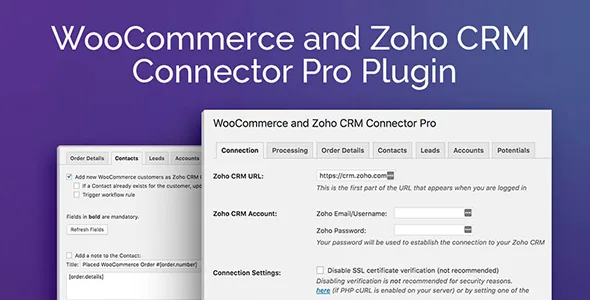
About Zoho CRM Connector Pro for WooCommerce
A store that sells on WooCommerce and follows up in the free Zoho CRM
Orders stay in WooCommerce while the sales team works in another tool, so someone ends up copying names and emails by hand, or nobody does and the CRM stays empty. This plugin moves your store's customer data into Zoho CRM without that manual work.
It is built for the free version of Zoho CRM. It is not designed for some of the paid version's features, and it does not create products or sales orders inside Zoho CRM: it works with contacts, leads, accounts and potentials. If you want to mirror your catalog or sales as CRM documents, this is not the plugin.
What happens in Zoho CRM when someone buys
The basics are simple: when a customer places an order, they are added as a contact and/or lead in Zoho CRM. If a record already exists, you can choose to update it instead of creating a duplicate.
The Pro version extends that behavior considerably:
- Edit how WooCommerce data is mapped to contact, lead, account and potential fields.
- Add a note to the contact or lead with the order details.
- Create a potential for each order, linked to the customer's contact when one was found or created.
- Associate contacts with an account, creating or updating it if needed, useful if you sell to companies.
- Trigger Zoho CRM workflow rules.
Send when the order is created or wait for payment: you decide when
A newly created order may still be unpaid, and you don't always want that customer to appear in the CRM as if they had already bought. That's why the plugin lets you choose when to send: when the order is created, when it moves to a specific status (pending payment, processing, completed or a custom status), or never automatically, leaving only manual sending.
Manual sending can be done order by order from the actions menu on the edit screen, or individually and in bulk from the order list.
How it is managed from the WordPress dashboard
Once activated, it adds its own menu under WooCommerce, organized in tabs:
- Connection: this is where you link your Zoho CRM account.
- Processing: defines when data is transferred and lets you enable an isolation mode to reduce the impact of possible errors in automatic sending.
- Order details: templates for the text with the order details and its items.
- Contacts, leads and accounts: field mapping and automatic notes.
- Potentials: options and fields, and the ability to update the potential's stage when the order status changes, according to the mapping you define.
- Error log: lists automatic processing failures with the order ID and time.
What to check before deciding
Two checks will save you surprises: that your Zoho CRM plan is the free one or that you don't depend on paid-only features, and that your workflow revolves around contacts, leads, accounts and potentials, not products or sales orders. If you sell to individuals, contacts or leads will probably be enough; if you sell to companies, the accounts part will give you more value.
Frequently asked questions
Can I avoid duplicates if the customer is already in Zoho CRM?
Yes, you can enable updating of existing contacts and/or leads instead of creating new ones.
Can I choose which data goes into each field?
Yes, but editing the field mapping is a Pro version feature.
Are orders sent only once they are paid?
You can set it up that way: sending can be triggered when the order changes to a specific status, such as processing or completed, instead of when it is created.
What happens if a send fails?
The plugin records automatic processing failures in the error log, with the order ID and time, and you can resend the order manually.
Does it create my store's products in Zoho CRM?
No. It is not designed to create products or sales orders in Zoho CRM.
Topics
Version history
-
v
2.1.14 Current 8 Jan 2025
Customer reviews
Sign in to leave a review. Only people who have the product can review it.
No reviews for this product yet.
Frequently asked questions
-
GPL (General Public License) is the license under which WordPress and most premium plugins/themes are distributed. It grants you the right to use, modify and redistribute the software in as many projects as you want, with no domain restrictions.
-
Yes. With membership you get automatic updates via our GPLClub Updater plugin (installed on your WP, detects new versions and applies them). With individual purchase, you get one year of manual updates from your account.
-
Depends on the plan. Monthly: 3 domains. Semi-annual: 7. Annual and Lifetime: 15. Individual purchase: 1 domain.
-
GPLClub offers its own support for installation, configuration and compatibility. For direct support from the original author (feature requests, product-specific bugs), a license purchased from the author is required.