Admin Theme - Firstr
Antivirus scan
Powered by ClamAV
✅ Verified clean
This product file has passed our security filters.
Want to run a fresh ClamAV scan right now? Takes a few seconds and shows scanner version, signature DB and live result.
This can take 5 to 30 seconds.
Clean file Threat detected
No threats detected in this file.
- File
- Size
- Scanned
- ClamAV
- Signature database
⚡ Powered by ClamAV
Scan could not be completed
Report product
If you detected an issue (broken file, malware, inappropriate content, etc.) let us know and we'll review it ASAP.
Sign in to report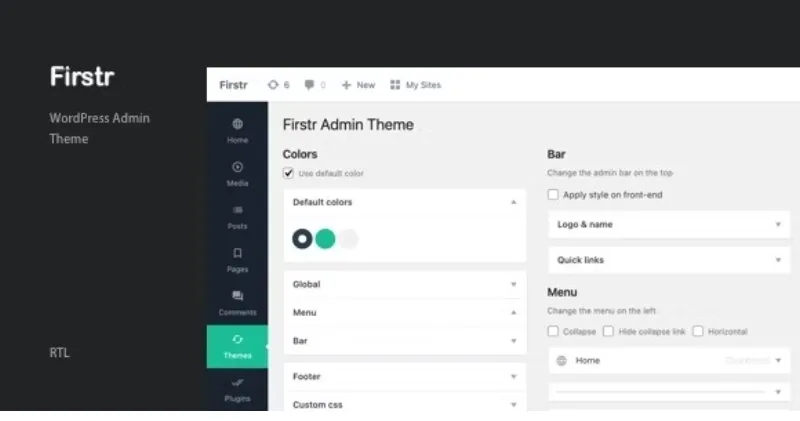
About Admin Theme - Firstr
Handing a website over to a client who then logs in and sees the WordPress logo, menus they don't understand and a footer talking about another brand undermines a job well done. Admin Theme - Firstr changes that first impression.
From first click to last: how to hand over a dashboard to a client with Firstr
Imagine you are an agency or a freelancer finishing a site and about to deliver it. This is the typical walkthrough and what the plugin solves at each step.
1. The login screen
The first thing your client sees is the login. You can change the logo, the link that logo points to and the background, either a color or an image. They land on a screen with the project's brand instead of WordPress's.
2. The top bar
Once inside, the admin bar accepts a custom logo and a custom name. You can also hide the name and the quick links, leaving fewer buttons the client might press without knowing what they do.
3. The side menu
This is the most useful part for handing over a tidy site: you can rename or remove entries in the menu and submenus. If your client only publishes posts, you can hide sections they don't need. Note: removing an item makes it disappear from view, but it is not a permissions system. To truly limit what each user can do, you need to manage roles elsewhere.
4. The footer and the look
You can change the text and the version shown in the dashboard footer. You also choose the menu icons and colors, and the plugin respects WordPress color profiles (the default eight).
Settings you'll appreciate when you manage several sites
- Import and export: you save one site's configuration and apply it to another, so you don't repeat the work on every delivery.
- Multisite: it works when network-activated, and there is an option to disable its settings on subsites.
- Local font: you can stop loading Open Sans from Google and use the local font.
What Firstr does not touch
It is a makeover of the dashboard, not a panel builder. It doesn't create new screens, add functions to the admin or reorganize the content of other plugins' settings pages. If a plugin adds its own menu, you'll need to check how it looks with your colors and icons. Check the demo to see the whole picture before deciding.
Frequently asked questions about Admin Theme - Firstr
Can I put my brand on the dashboard?
Yes: logo and name in the top bar, logo and background on the login, and your own text in the footer.
Can I hide menus from my client?
You can remove or rename them in the menu, but it is a visual change, not an access restriction.
Can I reuse my configuration on another site?
Yes, with the import and export function.
Does it work on multisite?
It supports network activation and lets you disable its settings on subsites.
Version history
-
v
4.0 Current 13 May 2024
Customer reviews
Sign in to leave a review. Only people who have the product can review it.
No reviews for this product yet.
Frequently asked questions
-
GPL (General Public License) is the license under which WordPress and most premium plugins/themes are distributed. It grants you the right to use, modify and redistribute the software in as many projects as you want, with no domain restrictions.
-
Yes. With membership you get automatic updates via our GPLClub Updater plugin (installed on your WP, detects new versions and applies them). With individual purchase, you get one year of manual updates from your account.
-
Depends on the plan. Monthly: 3 domains. Semi-annual: 7. Annual and Lifetime: 15. Individual purchase: 1 domain.
-
GPLClub offers its own support for installation, configuration and compatibility. For direct support from the original author (feature requests, product-specific bugs), a license purchased from the author is required.