Agile Store Locator Plugin
Antivirus scan
Powered by ClamAV
✅ Verified clean
This product file has passed our security filters.
Want to run a fresh ClamAV scan right now? Takes a few seconds and shows scanner version, signature DB and live result.
This can take 5 to 30 seconds.
Clean file Threat detected
No threats detected in this file.
- File
- Size
- Scanned
- ClamAV
- Signature database
⚡ Powered by ClamAV
Scan could not be completed
Report product
If you detected an issue (broken file, malware, inappropriate content, etc.) let us know and we'll review it ASAP.
Sign in to report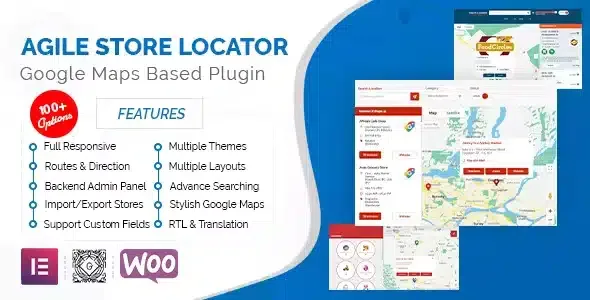
About Agile Store Locator Plugin
When customers search for "store near me" and your site only offers a list of addresses
Publishing several locations in a table or a block of text forces visitors to copy addresses, open another tab and work out distances on their own. Many give up before they ever arrive. Agile Store Locator Plugin turns those locations into a searchable map inside your WordPress site, so people can find the nearest point without leaving the page.
The business installing it usually has a hidden problem: the details of each location (opening hours, phone numbers, services) change, and addresses go out of date across different pages. Keeping everything in a single list and publishing it wherever you need it is what stops a customer from showing up at a closed door.
How visitors find their nearest location
Search is the strongest part of the plugin:
- By address, store name, postal code, city, state or country, with the option to restrict results to specific countries.
- By geolocation: the visitor is asked to share their location or types it in, and the closest stores are shown first with the distance to each one.
- With a search radius: a slider with minimum and maximum values, or a fixed radius, and a circle drawn on the map.
- With category filters: a store can have several categories, with parents and children, and you can set a default one or combine filters to narrow results.
Results can be sorted by distance, name, city or state, and the map re-centers itself on the searched place. If you have many locations, it loads only the ones within the visible area and updates the list as the map moves.
Agile Store Locator Plugin: map, opening hours and brand look
You can use Google Maps (with roadmap, satellite, hybrid and terrain views, custom styles and traffic, transit and bicycle layers) or MapLibre, which lets you work with OpenStreetMap without a Google API key. It also supports Mapbox, Geoapify and MapTiler tiles.
Each location supports opening hours per day, with several time slots, in 12-hour or 24-hour format. The plugin shows whether a store is open or closed and offers a switch to show only the ones open right now.
For the look, it includes 8 templates, with list, accordion (country, state, city and store) or grid layouts, and a responsive design for mobile. You can choose whether the map or the list appears first on mobile, change colors, texts and labels, upload your own marker icons, assign a different one to each category and cluster markers when there are many.
What it is good for beyond stores
Although it is called a store locator, the same approach works for any listing with a location: hotels, properties, restaurants, deals or jobs. You can also draw colored circles, polygons and rectangles on the map, for example to mark coverage or delivery areas.
What to decide before installing Agile Store Locator Plugin, and common questions
The main decision is which map provider to use. Google Maps offers more layers and styles, but it needs its own API key. If you don't want to depend on it, MapLibre with OpenStreetMap is the alternative. Searches with Google Places, Mapbox or Geoapify also depend on the account of the provider you choose. It is also a locator: it does not handle bookings or orders, it only helps people find and check each location.
Do I need a Google API key?
Only if you choose Google Maps. With MapLibre and OpenStreetMap you can work without it.
Do I have to enter every store by hand?
They are managed from the WordPress dashboard, and latitude and longitude are calculated from the address. With many locations, check in the demo how your existing data is loaded.
Can I show the map on several pages?
Yes, it is published with a shortcode, and you can limit each locator to certain categories.
Topics
Version history
-
v
5.4.14 Current 23 Oct 2026
-
v
5.4.12 9 Oct 2026
-
v
5.4.10 2 Oct 2026
-
v
5.4.9 30 Sep 2026
-
v
5.4.7 24 Sep 2026
-
v
5.4.1 28 Aug 2026
-
v
5.2.1 8 Apr 2026
Customer reviews
Sign in to leave a review. Only people who have the product can review it.
No reviews for this product yet.
Frequently asked questions
-
GPL (General Public License) is the license under which WordPress and most premium plugins/themes are distributed. It grants you the right to use, modify and redistribute the software in as many projects as you want, with no domain restrictions.
-
Yes. With membership you get automatic updates via our GPLClub Updater plugin (installed on your WP, detects new versions and applies them). With individual purchase, you get one year of manual updates from your account.
-
Depends on the plan. Monthly: 3 domains. Semi-annual: 7. Annual and Lifetime: 15. Individual purchase: 1 domain.
-
GPLClub offers its own support for installation, configuration and compatibility. For direct support from the original author (feature requests, product-specific bugs), a license purchased from the author is required.