AMA – WordPress bbPress Forum Theme
Antivirus scan
Powered by ClamAV
✅ Verified clean
This product file has passed our security filters.
Want to run a fresh ClamAV scan right now? Takes a few seconds and shows scanner version, signature DB and live result.
This can take 5 to 30 seconds.
Clean file Threat detected
No threats detected in this file.
- File
- Size
- Scanned
- ClamAV
- Signature database
⚡ Powered by ClamAV
Scan could not be completed
Report product
If you detected an issue (broken file, malware, inappropriate content, etc.) let us know and we'll review it ASAP.
Sign in to report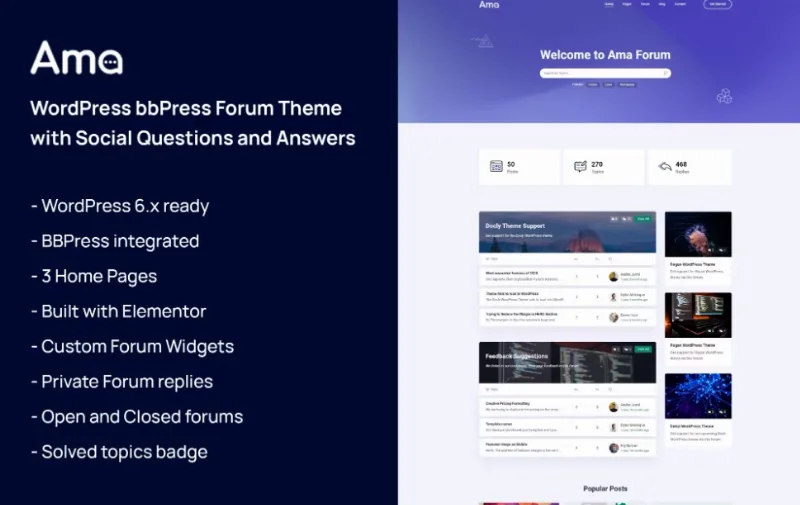
About AMA – WordPress bbPress Forum Theme
Setting up a forum in WordPress often ends in a bbPress that looks like 2008: flat lists, empty profiles and no hint of where to ask or what has already been answered. The visitor arrives with a question, can't find their topic and goes elsewhere.
A support forum lives on questions that are already answered
Anyone building a Q&A community (product support, a technical niche, developers) faces a problem: a forum only works if people search before they ask. If search is weak or the documentation lives elsewhere, every question gets repeated and the team answers the same thing again and again. AMA starts from there: it brings forum, documentation and blog together in one design.
What AMA does with the forum and what it lacks
AMA is a theme built around bbPress. Its demo shows a forum list with topic and reply counts, topics with author and age, a topic detail page and a button to ask a question.
- User profile: with tabs for topics started, replies created, engagements and favorites. It lets members see their activity.
- Private reply: a feature where only administrators can see certain replies.
- Documentation: a docs archive in two, three or four columns, with single pages and sections. You can point users to a guide before they open a topic.
- Product and company pages: several home pages (helpdesk, community), contact, testimonials, FAQs, sign up, search results, a 404 page and a changelog with or without a sidebar.
- Job board and blog: job listings with or without a sidebar, a single job page, and a blog as list, grid or with a slider.
What not to expect: AMA is the design, not the engine. The forum comes from bbPress, so you need that plugin active. Don't assume the home pages, job listings or documentation work out of the box either: check in the demo which part is sample content and which needs adjustments or extra plugins.
Questions people ask before building a forum with AMA
Does it work for a support forum for my products?
Yes, the demo is laid out that way: forums per product, topics with replies, documentation and a changelog in the same theme.
Can I use only the forum and ignore the rest?
Yes. Blog, jobs and documentation are separate pages; you don't have to use them all.
Do I need bbPress?
Yes, the forum is based on bbPress. The theme does not replace it.
Can replies be hidden from users?
Yes, the private reply is visible only to administrators. Test it before using it with sensitive data.
If you moderate alone, think about volume before opening
A forum with many unanswered topics looks worse than no forum. Before opening, decide who answers, how fast, and which questions a document can solve. The profile with favorites and engagements helps your community, but moderation is still your job. If the forum allows open registration, also prepare spam filters, which the theme does not replace.
The demo pages can be brought in as you need them
The demo includes many templates, and you won't need them all. Start with forum, profile, topic and help pages; then add documentation and blog. Review menus, sample texts and the footer, which you'll need to adapt to your brand. Check a long topic with many replies on mobile before inviting your users.
Topics
Version history
-
v
1.8.0 Current 30 Sep 2026
-
v
1.0.4 16 Jun 2024
Customer reviews
Sign in to leave a review. Only people who have the product can review it.
No reviews for this product yet.
Frequently asked questions
-
GPL (General Public License) is the license under which WordPress and most premium plugins/themes are distributed. It grants you the right to use, modify and redistribute the software in as many projects as you want, with no domain restrictions.
-
Yes. With membership you get automatic updates via our GPLClub Updater plugin (installed on your WP, detects new versions and applies them). With individual purchase, you get one year of manual updates from your account.
-
Depends on the plan. Monthly: 3 domains. Semi-annual: 7. Annual and Lifetime: 15. Individual purchase: 1 domain.
-
GPLClub offers its own support for installation, configuration and compatibility. For direct support from the original author (feature requests, product-specific bugs), a license purchased from the author is required.