Amazon Discount Finder - Wordpress Plugin
Antivirus scan
Powered by ClamAV
✅ Verified clean
This product file has passed our security filters.
Want to run a fresh ClamAV scan right now? Takes a few seconds and shows scanner version, signature DB and live result.
This can take 5 to 30 seconds.
Clean file Threat detected
No threats detected in this file.
- File
- Size
- Scanned
- ClamAV
- Signature database
⚡ Powered by ClamAV
Scan could not be completed
Report product
If you detected an issue (broken file, malware, inappropriate content, etc.) let us know and we'll review it ASAP.
Sign in to report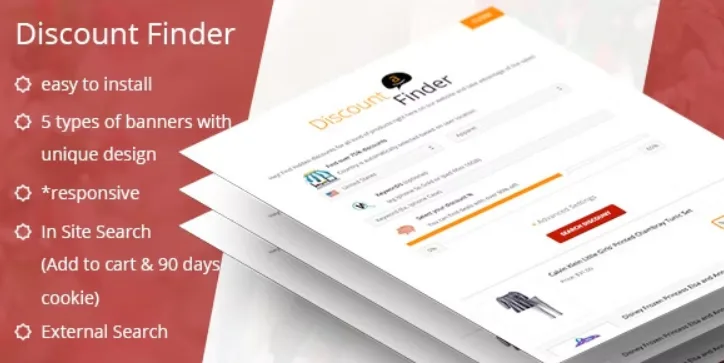
About Amazon Discount Finder - Wordpress Plugin
Monetizing a blog with Amazon without setting up a store
Many webmasters want to earn Amazon commissions but do not want to import catalogs, maintain product pages or turn their blog into a shop. They end up pasting loose affiliate links into articles, which go out of date and are rarely clicked. Amazon Discount Finder starts from a different idea: instead of listing products, it puts a deal finder in front of your visitors.
What this business does badly is visibility: a link inside a text competes with everything else on the page. Here the link lives in a banner that you decide where, when and to whom it is shown.
Five banner formats to place the finder
The plugin works with banners, and each one behaves differently:
- Pop-up box: with automatic open and close options.
- Sliding sidebar: added on the left or the right.
- Search bar: at the top or bottom of the page.
- Block at the top of the content: in posts or pages.
- Block at the bottom of the content: for the reader who has just finished reading.
You can create several banners and customize the design: show or hide icons, upload your logo, write your own text and add your own CSS.
Searching inside your site or sending the visitor to Amazon
Visitors can browse Amazon categories and filter by minimum and maximum price, brand or manufacturer and product condition, as well as sort by best sellers or deals. You have two search modes:
- In-site search: results are shown on your site, with add to cart and view more options buttons.
- External search: the visitor goes straight to Amazon.
The advantage of the in-site mode is that the reader does not leave your page until the last step. The external one is simpler and takes up no space in your design.
Control over who sees each banner and when
This is where the plugin stands apart from pasting an affiliate code. You can enable a banner for everyone, for an IP list, only for yourself (useful for testing) or disable it. You can also:
- Limit it to specific URLs and countries.
- Schedule campaigns with start and end date and time.
- Set a maximum number of impressions and see how many it has.
- Assign priority when several banners coincide (1 is the highest).
- Show it only to registered users or only to anonymous ones.
- Let the visitor choose not to see the banner again.
- Show it only on mobile, only on desktop or on both.
You need your own Amazon Associates account and a site with traffic
The plugin does not include the commissions: you must have your own account in the Amazon affiliate program and set it up. It supports several Amazon countries (Germany, United Kingdom, Canada, France, Japan, India, Italy, China and Spain, plus the worldwide program), so choose the one that matches your audience.
- Already solved: the banners, the search filters, the Amazon cart, the targeting and the impression statistics.
- You cover it: signing up for Amazon Associates, the traffic that brings visitors to your site and compliance with the affiliate program terms.
Nor is it a plugin for building your own store with an imported catalog: it is a deal finder in banner form. If you want product pages on your site, you need another tool. And check Amazon's terms on how you must disclose that you are an affiliate.
Frequently asked questions about Amazon Discount Finder
Do I need to know how to code?
No. You install it, set up the affiliate account, create the banner and choose where it appears.
What happens if the visitor buys later?
Amazon's 90-day cookie applies: if they buy within that period, it can earn you a commission.
Does it work for any type of site?
It is designed for any site that wants to do affiliate advertising with Amazon, from blogs to niche sites.
Can I show the banner only on some pages?
Yes, you can enable it by URL, by country, by user type and by device.
Topics
Version history
-
v
1.1.1 Current 18 May 2024
Customer reviews
Sign in to leave a review. Only people who have the product can review it.
No reviews for this product yet.
Frequently asked questions
-
GPL (General Public License) is the license under which WordPress and most premium plugins/themes are distributed. It grants you the right to use, modify and redistribute the software in as many projects as you want, with no domain restrictions.
-
Yes. With membership you get automatic updates via our GPLClub Updater plugin (installed on your WP, detects new versions and applies them). With individual purchase, you get one year of manual updates from your account.
-
Depends on the plan. Monthly: 3 domains. Semi-annual: 7. Annual and Lifetime: 15. Individual purchase: 1 domain.
-
GPLClub offers its own support for installation, configuration and compatibility. For direct support from the original author (feature requests, product-specific bugs), a license purchased from the author is required.