Amely Fashion Shop WordPress Theme
Antivirus scan
Powered by ClamAV
✅ Verified clean
This product file has passed our security filters.
Want to run a fresh ClamAV scan right now? Takes a few seconds and shows scanner version, signature DB and live result.
This can take 5 to 30 seconds.
Clean file Threat detected
No threats detected in this file.
- File
- Size
- Scanned
- ClamAV
- Signature database
⚡ Powered by ClamAV
Scan could not be completed
Report product
If you detected an issue (broken file, malware, inappropriate content, etc.) let us know and we'll review it ASAP.
Sign in to report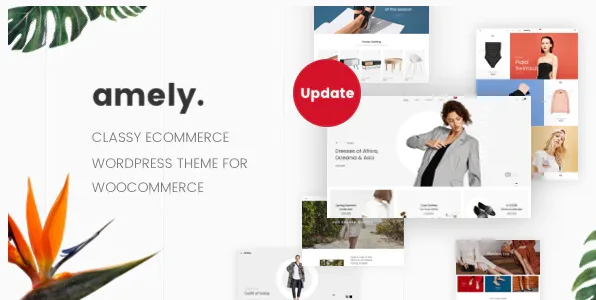
About Amely Fashion Shop WordPress Theme
The prettiest home pages in a fashion store are paid for by the photo shoot
Anyone setting up a clothing store tends to choose a theme by looking at the demo, and the demo misleads for a simple reason: it is made with campaign photography. Models, careful lighting, framing with room for text. You import the template, upload the white-background product photos your supplier gave you, and the result no longer looks like what you chose.
In fashion, the limit of a home page is set by the material you have, not by the theme. This weighs heavily with Amely, by ThemeMove, because several of its home pages revolve around the image: Lookbook, Shop The Look, Shoppable Images or Instagram Shop.
The useful decision comes before installing it: count what photos you have and what photos you can produce each season.
Twenty-four home pages, and what material each group asks for
- Built from the image: Lookbook, Shop The Look, Shoppable Images, Instagram Shop and Social Focus. They make sense if you produce photos of products being worn.
- Built from the catalog: Best Selling, Block Products, Smart Blocks and Creative Category. They suffer less with product photos on a clean background.
- By season: Sweet Summer, New Season and Special Collections, which fit if you refresh your collection.
- By product type: Footwear, Golden Sneaker, Watch, Jewelry and Lingeries.
- Beyond clothing: Interior and Furniture, for home stores.
This grouping comes from their names: open each demo before deciding.
Amely listings, product pages and comparison
- Listing: no sidebar, left sidebar or right sidebar.
- Product page: styles such as Basic, Sticky Details, Bottom Thumbnails, Extra Content, Variations Images and With Background Color.
- Comparison: with fields such as image, SKU, rating, price and stock, and an option to hide similarities or highlight differences.
- More pages: cart, checkout, order tracking and shop by brand.
Amely headers, blog and builder
It has premade headers, three blog layouts, a sticky header, a live customizer, unlimited colors and more than 600 Google Fonts. Demo installation takes one click, and WPBakery Page Builder and Slider Revolution are bundled.
The base is Bootstrap 3, which matters if a developer will touch its templates. And laying out pages with WPBakery has a long-term consequence: it pays to decide from the start whether you want to work with that builder.
What to confirm in Amely before choosing
The builder it brings is WPBakery. Elementor is not among its compatibilities, so if your team works with it, compare another theme.
Quick view, wishlist and variants: product cards in the demo shop show quick view, wishlist and compare. If you need color swatches, try them there before choosing.
It does not generate the material. The image-led home pages stay half done without the photos they ask for.
Compatibility and first steps
It is compatible with WordPress 6.0.x to 7.0.x and WooCommerce 5.x to 10.x, plus Contact Form 7 and WPML for forms and translation.
- Gather your real photos and sort them: worn, clean background, detail.
- Choose the home page by that material, not by the flashiest demo.
- Import the demo on a test site and replace the photos with yours.
- Test a product with all its variations on each product page style, and keep one.
Other store themes to compare
If you want to work with another builder, WoodMart works with Elementor, WPBakery and the block editor, and includes wishlist, comparison, color swatches and quick view. Flatsome integrates variation swatches, quick buy and an instant cart with no separate plugins.
Within clothing, Dunker has nine home pages and works with Elementor and WPBakery.
What to settle before buying new clothes for the photos
How many home pages does it have?
Twenty-four, across fashion, footwear, jewelry, watches and home.
Does it work if I only have supplier photos?
Yes, but pick a catalog-based home page, not a lookbook one.
What builder does it use?
It brings WPBakery Page Builder, along with Slider Revolution.
Can it be translated?
It is compatible with WPML.
Does it work for a furniture store?
It has Interior and Furniture home pages.
Can it compare products?
Yes, with a comparison bar where you choose the fields to show.
Topics
Version history
-
v
3.3.3 Current 26 Oct 2026
-
v
3.2.5 10 Nov 2025
Customer reviews
Sign in to leave a review. Only people who have the product can review it.
No reviews for this product yet.
Frequently asked questions
-
GPL (General Public License) is the license under which WordPress and most premium plugins/themes are distributed. It grants you the right to use, modify and redistribute the software in as many projects as you want, with no domain restrictions.
-
Yes. With membership you get automatic updates via our GPLClub Updater plugin (installed on your WP, detects new versions and applies them). With individual purchase, you get one year of manual updates from your account.
-
Depends on the plan. Monthly: 3 domains. Semi-annual: 7. Annual and Lifetime: 15. Individual purchase: 1 domain.
-
GPLClub offers its own support for installation, configuration and compatibility. For direct support from the original author (feature requests, product-specific bugs), a license purchased from the author is required.