Black Friday and Cyber Monday Plugin
Antivirus scan
Powered by ClamAV
✅ Verified clean
This product file has passed our security filters.
Want to run a fresh ClamAV scan right now? Takes a few seconds and shows scanner version, signature DB and live result.
This can take 5 to 30 seconds.
Clean file Threat detected
No threats detected in this file.
- File
- Size
- Scanned
- ClamAV
- Signature database
⚡ Powered by ClamAV
Scan could not be completed
Report product
If you detected an issue (broken file, malware, inappropriate content, etc.) let us know and we'll review it ASAP.
Sign in to report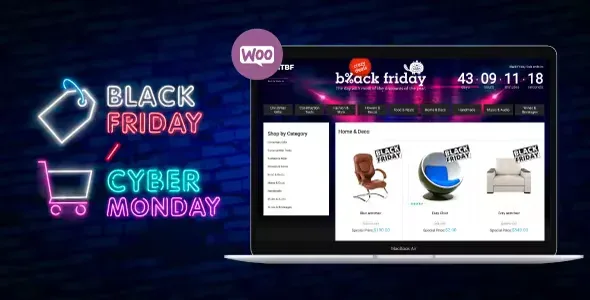
About Black Friday and Cyber Monday Plugin
If you run one-off campaigns on WooCommerce and are not looking for a discount engine
November arrives and the store still looks like it does the rest of the year: the same menu, the same home page, the same blocks. A visitor coming from a Black Friday ad sees nothing telling them they are in a campaign, and the urgency fades. This plugin is about that: changing how the store looks while the promotion lasts.
It suits you if you already have WooCommerce and want a campaign look with start and end dates, a custom header and a cleaner product grid. It does not suit you if you expect it to create the discounts for you: the options it offers are about timing and presentation (dates, header, backgrounds, grid). Prices and discount rules remain your job in WooCommerce, and if you need coupon logic or tiered pricing, check in the demo whether it covers any of that before counting on it. It also does not work without WooCommerce: it is an add-on for that store.
A store that dresses up for the campaign only when it should
For anyone who does not want to watch the clock, the most useful feature is scheduling. You set the start date and time and the closing date and time of the campaign.
Header, background and grid in Black Friday and Cyber Monday Plugin
The plugin is organized into specific blocks of options:
- Custom header: custom logo with its URL, header background color and a link back to the website with its own label.
- Backgrounds: an image or a color for the body background and a background for the area that follows the header.
- Product grid: how many products appear per row and a limit of products per category.
- Extra options: CSS classes or IDs of the blocks you want to hide during the campaign.
It is a set of appearance settings, not a page builder: if you want layouts very different from what these options allow, you will need another tool.
Black Friday and Cyber Monday Plugin also works for other dates
Although it is named after two specific dates, the setup is that of a generic campaign with a start and an end. It is also intended for Christmas, Easter, spring sales, Thanksgiving, flash sales or Mother's and Father's Day. If your commercial calendar has several key dates, changing the logo, the backgrounds and the dates lets you reuse it for each one.
The current version is rebuilt on VueJS and connects to the WooCommerce REST API. In practice, you should test in the demo how it behaves with your catalog before launching it in the middle of a campaign.
Questions before installing it
Do I need WooCommerce?
Yes. It is a campaign mode for WooCommerce stores and makes no sense without one.
Does it apply discounts automatically?
Its options cover dates, header, backgrounds, grid and hiding blocks. You prepare the discounts in WooCommerce.
Can I schedule the end of the campaign?
Yes: you set a start date and time and a closing date and time.
Can I hide parts of my store during the campaign?
Yes, by entering the CSS classes or IDs of the blocks you want to hide. You need to know how to find those selectors in your theme.
Is it only for Black Friday?
No. It is also intended for Cyber Monday, Christmas, Easter, flash sales and other dated campaigns.
Topics
Version history
-
v
2.0.10 Current 7 Sep 2026
-
v
2.0.4 8 May 2024
Customer reviews
Sign in to leave a review. Only people who have the product can review it.
No reviews for this product yet.
Frequently asked questions
-
GPL (General Public License) is the license under which WordPress and most premium plugins/themes are distributed. It grants you the right to use, modify and redistribute the software in as many projects as you want, with no domain restrictions.
-
Yes. With membership you get automatic updates via our GPLClub Updater plugin (installed on your WP, detects new versions and applies them). With individual purchase, you get one year of manual updates from your account.
-
Depends on the plan. Monthly: 3 domains. Semi-annual: 7. Annual and Lifetime: 15. Individual purchase: 1 domain.
-
GPLClub offers its own support for installation, configuration and compatibility. For direct support from the original author (feature requests, product-specific bugs), a license purchased from the author is required.