BrightHub - SaaS & Tech Startup WordPress Theme
Antivirus scan
Powered by ClamAV
✅ Verified clean
This product file has passed our security filters.
Want to run a fresh ClamAV scan right now? Takes a few seconds and shows scanner version, signature DB and live result.
This can take 5 to 30 seconds.
Clean file Threat detected
No threats detected in this file.
- File
- Size
- Scanned
- ClamAV
- Signature database
⚡ Powered by ClamAV
Scan could not be completed
Report product
If you detected an issue (broken file, malware, inappropriate content, etc.) let us know and we'll review it ASAP.
Sign in to report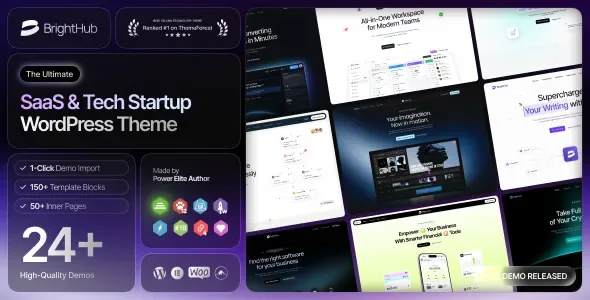
About BrightHub - SaaS & Tech Startup WordPress Theme
A SaaS website that doesn't explain the product on the first screen loses the visit
People who land on a software website usually have three tabs of competitors open and decide quickly whether it's worth reading on. What isn't clear (what the tool does, how much it costs, how to try it) gets abandoned. BrightHub is designed for that buyer: tech startups, SaaS platforms and software companies that need a tidy, presentable website without commissioning a custom build.
It's an Elementor-based theme with homepage templates, inner pages and elements designed to present a digital product: pricing, processes, team, testimonials and counters.
Elementor, mega menus and headers: what you can build and what you can't
The theme is built with Elementor, so you drag elements, change styles and see the result before publishing. On top of that base it adds several useful pieces:
- Mega menu with several columns, icons and images, editable from Elementor. Useful when your SaaS has many features, use cases or integrations to show.
- Header (desktop) and footer builder, with ready-made header and footer templates.
- One-page navigation with smooth scrolling, for a long landing page.
- Video backgrounds and parallax in sliders, sections and page headers.
- More than 50 elements of its own: accordions, tabs, pricing tables, progress bars, pie charts, countdowns, team and testimonial carousels, among others.
The limits: the header builder covers the desktop version, so the mobile header is handled with the theme's sticky mobile menu option and is worth checking in the demo. The theme also depends on Elementor, so if you prefer another page builder, this isn't your theme.
Global and per-page options
An options panel controls fonts and colors across the whole site. Each page or post can override those settings, which is handy if your campaign landing page needs a different look from the rest.
Questions buyers ask about BrightHub
Is it useful for anything besides SaaS?
Yes. It includes portfolio, blog, testimonials and a shop page, so it also suits a tech company or an agency with a corporate website.
Can I sell with it?
It's compatible with WooCommerce and includes a wishlist, quick view, product comparison and cart, with several shop and product layouts. WooCommerce is installed separately.
Does it work for a multilingual site?
It's ready for WPML and Polylang, and it supports right-to-left languages.
Does it come with forms and a newsletter?
It's compatible with Contact Form 7 and with the MC4WP plugin to connect a signup form to your Mailchimp list. Both plugins are external and you have to set them up.
Does it include anything besides the theme?
It includes Revolution Slider and Booked, plus an empty child theme so you can customize without losing your changes.
Twenty-four demos worth choosing carefully
The package brings together 24 prebuilt sites (12 multipage and 12 one-page) and more than 25 inner pages. With so many starting points, the temptation is to mix everything. A software website works better with a single visual line: pick a demo close to your product and adjust colors and fonts from the options panel.
Demos import with one click, but the content is yours
Demo installation is one click and comes with documentation and video guides. Importing a demo gives you the structure, not your copy: product screenshots, pricing plans, use cases and testimonials are for you to prepare. Check beforehand which plugins the chosen demo needs (Elementor, the slider, WooCommerce if you're going to sell) so you don't end up with empty blocks. Also check the header and large menus on mobile, which are the hardest parts to adapt.
Topics
Version history
-
v
1.0.5 Current 4 Feb 2026
Customer reviews
Sign in to leave a review. Only people who have the product can review it.
No reviews for this product yet.
Frequently asked questions
-
GPL (General Public License) is the license under which WordPress and most premium plugins/themes are distributed. It grants you the right to use, modify and redistribute the software in as many projects as you want, with no domain restrictions.
-
Yes. With membership you get automatic updates via our GPLClub Updater plugin (installed on your WP, detects new versions and applies them). With individual purchase, you get one year of manual updates from your account.
-
Depends on the plan. Monthly: 3 domains. Semi-annual: 7. Annual and Lifetime: 15. Individual purchase: 1 domain.
-
GPLClub offers its own support for installation, configuration and compatibility. For direct support from the original author (feature requests, product-specific bugs), a license purchased from the author is required.