BWD WooCommerce Product Compare Addon For Elementor
Antivirus scan
Powered by ClamAV
✅ Verified clean
This product file has passed our security filters.
Want to run a fresh ClamAV scan right now? Takes a few seconds and shows scanner version, signature DB and live result.
This can take 5 to 30 seconds.
Clean file Threat detected
No threats detected in this file.
- File
- Size
- Scanned
- ClamAV
- Signature database
⚡ Powered by ClamAV
Scan could not be completed
Report product
If you detected an issue (broken file, malware, inappropriate content, etc.) let us know and we'll review it ASAP.
Sign in to report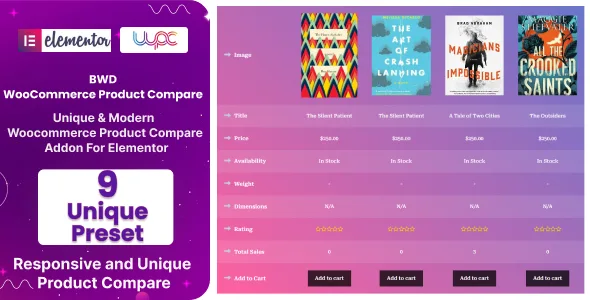
About BWD WooCommerce Product Compare Addon For Elementor
When a shopper opens five tabs to compare, one of them often ends up being another store
Someone torn between two or three similar products rarely decides by looking at individual pages: they open them in separate tabs, try to remember what each one offered and, if it gets hard, go looking for the answer elsewhere. A side-by-side comparison inside your own store saves them that back and forth and lets them decide without leaving your site.
A comparison table is only as good as the data your products have. If half of them have no attributes filled in, or each one describes them in its own way, the comparison will show gaps and help nobody. Before installing anything, make sure your catalog speaks the same language across all product pages.
Nine table designs in BWD WooCommerce Product Compare Addon
This plugin adds to Elementor a way to show WooCommerce products next to each other. The most useful parts, explained:
- 9 preset designs: you pick the one that best fits your store instead of building the table from scratch.
- Icons per field: an icon option for the table fields.
- Every product type: it supports the different WooCommerce product types and their options, so you don't have to leave out the ones that aren't simple.
- No code: it is handled from the Elementor editor itself.
It is built in Elementor and adapts to your theme
It works as an Elementor add-on, so whoever already works with that page builder can place and configure it. It doesn't try to replace your theme: it is designed to coexist with any WordPress theme and to look the same across the usual browsers.
It includes a pot file to translate the texts into any language, which is handy if your store isn't only in English or Spanish and you want the comparison labels in your customers' language.
Is this add-on enough to compare products in your store?
It is a good option if you sell items that differ by their features (electronics, tools, equipment, plans or models of the same range) and you already use Elementor. It makes less sense if your catalog is made of unique products or products very different from each other, where comparing adds nothing.
Keep in mind that it is an add-on: it needs WooCommerce and Elementor installed and active, and it replaces neither. If your store is built with another builder, it is not for you. In the demo, check how the table looks with many products at once on mobile, and see whether the flow for adding a product to compare fits how your customers browse.
Do I need to know how to code?
No. The plugin is easy to use and code-free, and it is configured from Elementor.
Does it work with variable products or other types?
It supports every product type and their options, but test it with your most complex products in your own store before launching.
Will it work with my theme?
It works with any WordPress theme. Even so, check the final look with your colors and fonts.
Can I translate it?
Yes, it includes a pot file to translate the texts into other languages.
Topics
Version history
-
v
1.0.0 Current 8 Jan 2025
Customer reviews
Sign in to leave a review. Only people who have the product can review it.
No reviews for this product yet.
Frequently asked questions
-
GPL (General Public License) is the license under which WordPress and most premium plugins/themes are distributed. It grants you the right to use, modify and redistribute the software in as many projects as you want, with no domain restrictions.
-
Yes. With membership you get automatic updates via our GPLClub Updater plugin (installed on your WP, detects new versions and applies them). With individual purchase, you get one year of manual updates from your account.
-
Depends on the plan. Monthly: 3 domains. Semi-annual: 7. Annual and Lifetime: 15. Individual purchase: 1 domain.
-
GPLClub offers its own support for installation, configuration and compatibility. For direct support from the original author (feature requests, product-specific bugs), a license purchased from the author is required.