Castilo – Audio Podcast WordPress Theme
Antivirus scan
Powered by ClamAV
✅ Verified clean
This product file has passed our security filters.
Want to run a fresh ClamAV scan right now? Takes a few seconds and shows scanner version, signature DB and live result.
This can take 5 to 30 seconds.
Clean file Threat detected
No threats detected in this file.
- File
- Size
- Scanned
- ClamAV
- Signature database
⚡ Powered by ClamAV
Scan could not be completed
Report product
If you detected an issue (broken file, malware, inappropriate content, etc.) let us know and we'll review it ASAP.
Sign in to report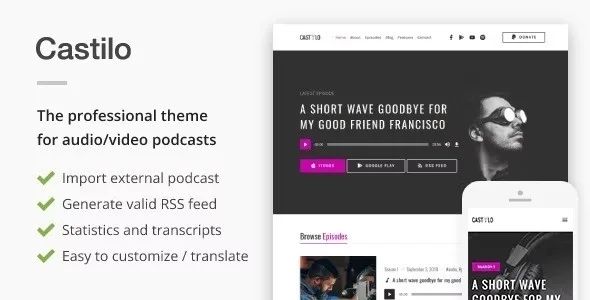
About Castilo – Audio Podcast WordPress Theme
Your podcast lives on other people's platforms, and so does your audience
Whoever publishes a podcast usually starts by uploading audio to a service and pasting the link into a website they don't control: the feed belongs to someone else, someone else sees the listening numbers and, if you switch services tomorrow, you start almost from scratch. Castilo starts from the opposite idea: you are the host and publisher of the show, and the website is the hub from which episodes go out to the directories.
It is a theme for audio or video podcasts.
Castilo generates the RSS feed, but episodes live in a separate plugin
What it does for your podcast:
- Your own RSS feed: it creates the feed that iTunes, Google Play Music and other RSS-based directories require, with no additional plugins or third-party tweaks.
- Import from another feed: paste the feed address, choose the category for the imported episodes and you are done. An advanced option lets you schedule the import to run periodically.
- Header with image or video: a large visual area, with your own logo, and a live preview in the Customizer to try a different header image, primary color or page background.
- Transcripts and jump points inside episodes.
- Built-in extras: RTL support, translation-ready, social icon menu, sidebar and footer widgets, integration with Gutenberg and with Contact Form 7.
Three things are worth knowing. The episode content type and the whole podcast function sit in a standalone plugin, so that plugin must stay active. Contact Form 7 is another plugin you install yourself if you want forms. And Castilo does not use page builders: you customize it with the Customizer, blocks and widgets, not by dragging sections around.
Listening statistics in your own dashboard
The admin panel shows daily, weekly and monthly data on total plays, listeners and listening sources: the site player, iTunes, Stitcher, Google Play, direct downloads and others. Audio files are served through your own permanent links, so the originals stay protected. For an independent podcaster, knowing where the audience comes from helps decide which directory deserves more effort.
Questions before moving your podcast to Castilo
Can I bring over the episodes I already have on another service?
Yes, through the import from the external feed. You choose the category they will receive and, if you want, schedule the import to repeat.
Do I need another plugin to send the feed to iTunes?
No. The theme generates the RSS feed those directories require. Just remember to keep the accompanying podcast plugin active.
Is it suitable for video as well as audio?
It is designed for audio and video podcasts, with a header that accepts an image or a video.
Can I run the site in another language?
It is ready to be translated into any language and supports right-to-left (RTL) languages.
The demo imports with one click, but its photos are not included
Castilo comes with a one-click demo importer, useful for seeing the site built and swapping in your own content. The images in the previews are not part of the package: they belong to their authors and are used only as samples, so you will need to add your own covers and header photos.
A sensible order: import the demo, change the logo, primary color and header from the Customizer, publish or import your first episodes and, once the feed is complete, submit it to the directories. Check in the demo how the player and the subscribe buttons look on mobile before you decide.
Topics
Version history
-
v
1.7.6 Current 14 Jun 2024
Customer reviews
Sign in to leave a review. Only people who have the product can review it.
No reviews for this product yet.
Frequently asked questions
-
GPL (General Public License) is the license under which WordPress and most premium plugins/themes are distributed. It grants you the right to use, modify and redistribute the software in as many projects as you want, with no domain restrictions.
-
Yes. With membership you get automatic updates via our GPLClub Updater plugin (installed on your WP, detects new versions and applies them). With individual purchase, you get one year of manual updates from your account.
-
Depends on the plan. Monthly: 3 domains. Semi-annual: 7. Annual and Lifetime: 15. Individual purchase: 1 domain.
-
GPLClub offers its own support for installation, configuration and compatibility. For direct support from the original author (feature requests, product-specific bugs), a license purchased from the author is required.