CharityEase - Elementor Charity Addon
Antivirus scan
Powered by ClamAV
✅ Verified clean
This product file has passed our security filters.
Want to run a fresh ClamAV scan right now? Takes a few seconds and shows scanner version, signature DB and live result.
This can take 5 to 30 seconds.
Clean file Threat detected
No threats detected in this file.
- File
- Size
- Scanned
- ClamAV
- Signature database
⚡ Powered by ClamAV
Scan could not be completed
Report product
If you detected an issue (broken file, malware, inappropriate content, etc.) let us know and we'll review it ASAP.
Sign in to report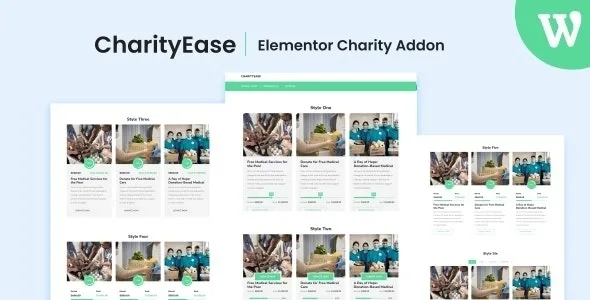
About CharityEase - Elementor Charity Addon
A nonprofit website that says everything, but that nobody knows how to update
Social organizations often leave their website in the hands of volunteers who change every few months. Every time someone new touches something, the project list falls out of line or the news gets buried. CharityEase is an Elementor addon designed for that scenario: it provides visual elements to show causes, campaigns and news, with settings handled from the Elementor panel itself, without writing code.
It is designed to work with any theme and its designs are responsive, so it does not force you to rebuild the website you already have. What it does need is Elementor installed, because it is an add-on and does not work on its own.
Isotope, Masonry, Grid and tabs: how CharityEase organizes content
A foundation accumulates content quickly: projects, events, beneficiary stories, reports. If everything appears in one long list, visitors get tired before reaching what interests them. CharityEase offers four ways to present it (Isotope, Masonry, Grid and Tab) so you can choose the one that suits each type of content.
- Category filter: visitors filter, for example, between education and health campaigns without leaving the page.
- Number of posts: you decide how many are shown in each block.
- Title: you can show or hide it and limit its length, useful when some campaign titles are much longer than others.
- Pagination: the list is split across several pages instead of growing endlessly.
Online donations need a separate plugin
CharityEase focuses on presenting content. Collecting donations or managing members is not among its features, so it is worth being clear about the division of work before building the site.
- Covered: lists of causes and news with different designs, category filters, pagination and title control.
- Covered: colors and typography adjustable from Elementor, and adaptation to mobile, tablet and desktop.
- On your own: the payment gateway and the donation form, which you will cover with a specific donation or payment plugin. Check in the demo whether what you see there is design only.
- On your own: the images. The demo photos are not included, so you will need your own photographs or image banks such as Unsplash or Freepik.
- On your own: the texts, the categories and the post structure that will feed the lists.
Colors and typography that look like your organization's
A nonprofit that looks like a generic template loses the feeling of closeness it uses to connect with its donors. The addon lets you change colors and typography (fonts, sizes, weights and styles) on each element, so you can follow your organization's identity. It also includes more than 15 pre-made designs as a starting point, so you do not begin from a blank page.
Frequently asked questions about CharityEase
Does it work without Elementor?
No. It is an addon: it adds elements to Elementor and needs it to be installed.
Do I have to change my theme?
No. It is designed to integrate with any WordPress theme.
Is it useful for receiving donations?
It is useful for presenting your causes and campaigns. To collect payments you will need a separate donation or payment plugin.
Are the demo images included?
No. They are for demonstration only, so you will have to provide your own.
Do I need to know how to code?
No. Design, content, title and metadata settings are configured from Elementor's visual interface.
Topics
Version history
-
v
1.0.1 Current 18 May 2026
-
v
1.0.0 12 May 2024
Customer reviews
Sign in to leave a review. Only people who have the product can review it.
No reviews for this product yet.
Frequently asked questions
-
GPL (General Public License) is the license under which WordPress and most premium plugins/themes are distributed. It grants you the right to use, modify and redistribute the software in as many projects as you want, with no domain restrictions.
-
Yes. With membership you get automatic updates via our GPLClub Updater plugin (installed on your WP, detects new versions and applies them). With individual purchase, you get one year of manual updates from your account.
-
Depends on the plan. Monthly: 3 domains. Semi-annual: 7. Annual and Lifetime: 15. Individual purchase: 1 domain.
-
GPLClub offers its own support for installation, configuration and compatibility. For direct support from the original author (feature requests, product-specific bugs), a license purchased from the author is required.