Chat - Support Board - WordPress Chatbot OpenAI Plugin
Antivirus scan
Powered by ClamAV
✅ Verified clean
This product file has passed our security filters.
Want to run a fresh ClamAV scan right now? Takes a few seconds and shows scanner version, signature DB and live result.
This can take 5 to 30 seconds.
Clean file Threat detected
No threats detected in this file.
- File
- Size
- Scanned
- ClamAV
- Signature database
⚡ Powered by ClamAV
Scan could not be completed
Report product
If you detected an issue (broken file, malware, inappropriate content, etc.) let us know and we'll review it ASAP.
Sign in to report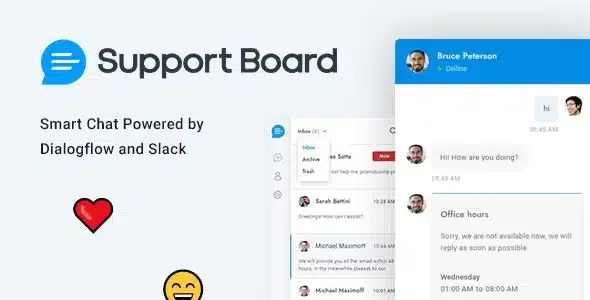
About Chat - Support Board - WordPress Chatbot OpenAI Plugin
An open chat promises an immediate answer
A visitor writes in your site's chat late in the day, nobody answers and they leave without giving any details. Neither the question nor an email address to write to tomorrow remains. A contact form at least keeps the message.
That is the commitment you take on by adding a chat: the button promises a quick answer, and the promise still stands when the team is busy or asleep. So it pays to evaluate Support Board for WordPress starting with what it does when nobody can deliver.
What happens when nobody can reply
- Follow-up message: asks the user for their email if no agent replies in time. You can set the delay; if you do not, it is 15 seconds during office hours or with an agent online, and 5 seconds otherwise.
- Outside office hours: a message or banner when it is not office hours or all agents are offline.
- Waiting queue: visitors see their position and waiting time in real time, and you can set a maximum of concurrent chats.
- Help center: multilingual articles on a dedicated page or inside the chat.
The team's daily work in one panel
- Departments with transfer rules, and automatic distribution of chats among agents.
- Collision detection, so that two agents do not work on the same conversation.
- Saved replies to avoid typing the same thing each time.
- Replies by email: piping lets you answer from your inbox and turns emails into chats.
- Reports and ratings on the chat and the agents.
It includes translations in 41 languages and right-to-left writing. Conversations and user data are stored on your server.
The chatbot and external channels come as separate apps
This plugin is the base, and several of the most visible features require additional apps, which are separate products.
- Artificial Intelligence: needed for the chatbot, real-time translation and suggested replies. With it, the bot trains on your site, XML sitemaps and PDFs, and can hand the conversation to an agent.
- Messaging: WhatsApp, Messenger, Telegram, Viber, LINE, WeChat and Zalo each have their own app.
- WooCommerce: connects the shop with the Dialogflow chatbot and can show up to 15 products in a slider.
- Tickets: adds a help area with an interface different from the chat.
The Shopify integration, the Zapier app and the automatic sync for OpenAI, Google and WhatsApp exist only in the vendor's cloud, not in this version: on WordPress you will use your own keys and accounts. And when you connect an external app such as WhatsApp, some data is shared with that provider and, in some cases, with Schiocco, the developer.
Server needs and getting it running
It requires PHP 8.0 or higher, MySQL 5.5 or higher and the cURL, ZIP Archive and MBString modules. The ONLY_FULL_GROUP_BY, STRICT and ANSI_QUOTES SQL modes must be disabled, and on a multisite installation it goes on the main site.
Since the chat shows up on all pages as soon as it is installed, this order makes sense:
- Upload the plugin from Plugins, Add New, Upload Plugin.
- Open the new Support Board menu and set the timetable and the out-of-hours message.
- Create departments and agents, and turn on the follow-up message.
- If the server gets overloaded, activate Pusher, which needs its own account and swaps AJAX requests for WebSockets.
Other routes within the catalog
WPBot answers with your pages and your FAQs, and it can work with no AI integration. WoowBot searches for products and adds them to the cart from the conversation.
For ticket-based support inside WordPress there is Fluent Support Pro. And if you only want to take the visitor to WhatsApp, Click to Chat Pro adds schedule and country rules to that button.
Common questions about Support Board
Does it work without the chatbot?
Yes. Chat with agents, saved replies and departments are not among the features that demand the Artificial Intelligence app.
Can I answer WhatsApp from the panel?
Yes, with the WhatsApp app. It supports the official API, 360dialog or Twilio, and the latter does not accept messages longer than 1600 characters.
Does it recover old Facebook messages?
No. The Messenger app syncs only new messages.
Can it be used from a phone?
Yes. The panel is adapted to phones and tablets, and the admin area is an installable progressive web app.
Topics
Version history
-
v
3.9.1 Current 30 Oct 2026
-
v
3.9.0 8 Jun 2026
-
v
3.8.9 24 Jan 2026
Customer reviews
Sign in to leave a review. Only people who have the product can review it.
No reviews for this product yet.
Frequently asked questions
-
GPL (General Public License) is the license under which WordPress and most premium plugins/themes are distributed. It grants you the right to use, modify and redistribute the software in as many projects as you want, with no domain restrictions.
-
Yes. With membership you get automatic updates via our GPLClub Updater plugin (installed on your WP, detects new versions and applies them). With individual purchase, you get one year of manual updates from your account.
-
Depends on the plan. Monthly: 3 domains. Semi-annual: 7. Annual and Lifetime: 15. Individual purchase: 1 domain.
-
GPLClub offers its own support for installation, configuration and compatibility. For direct support from the original author (feature requests, product-specific bugs), a license purchased from the author is required.