Conditional Fields PRO
Antivirus scan
Powered by ClamAV
✅ Verified clean
This product file has passed our security filters.
Want to run a fresh ClamAV scan right now? Takes a few seconds and shows scanner version, signature DB and live result.
This can take 5 to 30 seconds.
Clean file Threat detected
No threats detected in this file.
- File
- Size
- Scanned
- ClamAV
- Signature database
⚡ Powered by ClamAV
Scan could not be completed
Report product
If you detected an issue (broken file, malware, inappropriate content, etc.) let us know and we'll review it ASAP.
Sign in to report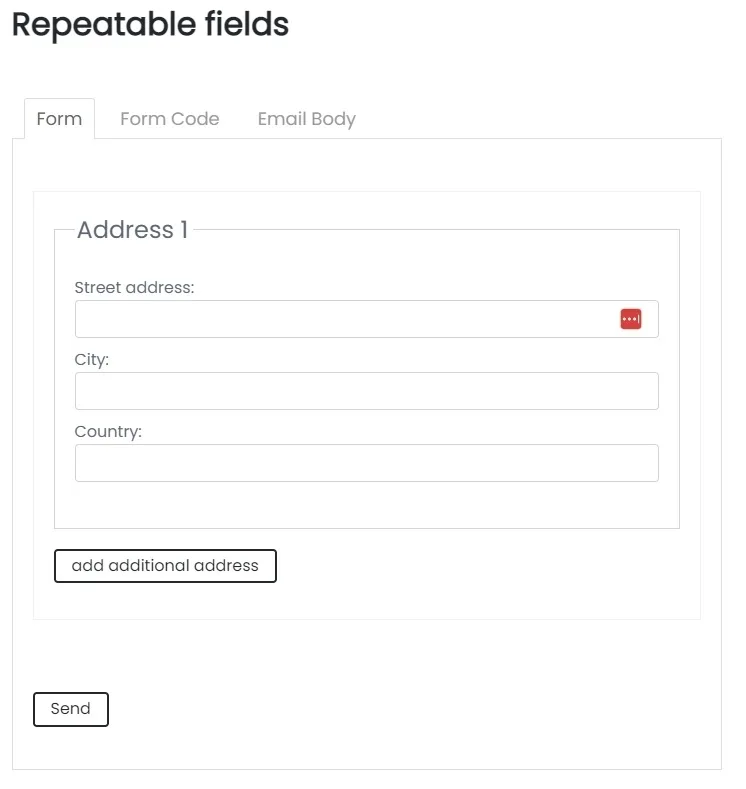
About Conditional Fields PRO
The email from a form with repeatable fields is designed separately
Your visitor adds three people to their booking and hits send. You receive a text email that does not look like the form: someone had to write a template that works the same for one person as for five.
When a form lets visitors repeat fields, the email you receive needs its own repetition structure, and it is written separately from the form.
Conditional Fields Pro extends Contact Form 7 with eight features, detailed below. Conditions are picked from select boxes or written as text, in the form show [group] if [field] operator "value".
Eight features on top of Contact Form 7
- Repeaters: the visitor adds and removes sets of fields, for example several addresses. The button labels are customizable and {{rep-1_index}} shows the number of each set.
- Steps: each page starts with [step title "..."], the visitor navigates with previous and next buttons, and [summary] shows their answers before sending.
- Calculated fields: the options of calc_select, calc_radio and calc_checkbox carry a number, and the [calculated] field applies a formula using the names of other fields. The result updates in real time.
- Operators: greater than, less than, greater or equal, less or equal, equals, not equals, empty and not empty.
- Regular expressions: equals (regex) and not equals (regex), for example to show a group when a text contains a word or is a valid email.
- Togglebutton: a visible switch with two texts. Its value is compared with one of them and it can also work as a terms acceptance checkbox.
- Multiple files: the [multifile] tag lets visitors upload more than one file.
- Custom functions: you write JavaScript to decide whether a group is shown.
A multistep booking with several people
This combination is ours and should be tested before publishing it. A booking form could have a first step with contact details and a second with a repeater, where each set collects one companion. The last step would show the [summary].
The email is the other half. Repeated data uses a loop with the repeater name: [rep-1] ... [/rep-1] walks through each set and [rep-1:index] numbers it. A conditional group can also wrap a block of the email, which only appears when that group is active. Calculated values reach the email as tags, by field name.
What it covers and what stays with you
Conditions are created in the form's Conditional fields tab, with select boxes or as text in the Conditional Fields (Text) section. Calculated fields depend on you assigning a number to each option, with the arrow syntax, such as "T-shirt=>12". Formulas accept arithmetic operations such as * and +, and parentheses.
Custom functions require you to write the JavaScript. This add-on works on top of Contact Form 7, so without that plugin it does nothing.
Building the first form
To start with a multistep form and a repeater:
- Install and activate Contact Form 7 and this add-on.
- Create a new form and add the fields for each step.
- Open each page with [step title "Details"] and wrap whatever repeats between [repeater rep-1 add "Add" remove "Remove"] and [/repeater].
- Create the conditions in the Conditional fields tab, with its select boxes or as text.
- Write the email with the loops for repeated data.
- Send tests down every possible path: with one set, with several sets, and with each condition met and unmet.
Steps in Contact Form 7 or in Ninja Forms
If you only need steps in Contact Form 7, there is also Contact Form Multi Step 7 Pro. To add other pieces to Contact Form 7 you can look at Ultimate Addons for Contact Form 7 Pro. And if you would rather change form plugin, Ninja Forms Multi-Part Forms adds steps to Ninja Forms.
Answers about Conditional Fields Pro
Can I mix steps, repeaters and conditions?
Yes, repeaters and conditional groups work inside steps.
Do calculated fields reach the email?
Yes. Calculated values are available as email tags by field name.
Do I need to know how to code?
Conditions are picked from select boxes or written as text, and steps are built with tags. Only custom functions require JavaScript.
Topics
Version history
-
v
2.3.3 Current 12 May 2024
Customer reviews
Sign in to leave a review. Only people who have the product can review it.
No reviews for this product yet.
Frequently asked questions
-
GPL (General Public License) is the license under which WordPress and most premium plugins/themes are distributed. It grants you the right to use, modify and redistribute the software in as many projects as you want, with no domain restrictions.
-
Yes. With membership you get automatic updates via our GPLClub Updater plugin (installed on your WP, detects new versions and applies them). With individual purchase, you get one year of manual updates from your account.
-
Depends on the plan. Monthly: 3 domains. Semi-annual: 7. Annual and Lifetime: 15. Individual purchase: 1 domain.
-
GPLClub offers its own support for installation, configuration and compatibility. For direct support from the original author (feature requests, product-specific bugs), a license purchased from the author is required.