CSSIgniter Zermatt WordPress Theme
Antivirus scan
Powered by ClamAV
✅ Verified clean
This product file has passed our security filters.
Want to run a fresh ClamAV scan right now? Takes a few seconds and shows scanner version, signature DB and live result.
This can take 5 to 30 seconds.
Clean file Threat detected
No threats detected in this file.
- File
- Size
- Scanned
- ClamAV
- Signature database
⚡ Powered by ClamAV
Scan could not be completed
Report product
If you detected an issue (broken file, malware, inappropriate content, etc.) let us know and we'll review it ASAP.
Sign in to report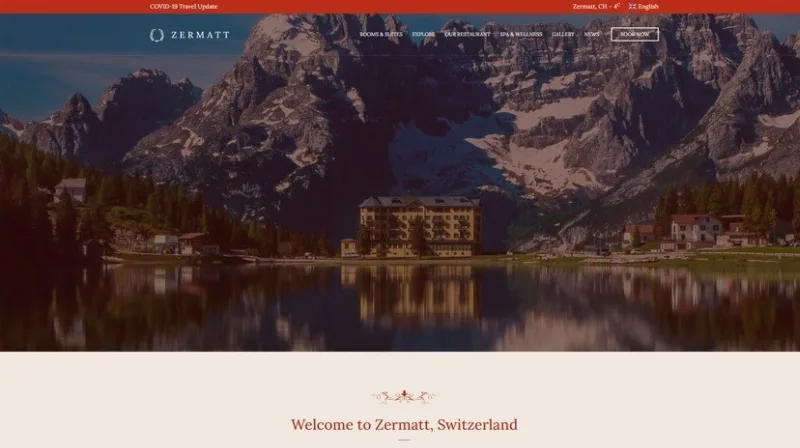
About CSSIgniter Zermatt WordPress Theme
A request without dates costs you one more email
Someone writes through your website: "Do you have a room in July?" To answer you need to know which nights, how many people and what type of room, so you reply with another question and wait.
A hotel that confirms bookings by hand saves an exchange of emails when the first request already arrives complete.
Zermatt, by CSSIgniter, is a WordPress theme for hotels and resorts that fits that way of working. Its request bar collects dates, people and room, and takes the visitor to the page with your form. The reply to the guest stays in your hands.
The route from the bar to your form
The bar comes from the Ignition framework, the theme's base, and is placed with a shortcode:
- Fields: arrival date, departure date, number of people and selected room.
- Three layouts: vertical, horizontal or with the button below.
- Room dropdown: its value can be the accommodation's title, slug or ID.
In the sample content, the Book Now page combines a Contact Form 7 block with a Google Maps block above it. For the form to receive what the bar sends, its fields must read GET variables from the address, and the name attribute of each one must match the bar's. For the room dropdown you can use the Contact Form 7 – Post Fields plugin. Test it with a real request.
Each room is published as its own content
Rooms have their own content type, under Accommodation > Add New. Each one accepts a summary, category, featured image and excerpt.
Categories also work as a filter on listings. The sample separates Suites and Rooms, and the Rooms & Suites page shows them with Post Types blocks in three columns.
The sample also lays out Explore with activities, Our Restaurant, Spa & Wellness, a gallery and a blog. Explore and the restaurant include their own booking inquiry section.
Three variations on the same settings system
The theme offers three one-click presentations: Zermatt, Santorini Resort and Sun Resort. Switching between them changes the palette and the Customizer options: back them up first.
- Header and footer: color, layout and fonts, plus a logo in the header, with a preview in the Customizer.
- Color and Google Fonts: global or fine-tuned by area.
- Global Sections: designed once and reused in more than 15 theme locations.
- Six page templates that change the sidebar and the content width.
- Your choice of editor: WordPress blocks with GutenBee's, or Elementor.
When your hotel calls for a full booking engine
Zermatt's features do not include an availability calendar, seasonal rates or payment for stays. The bar delivers a request, and checking for space and confirming stay on your side. For guests to see availability and book on their own:
- MotoPress Hotel Booking is a plugin that turns WordPress into a booking engine, with real-time availability search and seasonal rates.
- Sunway is a theme built on that same plugin.
- Hotale is a theme with its own booking system and deposit collection through Stripe and PayPal.
Installing Ignition and getting the Book Now page ready
The only essential plugin is Ignition Framework. GutenBee and WooCommerce are optional, and the other plugins on the Sample Content tab are only needed to import the sample. Setup follows this order:
- Upload the theme under Appearance > Themes, activate it and install Ignition Framework when the onboarding asks.
- Choose the variation and, if you want to start from the sample, import it from Sample Content.
- Create your rooms under Accommodation and assign them a category.
- Prepare the Book Now form with fields that read GET variables.
- Add the request bar with that page's address. The tag may be [ignition-booking-form] or [ignition-booking-bar]: test which one your install accepts.
Zermatt from the front desk
Does the guest pay for the stay on the website?
The bar sends a request to a form. The theme's features do not include payment for stays.
Can I build it with Elementor?
Yes. You can work with the block editor or with Elementor, and the sample content can also be imported in an Elementor version.
Can I sell products on the same site?
Yes, with WooCommerce, which you only need if you want a shop.
Topics
Version history
-
v
1.3.3 Current 14 Jun 2024
Customer reviews
Sign in to leave a review. Only people who have the product can review it.
No reviews for this product yet.
Frequently asked questions
-
GPL (General Public License) is the license under which WordPress and most premium plugins/themes are distributed. It grants you the right to use, modify and redistribute the software in as many projects as you want, with no domain restrictions.
-
Yes. With membership you get automatic updates via our GPLClub Updater plugin (installed on your WP, detects new versions and applies them). With individual purchase, you get one year of manual updates from your account.
-
Depends on the plan. Monthly: 3 domains. Semi-annual: 7. Annual and Lifetime: 15. Individual purchase: 1 domain.
-
GPLClub offers its own support for installation, configuration and compatibility. For direct support from the original author (feature requests, product-specific bugs), a license purchased from the author is required.