Divi Animation
Antivirus scan
Powered by ClamAV
✅ Verified clean
This product file has passed our security filters.
Want to run a fresh ClamAV scan right now? Takes a few seconds and shows scanner version, signature DB and live result.
This can take 5 to 30 seconds.
Clean file Threat detected
No threats detected in this file.
- File
- Size
- Scanned
- ClamAV
- Signature database
⚡ Powered by ClamAV
Scan could not be completed
Report product
If you detected an issue (broken file, malware, inappropriate content, etc.) let us know and we'll review it ASAP.
Sign in to report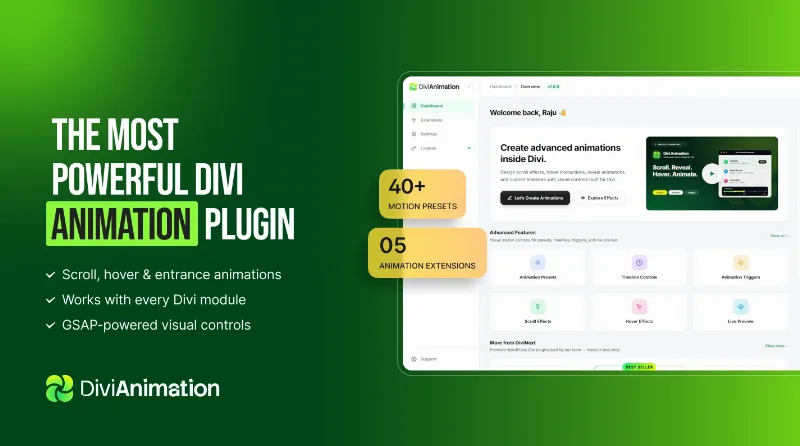
About Divi Animation
Animation is not decoration: it directs the eye, and that is why it can get in the way
People think of animation as an ornament added at the end, once the page is built and looks flat. With that approach, everything gets animated a little, and the result is a page where nothing stands out because everything moves.
What an animation actually does is tell the eye where to look. An element appearing as you reach it takes attention away from everything else around it. That is a powerful tool with a single use: if you spend it on the footer, you no longer have it for the button that feeds you.
Which is why the rule separating a thoughtfully animated page from a dizzying one is dull and always works: animate what you want looked at, and leave everything else still.
What it brings
- Animator: entrances, scroll interactions, mouse effects, sticky elements and hover states.
- Text Flow: splits text into characters, words or lines for staggered reveals.
- Image Flow: wipe transitions and masked entrances for images.
- SVG Draw: draws an SVG's paths as you scroll down the page.
- Tilt Effect: three dimensional tilt on hover, with depth and parallax.
- Timeline: keyframe sequencing with easing curves.
- Triggers and Live Preview: firing on load, scroll, click, hover or continuously, and editing while seeing the result without publishing.
- Extras: Lottie animation imports, custom paths and an assisted generator.
It needs Divi 5, and that has to be checked first
It is built specifically for Divi 5 and integrated into that builder. It is not a generic animation plugin that works with any theme.
Divi 5 is a major rewrite of the product, so the prior question is not whether you like this plugin, but which version of Divi your site is on. If you are coming from the previous one, upgrading a large site is a project in itself and deserves to be done calmly and with a backup, not in order to install some animations.
If you are already on Divi 5, the fit is direct and everything happens inside the builder you already use.
What it genuinely saves is time writing code
Nothing this plugin does is impossible by hand. All of it can be built with CSS and an animation library, and anyone who knows how will do it better and lighter.
What changes is how long it takes. A word by word reveal with staggered delay and an easing curve is half an hour of code and testing, or two minutes of visual controls. Multiplied by the number of times it appears on a site, the difference is days.
A performance note: the plugin states it scales the effect by device, fuller on desktop and more restrained on mobile, and uses graphics card accelerated transforms. Even so, animation has a cost, and on mobile that cost shows sooner. It is worth checking how your page behaves on a real phone, not in the browser simulator.
Requirements and what it does not do
It needs Divi 5. Outside that it does not work: not for Elementor, not for Bricks, not for the block editor.
It is not a theme or a builder: it adds the movement layer to what you already assemble with Divi.
And it does not fix a page that does not work. If the section is unconvincing while still, animating it does not improve it, it only makes it more noticeable. Animations are applied at the end for a reason: they are the last thing, not the first resort.
Alternatives in the catalogue
The base it needs is in the catalogue: Divi. And if you work with that builder, Divi Pixel is the add-on that brings the most on the visual side, while its filter handles the listings part.
If you are choosing a builder rather than an add-on, Elementor Pro brings its own motion effects and Bricks leaves more markup control to anyone wanting to do it by hand.
Frequently asked questions
Does it work with Divi 4?
No. It is built specifically for Divi 5 and integrated into that builder.
Does it work with Elementor or the block editor?
No. It is exclusive to Divi.
Do I need to know how to code?
No. Everything is set through visual controls and the result is visible without publishing.
Does it slow the site down?
Animation always has a cost. It scales by device, but it is worth testing on a real phone.
Does it support Lottie animations?
Yes, they can be imported from a JSON file.
How much should I animate?
Whatever you want looked at. If everything moves, nothing stands out.
Version history
-
v
2.0.0 Current 15 Jul 2026
Customer reviews
Sign in to leave a review. Only people who have the product can review it.
No reviews for this product yet.
Frequently asked questions
-
GPL (General Public License) is the license under which WordPress and most premium plugins/themes are distributed. It grants you the right to use, modify and redistribute the software in as many projects as you want, with no domain restrictions.
-
Yes. With membership you get automatic updates via our GPLClub Updater plugin (installed on your WP, detects new versions and applies them). With individual purchase, you get one year of manual updates from your account.
-
Depends on the plan. Monthly: 3 domains. Semi-annual: 7. Annual and Lifetime: 15. Individual purchase: 1 domain.
-
GPLClub offers its own support for installation, configuration and compatibility. For direct support from the original author (feature requests, product-specific bugs), a license purchased from the author is required.