Divi Ecommerce Child Theme
Antivirus scan
Powered by ClamAV
✅ Verified clean
This product file has passed our security filters.
Want to run a fresh ClamAV scan right now? Takes a few seconds and shows scanner version, signature DB and live result.
This can take 5 to 30 seconds.
Clean file Threat detected
No threats detected in this file.
- File
- Size
- Scanned
- ClamAV
- Signature database
⚡ Powered by ClamAV
Scan could not be completed
Report product
If you detected an issue (broken file, malware, inappropriate content, etc.) let us know and we'll review it ASAP.
Sign in to report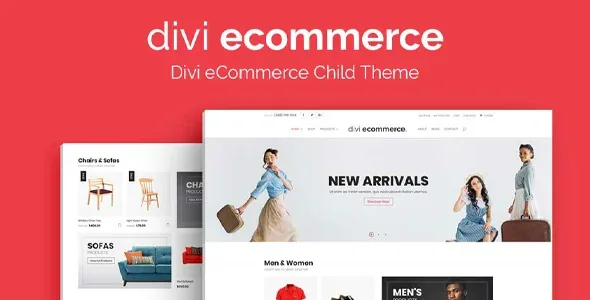
About Divi Ecommerce Child Theme
Building a shop on Divi without designing every page from scratch
Setting up a store with WooCommerce often leaves you with a bland product template, a cart that doesn't match the rest of the site and hours of tweaking to make everything look like one brand. Divi Ecommerce Child Theme is a Divi child theme that already includes those pieces, designed: you add the products, images and your own copy.
It is a child theme, so it needs Divi installed as the parent theme.
A shop is sold on the product page, not the homepage
In a shop the homepage attracts, but the buying decision is made on the product page and in the cart. That is why the theme spreads its design across the whole journey, not just the home page.
Divi Ecommerce Child Theme features and their limits
- Two home pages to choose your first impression from. They include featured and trending products, a Deal of the Day countdown and an email signup form.
- A shop with its own sidebar for WooCommerce, designed to make products stand out.
- Three product page layouts, with breadcrumbs, related products by tag and category, and vertical tabs for additional information without cluttering the page.
- Purchase pages already laid out: cart, account login and checkout.
- Blog plus designed About and Contact pages, useful if you want to attract visits with content.
What to know before choosing it
WooCommerce is essential and you should be familiar with it: one user review says so plainly. Another buyer reports that using Divi's visual builder on the product page broke the formatting of related products, so test that kind of editing on a copy before touching anything. Nor is this a theme that solves speed for you: a user with a large catalog is still working on making the shop load faster.
Frequently asked questions
Does it work without Divi?
No. It is a child theme and requires Divi as the parent theme.
Do I need to know how to code?
You don't need to touch code to get the shop running, but you do need to understand how WooCommerce works: products, categories and payment gateways.
Is it useful for anything other than physical products?
It is designed to showcase products or services, but its structure (product page, cart, checkout) revolves around WooCommerce.
Can I change the page design?
Yes, it is Divi, but the easiest approach is to respect the product structure and adjust colors, texts and images.
Getting started: Divi first, then WooCommerce, then your content
The order matters: install Divi, activate the child theme and make sure WooCommerce is working. Then replace the texts and images on the home pages, pick one of the three product layouts and check the cart and checkout with a test order. If your catalog is large, decide the product page layout before loading products so you don't have to redo anything.
Topics
Version history
-
v
1.3.5 Current 8 May 2024
Customer reviews
Sign in to leave a review. Only people who have the product can review it.
No reviews for this product yet.
Frequently asked questions
-
GPL (General Public License) is the license under which WordPress and most premium plugins/themes are distributed. It grants you the right to use, modify and redistribute the software in as many projects as you want, with no domain restrictions.
-
Yes. With membership you get automatic updates via our GPLClub Updater plugin (installed on your WP, detects new versions and applies them). With individual purchase, you get one year of manual updates from your account.
-
Depends on the plan. Monthly: 3 domains. Semi-annual: 7. Annual and Lifetime: 15. Individual purchase: 1 domain.
-
GPLClub offers its own support for installation, configuration and compatibility. For direct support from the original author (feature requests, product-specific bugs), a license purchased from the author is required.