Draw Attention Pro
Antivirus scan
Powered by ClamAV
✅ Verified clean
This product file has passed our security filters.
Want to run a fresh ClamAV scan right now? Takes a few seconds and shows scanner version, signature DB and live result.
This can take 5 to 30 seconds.
Clean file Threat detected
No threats detected in this file.
- File
- Size
- Scanned
- ClamAV
- Signature database
⚡ Powered by ClamAV
Scan could not be completed
Report product
If you detected an issue (broken file, malware, inappropriate content, etc.) let us know and we'll review it ASAP.
Sign in to report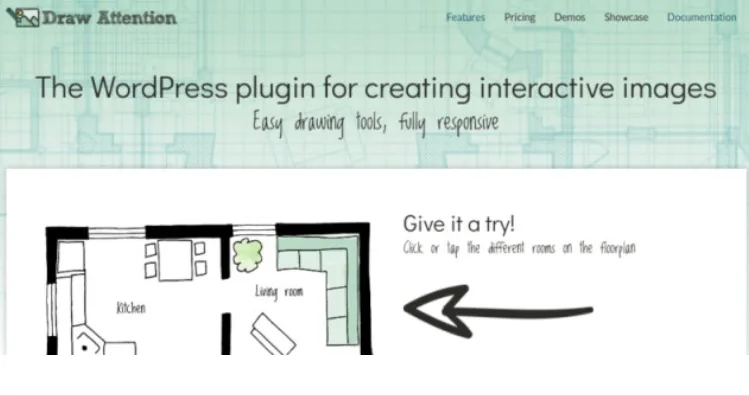
About Draw Attention Pro
Your floor plan is already an index, it just cannot be clicked
You publish an apartment floor plan, a machine diagram or a route map, and below it you repeat in a long list what each part means. The visitor looks at the image, finds what interests them and then has to scroll down to hunt for it among the paragraphs.
The image already orders your content the way the visitor looks for it: by where things sit. What it lacks is a response when someone points at it. Draw Attention Pro turns any PNG, JPG or GIF image into a map of areas: you draw the room, the part or the stretch, and each area highlights and shows its information or leads to another page.
What gets drawn and what appears when touched
- Three drawing tools: polygon for complex shapes, rectangle and circle. Each point can be adjusted later by dragging it.
- Content per area: title, featured image and formatted text, with shortcodes for video, audio and galleries.
- Two actions: show more information or go to a URL, which can be a page, a post, a product, a document or a file, in the same window or a new one.
- Click or hover: the information is revealed by either one, and by tapping on touch screens.
- Style: color, opacity, border color, border width and border opacity. Fonts and sizes are inherited from the theme.
- Placement: shortcode, Draw Attention Image block or Beaver Builder module. In Elementor it goes in through the shortcode element.
What Pro adds to the free edition
Clickable areas are unlimited in all editions, so that is not the reason to move up. Pro adds this:
- Several interactive images on the same site, as many as you want.
- Six layouts for the information: left, right, top, bottom, lightbox and tooltip.
- 20 preset color schemes, plus your own schemes.
- Several highlight styles on one image, useful for telling statuses or categories apart.
- Always-visible areas, so people can see where to click before hovering.
One action per area, and other plugin limits
- One action per area. It opens a URL or shows information, not both. The workaround is to use a lightbox or tooltip and put the link inside the description.
- No click measurement. There is no direct way to count which areas get pressed. It takes custom JavaScript with Google Tag Manager or Analytics.
- No autoplay. Video and audio can be embedded, but they do not start on their own.
- No nested images. One interactive image does not go inside another. You can link one area to another with anchors.
- No fixed size when zooming. On mobile the browser handles zoom, and areas and tooltips scale with the image.
First image and minimum area size
It is a WordPress plugin, and Beaver Builder is optional. Creation follows this order:
- In the dashboard, go to Draw Attention and click Add New.
- Upload the image and save or publish: the area tools become active at that point.
- Choose polygon, rectangle or circle and draw the first area.
- Write the title, choose the action and write the description.
- Update and check the result at the permalink.
For it to work on a phone, draw generous areas. The W3C reference is a target of 44 by 44 pixels. And if the description carries links, avoid combining hover with tooltip, because nobody will be able to press them.
If your map is about territories or data
MapSVG also turns JPEG or PNG images into maps with clickable areas, and it treats each region as a record with its own fields.
Interactive Geo Maps starts from vector maps by region. It is the route for coloring countries or provinces, not for drawing on a photo of your own.
When the image reaches other users and languages
Does it work with a keyboard and screen readers?
Yes, all areas can be reached by keyboard. For screen readers, tooltip and lightbox are the suitable layouts; left, right, top and bottom are not ideal.
Can the content of each area be translated?
Yes, with a plugin that translates content strings. Polylang and WPML do this; TranslatePress and Loco Translate are incompatible.
Can other users edit the images?
By default only administrators. A role plugin can grant access, but that permission also opens editing of other posts on the site.
Can the more information area be hidden?
Yes. If all areas use the go to URL action, that area disappears, with no code.
Version history
-
v
3.0.30 Current 13 Sep 2025
Customer reviews
Sign in to leave a review. Only people who have the product can review it.
No reviews for this product yet.
Frequently asked questions
-
GPL (General Public License) is the license under which WordPress and most premium plugins/themes are distributed. It grants you the right to use, modify and redistribute the software in as many projects as you want, with no domain restrictions.
-
Yes. With membership you get automatic updates via our GPLClub Updater plugin (installed on your WP, detects new versions and applies them). With individual purchase, you get one year of manual updates from your account.
-
Depends on the plan. Monthly: 3 domains. Semi-annual: 7. Annual and Lifetime: 15. Individual purchase: 1 domain.
-
GPLClub offers its own support for installation, configuration and compatibility. For direct support from the original author (feature requests, product-specific bugs), a license purchased from the author is required.