Easy Form Builder By WhiteStudio
Antivirus scan
Powered by ClamAV
✅ Verified clean
This product file has passed our security filters.
Want to run a fresh ClamAV scan right now? Takes a few seconds and shows scanner version, signature DB and live result.
This can take 5 to 30 seconds.
Clean file Threat detected
No threats detected in this file.
- File
- Size
- Scanned
- ClamAV
- Signature database
⚡ Powered by ClamAV
Scan could not be completed
Report product
If you detected an issue (broken file, malware, inappropriate content, etc.) let us know and we'll review it ASAP.
Sign in to report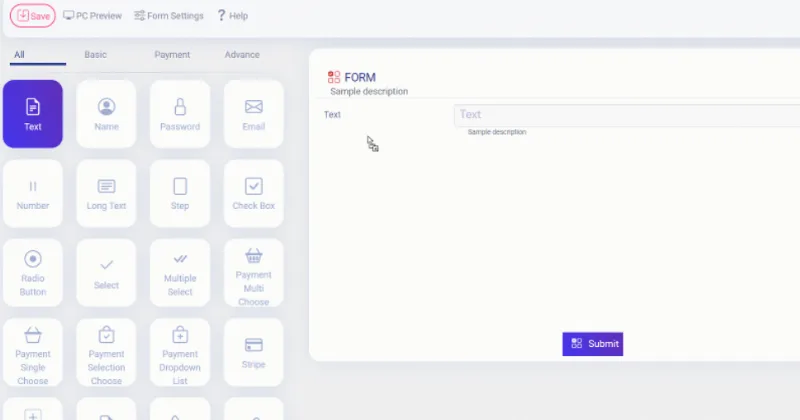
About Easy Form Builder By WhiteStudio
A form nobody finishes costs more than no form at all
You add a contact or application form and the enquiries don't come: people start, get tired of a wall of fields and leave. Or they do arrive, but without context, mixed with spam and with no way of knowing whom you already replied to. Easy Form Builder is aimed at anyone who needs to collect data from customers, candidates or registrants without depending on a developer.
The form is the only place on your site where a visitor hands you something of their own. If it asks too much at once, you lose them; if it leaves no trail, you lose the follow-up. That's why how it's split up and how it's managed afterwards matters more than how pretty it looks.
What Easy Form Builder does, field by field
The plugin works with a drag-and-drop canvas: you add fields, reorder them and open each one's panel to edit the label, help text, required status and colors. Changes show instantly in the preview.
- Multi-step forms: split a long application or registration into short stages so it doesn't overwhelm.
- Conditional logic: show or hide fields and steps depending on the answer, for example asking for a phone number only if someone picks "Sales" in the subject. It can also route email notifications based on the answers.
- Automatic emails: they notify the administrator, a manager or the person who submits the form, with editable email templates and an error log for delivery problems.
- Entries panel: search, filter, tag, reply and export to CSV from within WordPress. Each submission carries a confirmation code so the visitor can track it.
- Audio, video and screen recording: the visitor records from the browser and the files are stored on your own site.
- Google Sheets sync: sends each response to a spreadsheet, mapping fields to columns.
- Anti-spam: reCAPTCHA v2, Shield silentCAPTCHA and a CAPTCHA-free option with honeypot and per-IP limiting.
Payments, logic and other advanced features
Payments with Stripe or PayPal work for donations, orders or services, but they are not a shopping cart: it's a form that charges. There are also ready-made templates (contact, payment, survey, registration, subscription, support ticket and job application). Keep in mind there is a free version and a premium one, and that payments, advanced fields and some features may depend on it: check in the demo what comes with each before deciding.
Frequently asked questions before installing
Do I need to know how to code?
No. You build by dragging fields and insert it with a shortcode.
Does it work with my page builder?
It is inserted with a shortcode in Elementor, Divi, WPBakery or in a Gutenberg block.
Where are the responses stored?
In your own WordPress database, not on third-party servers.
Is it good for a survey?
Yes: there is a survey template with CSV export and a Google Charts view.
Does it support right-to-left languages?
Yes, it includes RTL support, plus Hijri and Jalali date pickers.
How to test it before going live
Start with the template closest to your case and trim it: remove every field you won't use. Send a real test and check in the email log that the notice arrives, because many hosts filter WordPress emails. If you enable the CAPTCHA-free protection, it starts in monitor-only mode, so check that it doesn't block legitimate submissions before tightening it.
You copy the shortcode and paste it wherever you want
Each form has its own identifier. Copy the shortcode with that number and paste it into a page, a post or a widget. Test the result on mobile: the forms are responsive, but a multi-step form with many long fields is worth checking on a small screen.
Topics
Version history
-
v
3.7.32 Current 9 Aug 2024
Customer reviews
Sign in to leave a review. Only people who have the product can review it.
No reviews for this product yet.
Frequently asked questions
-
GPL (General Public License) is the license under which WordPress and most premium plugins/themes are distributed. It grants you the right to use, modify and redistribute the software in as many projects as you want, with no domain restrictions.
-
Yes. With membership you get automatic updates via our GPLClub Updater plugin (installed on your WP, detects new versions and applies them). With individual purchase, you get one year of manual updates from your account.
-
Depends on the plan. Monthly: 3 domains. Semi-annual: 7. Annual and Lifetime: 15. Individual purchase: 1 domain.
-
GPLClub offers its own support for installation, configuration and compatibility. For direct support from the original author (feature requests, product-specific bugs), a license purchased from the author is required.