Essential Pricing Plan Switcher for Elementor
Antivirus scan
Powered by ClamAV
✅ Verified clean
This product file has passed our security filters.
Want to run a fresh ClamAV scan right now? Takes a few seconds and shows scanner version, signature DB and live result.
This can take 5 to 30 seconds.
Clean file Threat detected
No threats detected in this file.
- File
- Size
- Scanned
- ClamAV
- Signature database
⚡ Powered by ClamAV
Scan could not be completed
Report product
If you detected an issue (broken file, malware, inappropriate content, etc.) let us know and we'll review it ASAP.
Sign in to report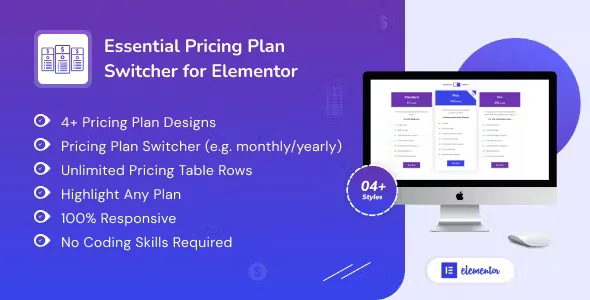
About Essential Pricing Plan Switcher for Elementor
A pricing table where visitors don't have to do the math
Anyone selling by plans (hosting, software, courses, consulting) tends to spend weeks fine-tuning the price and build the table in a hurry, when that table is where the visitor does the math: how much it costs per year, what changes from one plan to the next, whether the longer period pays off. If they have to work it out in their head, they will most likely leave it for another day.
Essential Pricing Plan Switcher for Elementor is an Elementor widget that lays out your plans in columns and adds a toggle to switch between periods, for example from monthly to yearly. That way the page makes the comparison, not the visitor.
A period toggle and everything that fits in each plan
The toggle is what gives the plugin its name. Inside each plan you can configure:
- Title and feature list, with unlimited rows.
- Price with the currency symbol you choose.
- Popular plan badge.
- Icon.
- Button with its own text and URL.
- Highlighting of any plan, to draw the eye to the one you most want to sell.
It helps to know in advance which one you want the visitor to look at first.
Five Essential Pricing Plan Switcher layouts and how they adapt to your site
There are five table layouts to choose from depending on the tone of your site. You can set the columns separately for desktop, tablet and mobile, which is where a pricing table tends to break when it has many rows. You can also adjust the color of all the content, the shadow, the border, the button position and the hover animation.
It suits website building platforms, software development, consulting, online courses, email marketing tools, coaching, surveys, virtual offices and advertising agencies. It works with any theme, as long as you use Elementor, and includes a .pot translation file so you can publish it in your language.
Is Essential Pricing Plan Switcher what your table needs, or will it fall short?
It needs Elementor. It is a widget and does not work on its own. It is also presentation only: the button leads to the URL you set (a checkout, a form, a contact page), but it does not take payments or manage subscriptions.
If your offer is a product catalog with a cart, this is not for you. If you sell plans or packages and want to compare them clearly, it is.
Does it work without Elementor?
No. It is an Elementor widget and is dragged into a page built with it.
Can I take payments from the table?
No. Each button links to the address you specify, and that page has to handle the payment or the contact.
Do I need to know how to code?
No. Everything is configured from the widget settings, without writing code.
Does it look good on mobile?
The design is responsive and the columns adjust per device. If your plans have many rows, check in the demo how they stack on a small screen.
Version history
-
v
1.0.7 Current 5 Sep 2026
-
v
1.0.6 25 Aug 2026
-
v
1.0.2 8 Jan 2025
Customer reviews
Sign in to leave a review. Only people who have the product can review it.
No reviews for this product yet.
Frequently asked questions
-
GPL (General Public License) is the license under which WordPress and most premium plugins/themes are distributed. It grants you the right to use, modify and redistribute the software in as many projects as you want, with no domain restrictions.
-
Yes. With membership you get automatic updates via our GPLClub Updater plugin (installed on your WP, detects new versions and applies them). With individual purchase, you get one year of manual updates from your account.
-
Depends on the plan. Monthly: 3 domains. Semi-annual: 7. Annual and Lifetime: 15. Individual purchase: 1 domain.
-
GPLClub offers its own support for installation, configuration and compatibility. For direct support from the original author (feature requests, product-specific bugs), a license purchased from the author is required.