Fast Media Gallery for Elementor
Antivirus scan
Powered by ClamAV
✅ Verified clean
This product file has passed our security filters.
Want to run a fresh ClamAV scan right now? Takes a few seconds and shows scanner version, signature DB and live result.
This can take 5 to 30 seconds.
Clean file Threat detected
No threats detected in this file.
- File
- Size
- Scanned
- ClamAV
- Signature database
⚡ Powered by ClamAV
Scan could not be completed
Report product
If you detected an issue (broken file, malware, inappropriate content, etc.) let us know and we'll review it ASAP.
Sign in to report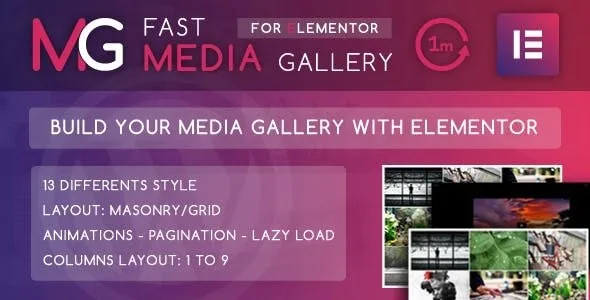
About Fast Media Gallery for Elementor
A gallery that mixes photos, a YouTube video and an audio clip often ends up as three different plugins, with styles that don't match and a page heavier than it should be. If you already build your pages with Elementor, it makes sense to solve this inside the same editor.
A media gallery, not just a photo gallery
Fast Media Gallery for Elementor is an addon that adds to Elementor a gallery widget designed to mix content types. Each item can be:
- An image.
- A YouTube, Vimeo or local video.
- A SoundCloud or local audio file.
- An iframe.
- An image with a custom URL.
This matters most to anyone with a portfolio of varied material: a photographer adding a making-of video, a band with its audio tracks, or an agency showing screenshots and embedded demos.
Thirteen styles, from 1 to 9 columns
You can choose between 13 layout styles, in grid or masonry. The number of columns goes from 1 to 9, and you can set the spacing between items.
Three ways to adapt to mobile
There are three responsive behaviors: the default, a custom one and a fluid one. Before deciding, check how it behaves on mobile in the demo.
Lighter loading with pagination and lazy load
A gallery with hundreds of items is what hurts a page's speed the most. The plugin includes a lazy load effect and pagination with 2 styles, so the visitor doesn't download everything at once. It also comes with entrance animations.
You can also choose the thumbnail size (default, thumbnail, medium, large or full), both for the grid and for the lightbox image. A practical tip: use small thumbnails in the grid and keep the large size for the lightbox.
Several galleries, each with its own color
You can place several galleries on the same page and give each one a main color (with opacity) and a secondary one. It's handy if you have sections like "Weddings", "Portraits" or "Videos" and want each to have its own look without touching CSS. It includes .po/.mo files, so you can translate the labels into your language.
It needs Elementor installed
It's an addon and doesn't work on its own. Here is what it solves and what you'll have to cover elsewhere:
- Already solved: the media types, pagination, lazy load and colors.
- Up to you: Elementor active on the site, content optimized before uploading, and the rights to the images, videos and audio you publish.
- Check in the demo: whether the category filters you want for your portfolio are available, since it can't be taken for granted.
Frequently asked questions
Does it work without Elementor?
No. It's an addon and requires Elementor to be installed.
Can I mix video and audio with images in the same gallery?
Yes. The supported types are image, video (YouTube, Vimeo or local), audio (SoundCloud or local), iframe and image with a custom URL.
Can I have more than one gallery on a page?
Yes, and each one can have its own colors.
Is it suitable for large galleries?
Lazy load and pagination in 2 styles help, but you should upload images that are already resized and compressed.
Topics
Version history
-
v
1.0 Current 30 May 2024
Customer reviews
Sign in to leave a review. Only people who have the product can review it.
No reviews for this product yet.
Frequently asked questions
-
GPL (General Public License) is the license under which WordPress and most premium plugins/themes are distributed. It grants you the right to use, modify and redistribute the software in as many projects as you want, with no domain restrictions.
-
Yes. With membership you get automatic updates via our GPLClub Updater plugin (installed on your WP, detects new versions and applies them). With individual purchase, you get one year of manual updates from your account.
-
Depends on the plan. Monthly: 3 domains. Semi-annual: 7. Annual and Lifetime: 15. Individual purchase: 1 domain.
-
GPLClub offers its own support for installation, configuration and compatibility. For direct support from the original author (feature requests, product-specific bugs), a license purchased from the author is required.