Gravity Forms gAppointments Addon
Antivirus scan
Powered by ClamAV
✅ Verified clean
This product file has passed our security filters.
Want to run a fresh ClamAV scan right now? Takes a few seconds and shows scanner version, signature DB and live result.
This can take 5 to 30 seconds.
Clean file Threat detected
No threats detected in this file.
- File
- Size
- Scanned
- ClamAV
- Signature database
⚡ Powered by ClamAV
Scan could not be completed
Report product
If you detected an issue (broken file, malware, inappropriate content, etc.) let us know and we'll review it ASAP.
Sign in to report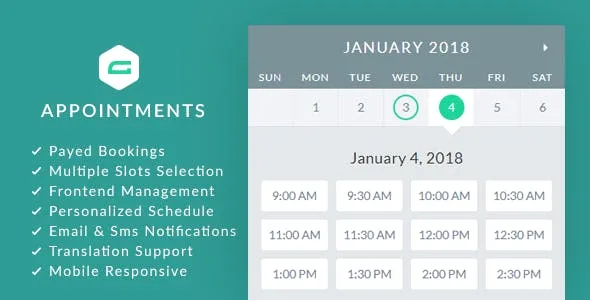
About Gravity Forms gAppointments Addon
Bookings that live inside your form, not in another tool
Anyone who takes appointments often ends up with a contact form on one side, a calendar on another and an email exchange to agree on a time. Every step in between is a chance for the customer to get tired and not book. Gravity Forms gAppointments Addon puts the booking calendar inside a Gravity Forms form.
It is an add-on: it needs Gravity Forms installed.
Interval or custom slots: how each service is defined
The practical truth of an appointment business is that not every service is scheduled the same way. A half-hour consultation and a full-afternoon workshop do not fit the same logic. That is why each form can have its own services, with two slot modes:
- Interval slots: you define duration, cleanup time between appointments, capacity, gap reduction and minimum lead time. You can also show the end time, choose the time format, remove the am/pm text, limit maximum bookings per date and allow multiple slots to be selected.
- Custom slots: you assign a price and capacity to each slot, with the same format and maximum-bookings-per-date options.
You also decide when booking is possible: in the future from today within a number of days, within a defined range of dates, or only on specific dates you choose.
Providers, clients and notifications: who manages what
You can assign a registered user as the service provider. Each provider has their own work hours, breaks and holidays, and can edit their schedule from the front-end. Clients and providers also manage their appointments on the public side, and can add the appointment to their favorite calendar.
- Links to add the appointment to Google Calendar and Yahoo in the email.
- Email notifications, with custom HTML.
- SMS through Twilio and the free WP Twilio Core plugin.
- Automatic confirmation, automatic completion and cancellation of unpaid appointments after a set time.
- Activity page, first day of the week on Sunday or Monday and configurable colors.
It uses the Gravity Forms name, email and phone fields for the client's details, and the form adapts to mobile.
Charging or not charging for the appointment: what to decide before choosing it
It supports paid and unpaid bookings, with any gateway that works with Gravity Forms. It is also compatible with Gravity Perks Preview Submission and Multi-Page Navigation. If you charge in advance, automatic cancellation of unpaid appointments keeps you from blocking hours nobody is going to use.
Keep in mind that it is not a standalone booking system: it does not work without Gravity Forms, and SMS also requires Twilio and its plugin. Payments depend on the gateway you connect in Gravity Forms.
Can I have several services with different schedules?
Yes, each form can have its own services, with interval or custom slots.
Can I prevent two clients from booking the same time?
Yes, there is capacity control per slot, maximum bookings per date and a setting to prevent double bookings.
Can it be translated?
Yes, it supports translation, even per form. Check in the demo how it looks in your language.
Can clients cancel or reschedule?
The cancel, confirm and reschedule actions exist in the appointment lists. Check in the demo what exactly the client sees.
Topics
Version history
-
v
1.15 Current 22 May 2026
-
v
1.14.1 28 Sep 2025
Customer reviews
Sign in to leave a review. Only people who have the product can review it.
No reviews for this product yet.
Frequently asked questions
-
GPL (General Public License) is the license under which WordPress and most premium plugins/themes are distributed. It grants you the right to use, modify and redistribute the software in as many projects as you want, with no domain restrictions.
-
Yes. With membership you get automatic updates via our GPLClub Updater plugin (installed on your WP, detects new versions and applies them). With individual purchase, you get one year of manual updates from your account.
-
Depends on the plan. Monthly: 3 domains. Semi-annual: 7. Annual and Lifetime: 15. Individual purchase: 1 domain.
-
GPLClub offers its own support for installation, configuration and compatibility. For direct support from the original author (feature requests, product-specific bugs), a license purchased from the author is required.